29
1
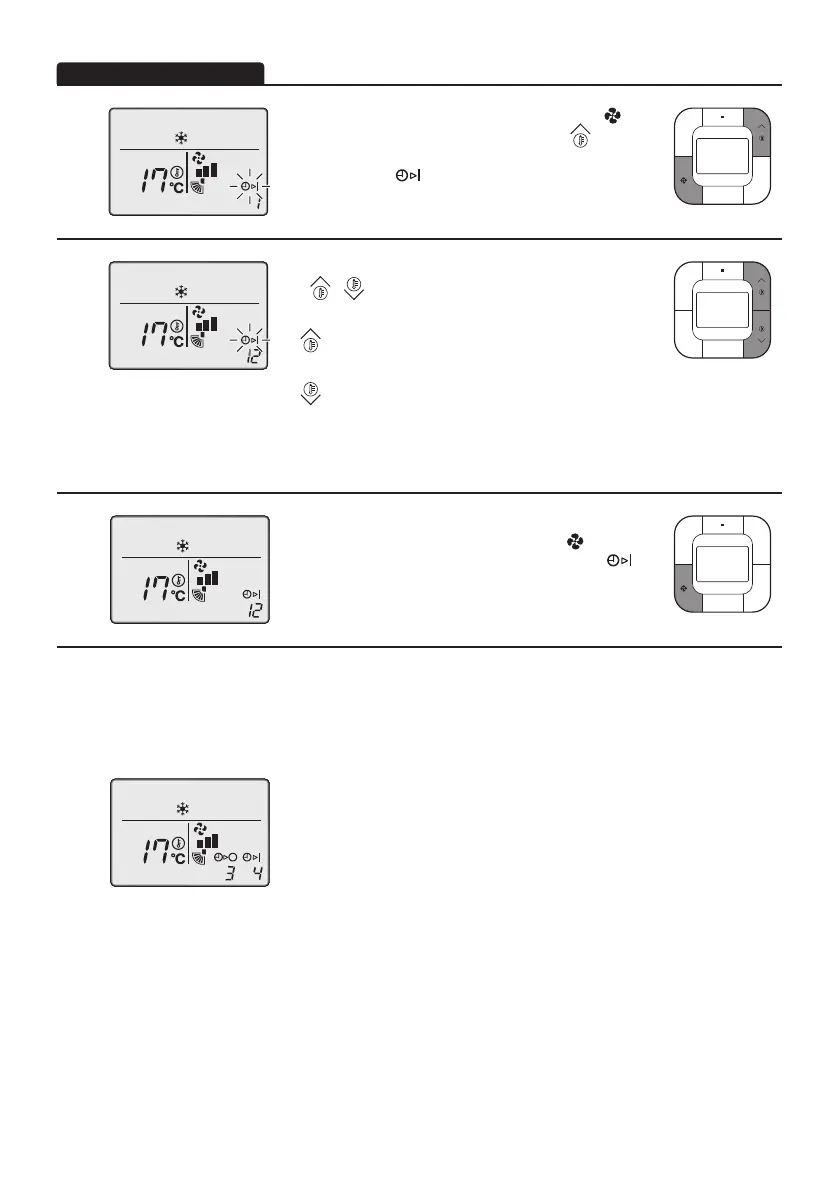
• Press both the Fan Speed Control button ( )
and Temperature Setting (up) button (
)
simultaneously to enter timer mode setting.
The display “ ”blinks.
2
• PresstheTemperatureSetting(up/down)button
(
/ ) and set the time for starting the air
conditioner.
:Whenthisbuttonispressed,thetimer
advances by 1 hour.
:Whenthisbuttonispressed,thetimer
goesbackwardby1hour.
Ifsetthetimeis“0”,itmeansthatthetimer
startingsettingwascancelled.
3
• Afterselectingthetimetostarttheairconditioner,
press the Fan Speed Control button ( ) to set it.
The timer setting procedure ends and the “ ”
onthedisplaychangesfromaashinglighttoa
constant light.
Note:
•
WhensettingthetimerOFFandONatthesametime,repeattheaboveprocedure(from1to3)
once again.
• Afterthetimerisprogrammed,thedisplayshowstheremainingtime.
• Forexample
Whenthetimerisprogrammedtostoptheairconditionerafter
3hoursandstarttheairconditionerafter4hours,theairconditioner
willstopafter3hoursandthen1hourlatertheairconditionerwill
start.
• Timer setting cannot be carried out if this remote controller has been set as a sub remote
controller[slave].
01_EN_4P543053-1C.indd 29 10-May-19 4:13:36 PM



 To Next Page