5
2.
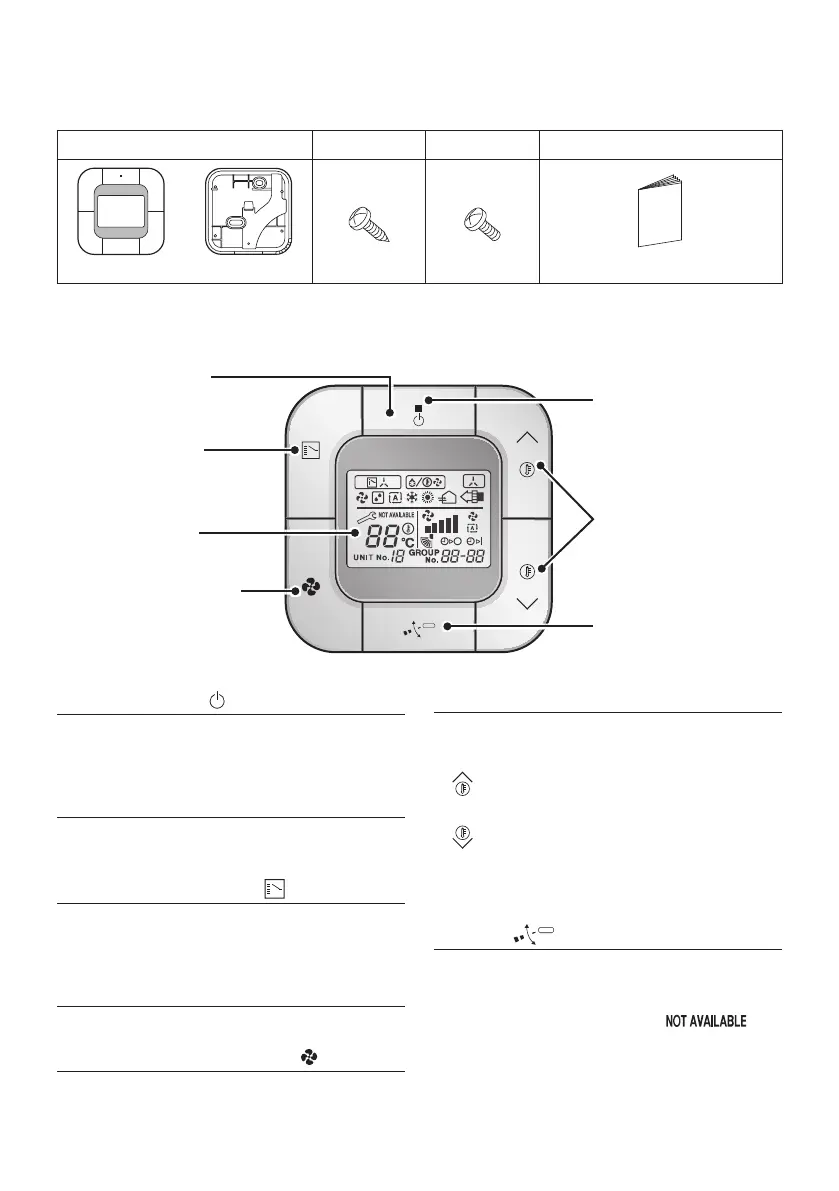
Accessories
Thefollowingaccessoriesareincluded.
Wiredremotecontroller Woodscrew Smallscrew Installation&Operationmanual
(M3.5 × 16)
(M4 × 16)
(1 pc.) (1 pc.) (2 pcs.) (2 pcs.) (1 pc.)
3.
Button locations and descriptions
1. ON/OFF button
2. Operation lamp
(Green)
6. Temperature
Setting button
7. Air ow Direction
Adjustment button
3. Mode Selector
button
4. Display (LCD)
5. Fan Speed Control
button
1. ON/OFF button
• Pressthisbuttonandthesystemwillstart.
• Pressthisbuttonagainandthesystemwill
stop.
2. Operation lamp (Green)
• This lamp lights up during operation.
• Thislampblinksifamalfunctionoccurs.
3. Mode Selector button
Press this button to select the operation mode
of your preference.
•
Availablemodesvarywiththeconnectedmodel.
4. Display (LCD)
Showsthestatusanddetailofoperation.
5. Fan Speed Control button
Press this button to select the fan speed of
your preference.
6. Temperature Setting button
Press this button to set the temperature.
:Eachpressraisesthe
set temperature by 1°C
:Eachpresslowersthe
set temperature by 1°C
The variable temperature range is 16°C to 32°C.
7. Air ow Direction Adjustment
button
Pressthisbuttontoadjusttheairowdirection
(orapposition).
• Ifswingmodeisnotavailableonthemodel
(Ductmodelforexample),“ ”
maybedisplayedfor3secondswhenthis
button is pressed.
01_EN_4P543053-1C.indd 5 10-May-19 4:13:15 PM



 To Next Page