6
4.
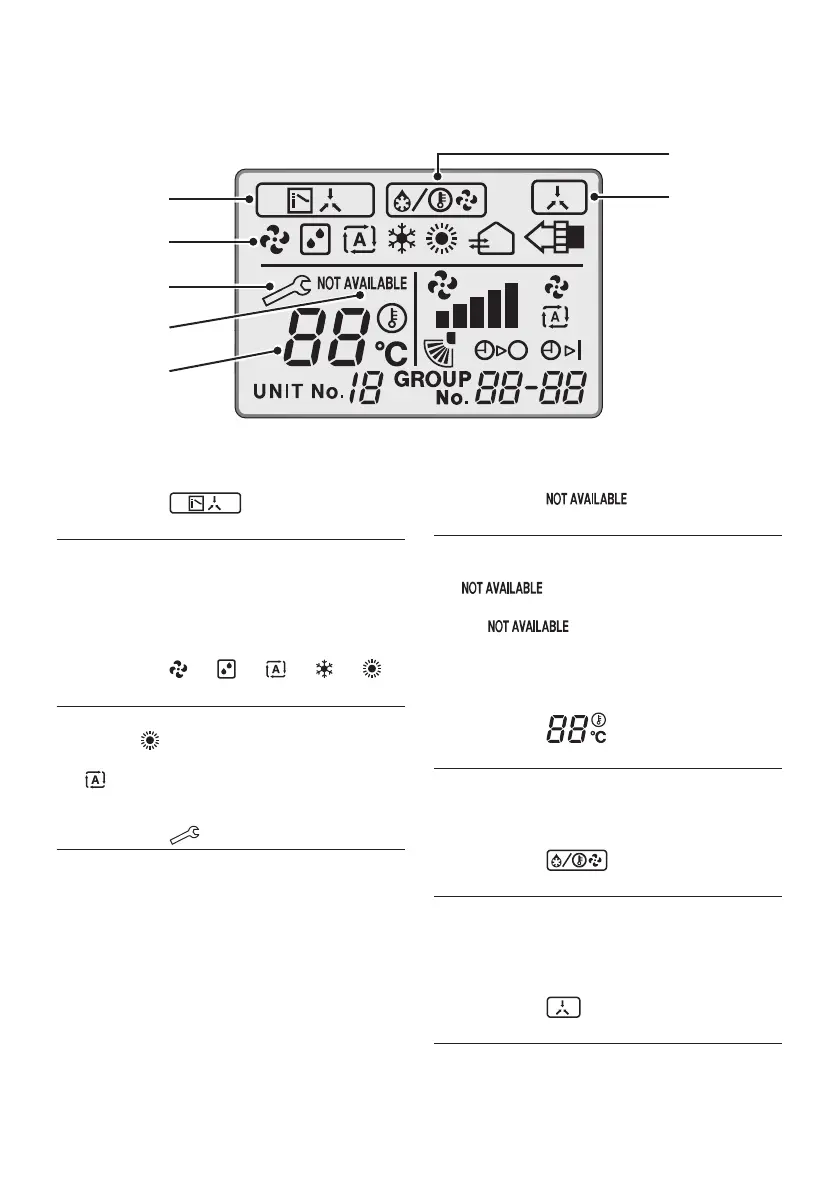
Names and functions
4.1
Basic screen
1
4
5
2
3
6
7
1. DISPLAY “ ” (CHANGEOVER
UNDER CONTROL)
ItisimpossibletochangeoverHeat/Coolwith
theremotecontrollerwhenitshowsthis
display.(Asfordetails,see“SETTINGOF
MASTERREMOTECONTROLLER”inthe
operation manual attached to the indoor unit.)
2. DISPLAY “ ” “ ” “ ” “ ” “ ”
(OPERATION MODE)
ThisdisplayshowscurrentOPERATION
MODE.“ ”isnotavailableinoutdoorunits
specially designed for cooling only.
“ ”isreservedonlyforoutdoorunits
capable of heat recovery.
3. DISPLAY “ ” (MALFUNCTION)
Indicatesmalfunctionandblinksiftheunit
stops operating due to malfunction.
(Asfordetails,see“TROUBLESHOOTING”in
the operation manual attached to the indoor
unit.)
4. DISPLAY “ ” (NON
FUNCTION DISPLAY)
Iftheparticularfunctionisnotavailable,
pressingthebuttonmaydisplaythewords
“ ”forafewseconds.
Whenrunningmultipleunitssimultaneously,
the “ ”messagewillonlybe
appearifnoneoftheindoorunitsisequipped
withthefunction.Ifevenonunitisequipped
withthefunction,thedisplaywillnotappear.
5. DISPLAY “ ” (SET
TEMPERATURE)
Thisdisplayshowsthesettemperature.Only
given during a Cooling operation or Heating
operation.
6. DISPLAY “ ” (DEFROST/
HOT START)
Indicatesthatdefrostorhotstart(duringwhich
the fan is stopped until the temperature of air
supply rises enough at the start of a Heating
operation) is in progress.
7. DISPLAY “ ” (UNDER
CENTRALIZED CONTROL)
Whenthisdisplayshows,thesystemis
UNDERCENTRALIZEDCONTROL.
(Thisisnotastandardspecication)
01_EN_4P543053-1C.indd 6 10-May-19 4:13:17 PM



 To Next Page