21
For the user
10.
Basic operation
10.1
Cool/Heat/Auto/Fan operation
Preparation
• Formechanicalprotectionpurpose,turnonthepowertotheairconditioneratleast6hoursbefore
starting the operation.
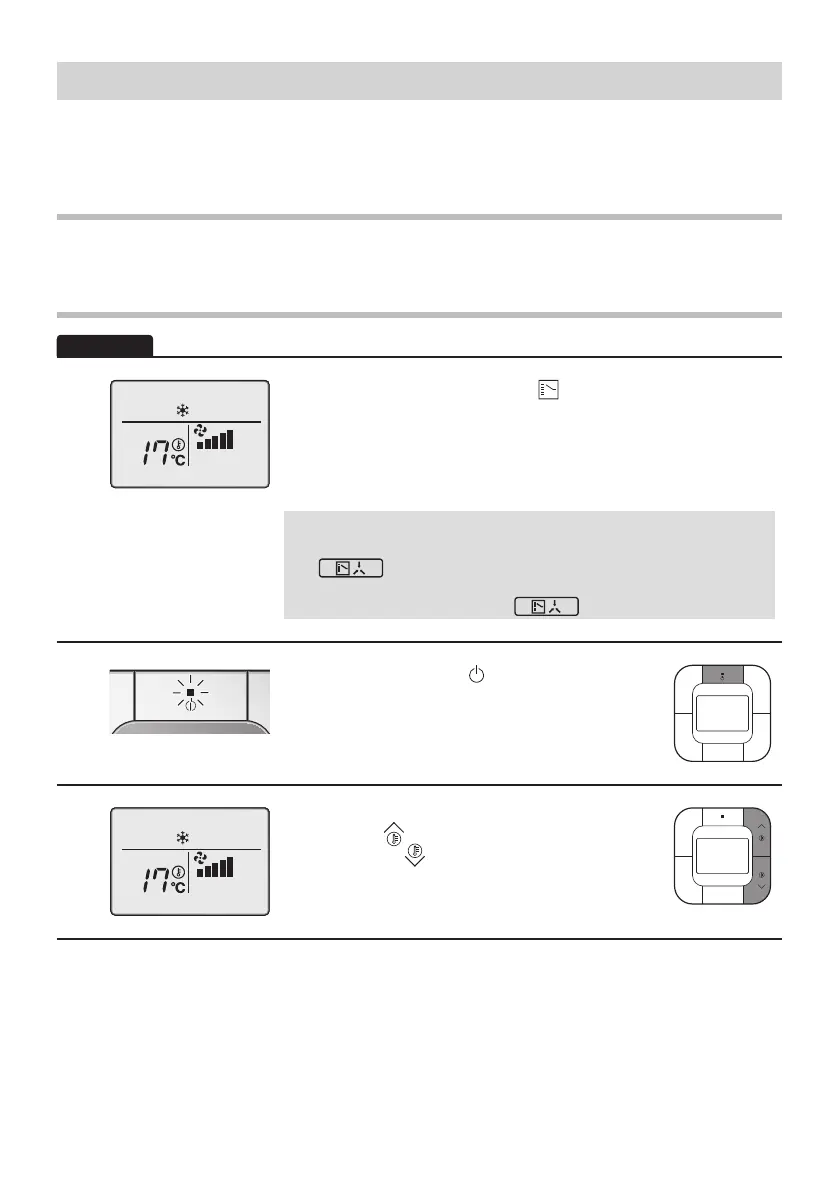
1
Basic screen
• Press the Mode Selector button ( ) several times until the
desiredmode(Cool,Heat,FanorAuto)isselected.
Unavailableoperationmodesarenotdisplayed.
OnlytheCoolorFanmodecanbeselectediftheairconditioner
is a cooling only model.
Note:
• The Cooling or Heating mode cannot be selected if the icon
“ ”(ChangeoverUnderControl)isdisplayedonthe
remote controller.
Refer to page 25 if the icon “ ”blinks.
2
• PressON/OFFbutton( ).
Theoperationlamp(green)willbelitandthe
systemwillstartoperating.
3
• Thesettemperaturewillincreaseby
1°Cwhen“
”buttonispressedanddecrease
by1°Cwhen“
”buttonispressed.
Notemperaturesettingsarepossiblewhile
operating in Fan mode.
01_EN_4P543053-1C.indd 21 10-May-19 4:13:27 PM



 To Next Page