25
10.3
Setting the Cool/Heat selection eligibility (VRV only)
Referto“Cool/Heatselectioneligibility”onpage26foranexplanationofthe
Cool/Heat selection eligibility.
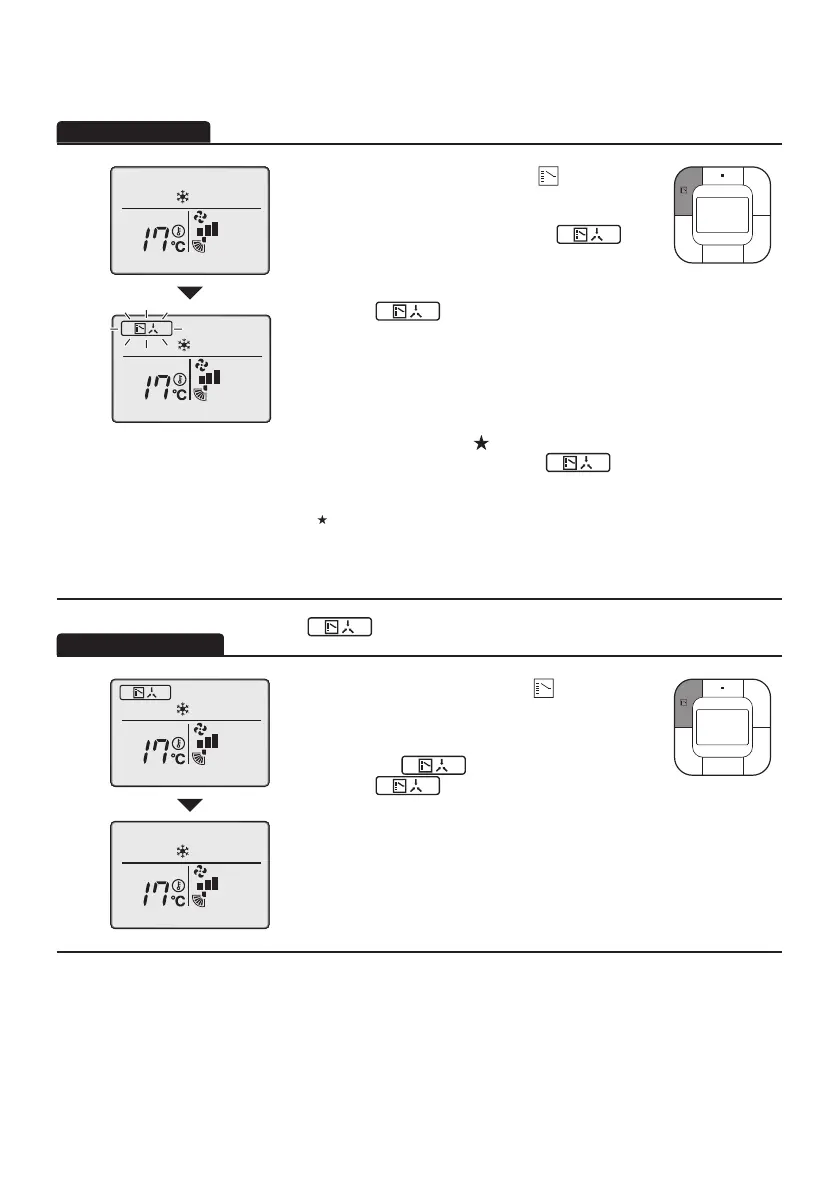
1
• Press the Mode Selector button ( ) on the
remote controller that has Cool/Heat selection
eligibilityforatleast4seconds.
Aremotecontrollerwillnotdisplay“ ”
(ChangeoverUnderControl)ifaCool/Heat
selection eligibility is granted to the remote
controller.
• The icon “ ”oneachremotecontrollerof
indoor units connected to the same outdoor unit or
BSunitwillstartblinking.
Vent mode setting changes are possible
regardless of the Cool/Heat selection eligibility.
IfaCool/Heatselectioneligibilityissetinthe
“Cool/Heatselector”(
),alltheremote
controllerswilldisplaytheicon“
”.
Inthiscase,noCool/Heatselectioneligibility
can be set in the remote controllers.
Refer to the operation manual attached to the
outdoor unit for the details of the “Cool/Heat
selector”.
• SetaCool/Heatselectioneligibilityasfollows.
The icon “
”(ChangeoverUnderControl)willblinkonallremote
controllerswhenthepoweristurnedonforthersttime.
2
•
Press the Mode Selector button ( ) on the
remotecontrollerforwhichtheselectioneligibility
to be set.
ThentheCool/Heatselectioneligibilitywillbeset
and the icon “ ”willdisappear.
The icon “ ”willappearontheother
remote controllers.
01_EN_4P543053-1C.indd 25 10-May-19 4:13:29 PM



 To Next Page