146
FTX-N/U, FVXS-N, FDMQ-R Series EDUS091558E
3P243521-7L
19
Adding Maintenance Contact9.
Information
Registration of the maintenance contact.●
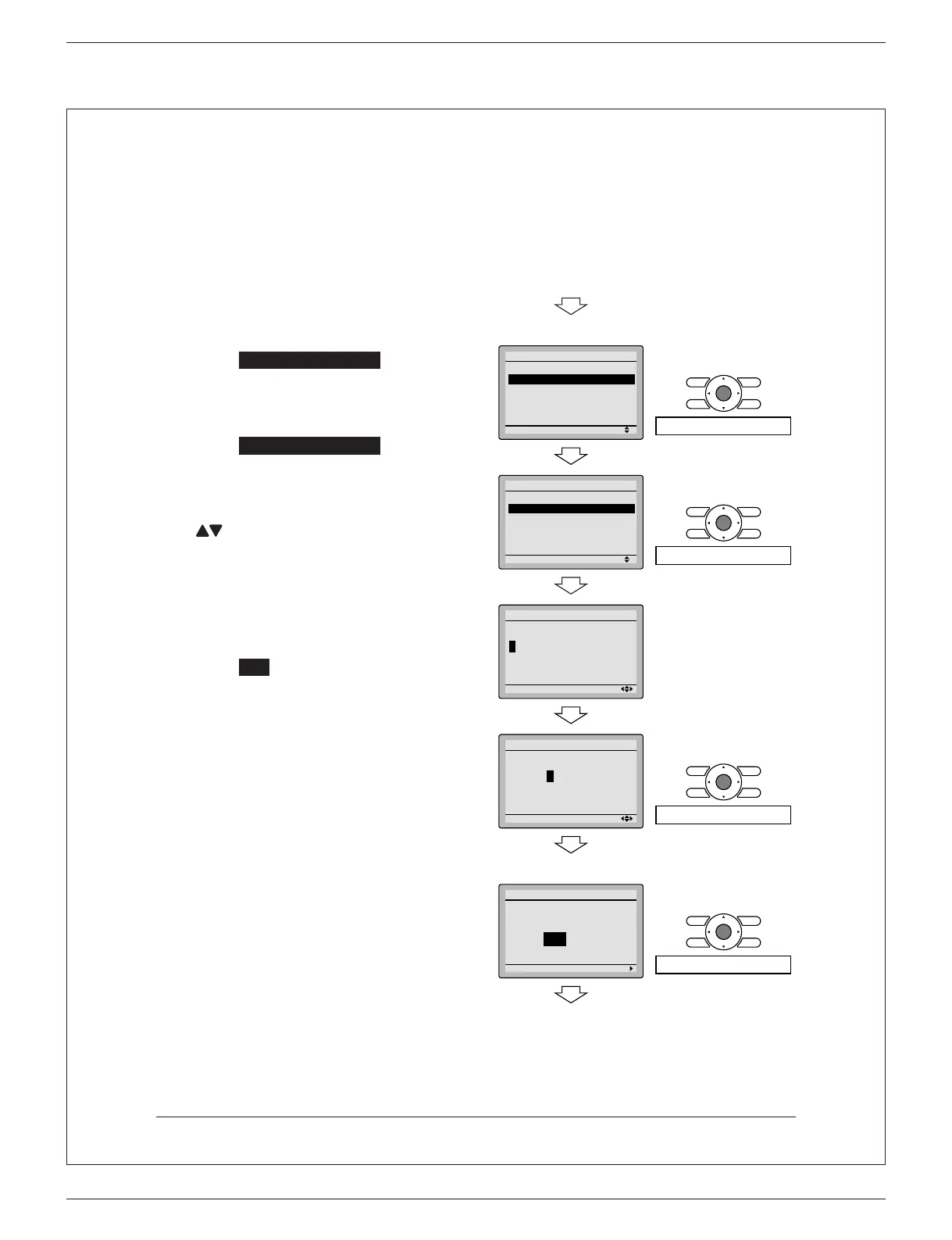
9-1 Press and hold Cancel button for
4 seconds or longer in the basic
screen.
Service settings menu is displayed.
Select
9-2 Maintenance Contact in the
service settings menu, and press
Menu/OK button. Maintenance contact
menu screen is displayed.
Select
9-3 Maintenance Contact , and
press Menu/OK button.
Enter the telephone number.
9-4
Scroll through the numbers by using
(Up/Down) buttons. Start from the
left side. Blank digits should remain as
“ - ”.
Press
9-5 Menu/OK button.
Setting con rmation screen is
displayed.
Select
9-6 Yes and press Menu/OK
button.
Setting details are saved and service
settings menu screen returns.
Press
9-7 Cancel button once.
The basic screen returns.
19 - <Basic screen>
<Service settings menu screen>
29 -
Setting
Service Settings
Test Operation
Maintenance Contact
Field Settings
Energy Saving Options
Prohibit Function
Min Setpoints Differential
1/3
Press Menu/OK button.
39 -
Setting
Maintenance Contact
None
Maintenance Contact
Press Menu/OK button.
49 -
Setting
Maintenance Contact
––––––––––––––––
1/2
59 -
Setting
Maintenance Contact
0123
–
45
–––––––––
1/2
Press Menu/OK button.
<Setting con rmation screen>
69 -
Setting
Save the settings?
Maintenance Contact
Yes No
Press Menu/OK button.
<Service settings menu screen>
01_EN_3P243521-7L.indd 19 11/27/2014 11:21:46 AM



 To Next Page