318
FTX-N/U, FVXS-N, FDMQ-R Series EDUS091558E
3P243520-7Q
26
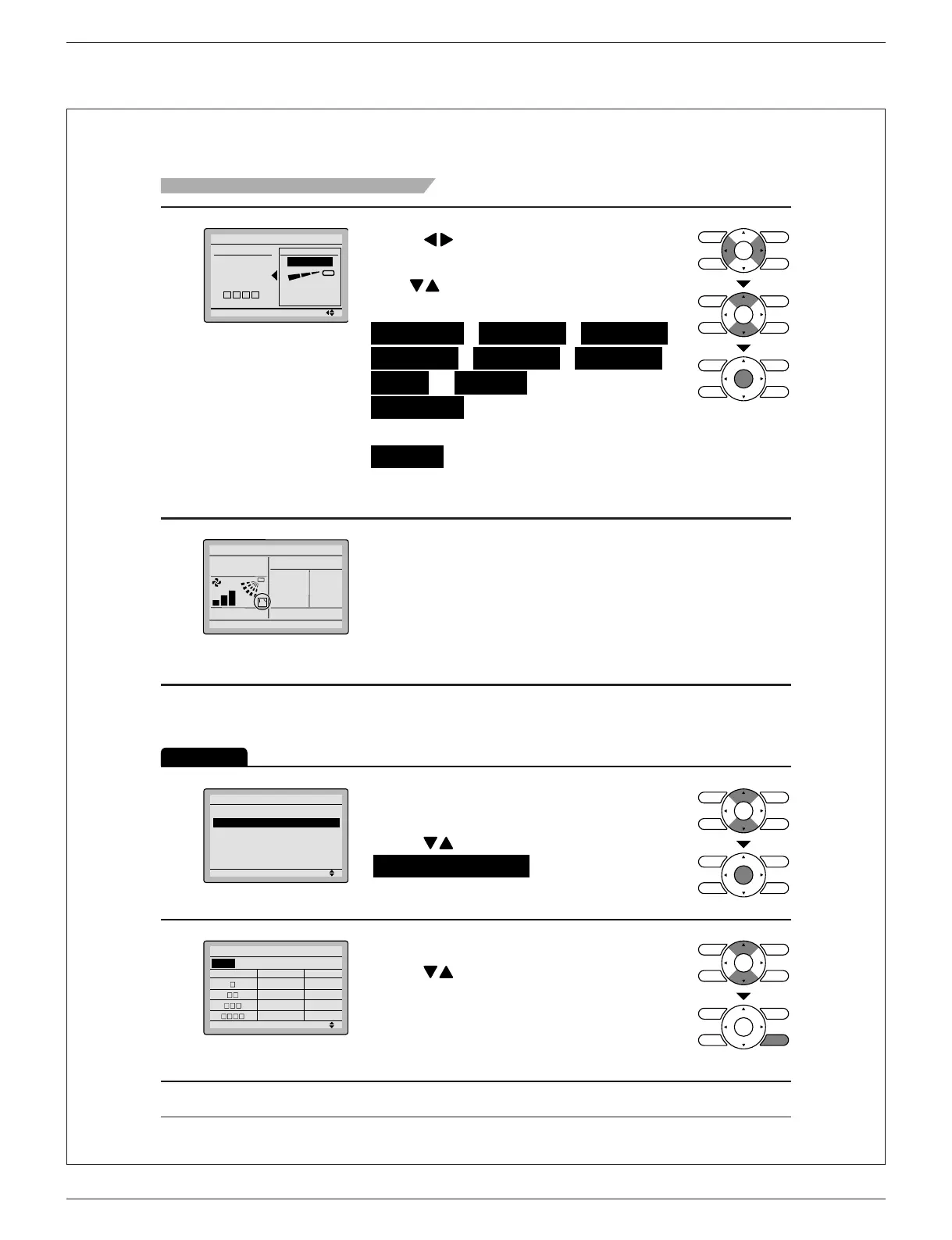
Menu Options
4
No Ind Set
Outletmark
Unit 0
Louver Setting
Direction
Outlet
Setting
Press ● button to select the air ow
direction.
Use ●
buttons to change the air ow
direction to the following:
No Ind Set , Position 0 , Position 1 ,
Position 2 , Position 3 , Position 4 ,
Swing or Blocked .
No Ind Set : No Individual Louver
Setting.
Blocked : Individual air ow is blocked.
Press
●
Menu/OK button to con rm the
settings and to return to the basic screen.
5
Room
Fr i
11
:
03
A
Set to
74
F
Cool
74
F
Basic screen
(Detailed display)
If individual air ow direction is set, then ●
the individual air ow direction icon is
displayed in the basic screen.
Louver Setting List
Operation
1
Setting
Individual Airflow Direction
Louver Setting
Louver Setting List
Reset All Louvers Position
Display the individual air ow direction
●
screen.
(See page 25.)
Press ● buttons to select
Louver Setting List and press
Menu/OK button.
2
Unit 0
Outletmark Direction Indiv.
Louver Setting List
Position 0 OFF
Position 0 OFF
Position 0 OFF
Position 0
OFF
A table shows the current settings. ●
Press
buttons to go to the next unit.
Press ● Cancel button to return to the
previous menu.
01_EN_3P243520-7Q.indd 26 3/2/2015 5:36:39 PM



 To Next Page