FTX-N/U, FVXS-N, FDMQ-R Series EDUS091558E
329
3P243520-7Q
37
Maintenance Information
Displaying the service contact and model
information
Operation
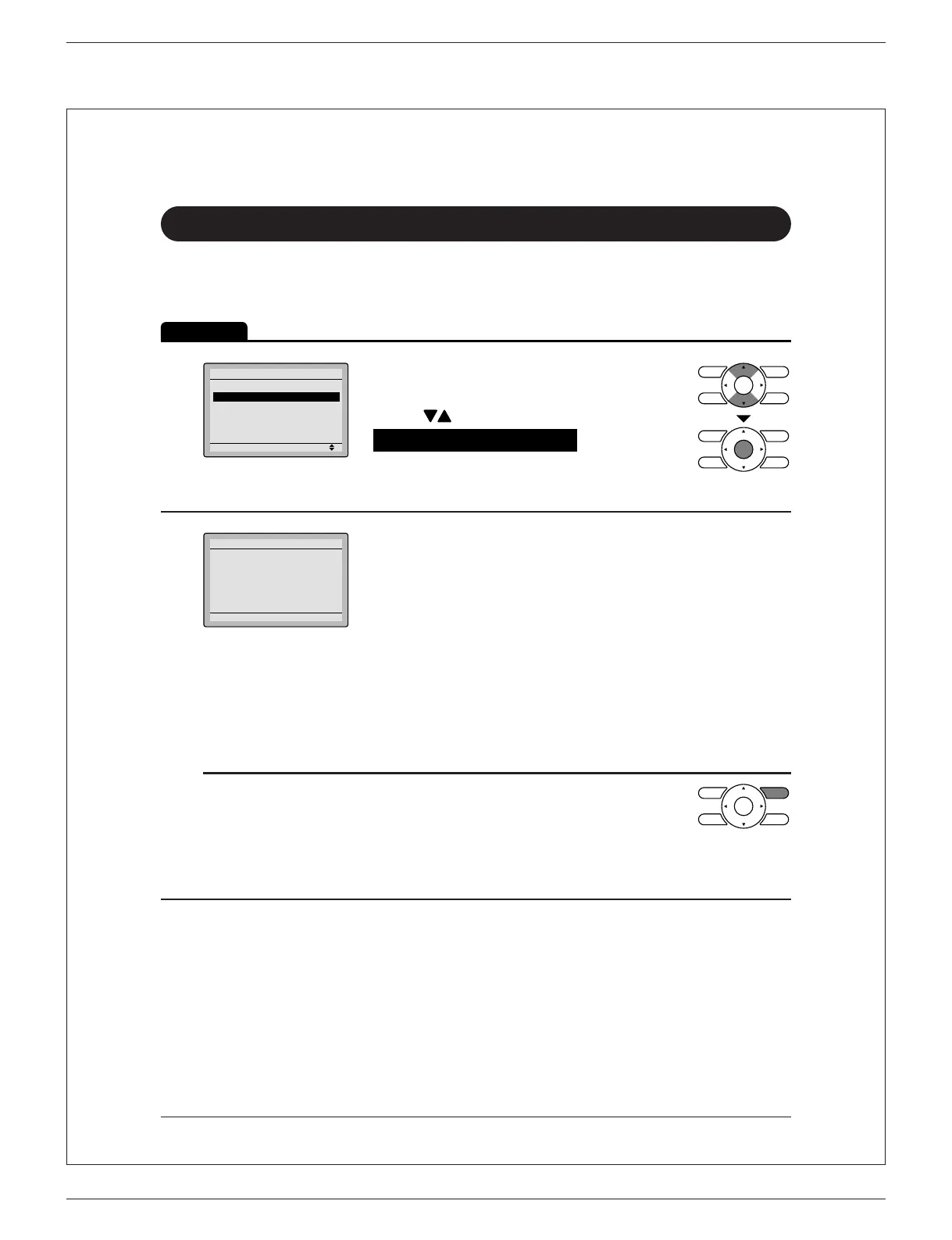
1
Setting
Main Menu
Filter Auto Clean
Maintenance Information
Configuration
Current Settings
Clock & Calendar
Daylight Saving Time
2/3
Display the main menu screen. ●
(See page 22.)
Press ● buttons to select
Maintenance Information on the main
menu screen and press Menu/OK
button.
2
Maintenance Information
Contact Info
0123-456-7890
Indoor Model ---/000
Outdoor Model ---/000
The phone number for the contact is ●
displayed at the top of the screen.
(If it has not yet been entered, it will not be
displayed.)
The model information of the indoor and ●
outdoor units for your product will be
displayed on the bottom of the screen.
(For some models the product code may be
displayed. )
The model name will not be displayed if the*
indoor unit PCB has been replaced.
The error code history may also be displayed.*
If the Operation lamp is not ashing, the unit is
working properly.
The error code history is no longer displayed if
you press On/Off button for more than
4 seconds.
01_EN_3P243520-7Q.indd 37 3/2/2015 5:36:44 PM



 To Next Page