FTX-N/U, FVXS-N, FDMQ-R Series EDUS091558E
339
3P243520-7Q
47
2
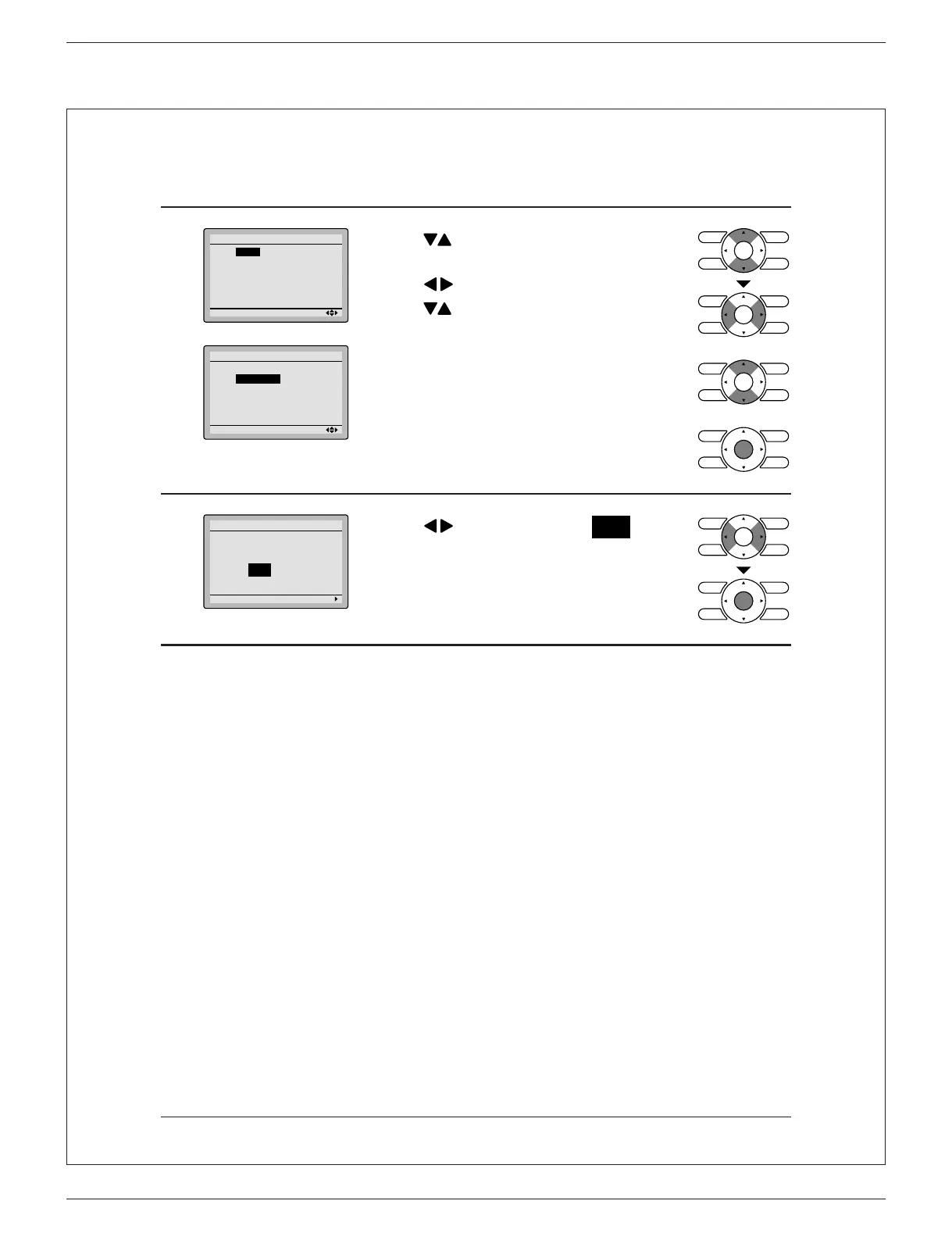
Setting
Daylight Saving Time
Start March
2nd Sunday
End November
1st Sunday
Setting
Daylight Saving Time
Start March
2nd Sunday
End November
1st Sunday
Press ● buttons to select the start
month and the end month.
Press ●
buttons to select a week.
Press
buttons to select the start
week and the end week.
After setting the Start and End dates, ●
press Menu/OK button to display the
setting con rmation screen.
3
Setting
Save the settings?
Daylight Saving Time
Yes No
Press ● buttons to select Yes on the
setting con rmation screen.
Pressing Menu/OK button con rms the
Daylight Saving Time settings and takes
you back to the basic screen.
When Daylight Saving Time is enabled
When the time in the remote controller reaches 2:00 a.m. on the speci ed start date, the clock is
automatically set forward by one hour. When the time in the remote controller reaches 2:00 a.m. on
the end date, the clock is automatically set back by one hour.
01_EN_3P243520-7Q.indd 47 3/2/2015 5:36:47 PM





 To Next Page