5 | Operation
User reference guide
22
FTXTM-R, FTXTM-S
Daikin room air conditioner
4P728152-2 – 2023.03
5.4 Climate compensation control (CCC)
Use this function to compensate for the heat losses of your house during colder
outdoor temperatures.
Use this function in case of discomfort during a drop of outside ambient
temperature between day/night or a change of weather season.
INFORMATION
▪ This feature reduces the frequency of temperature setpoint adjustments to reach
the target room temperature.
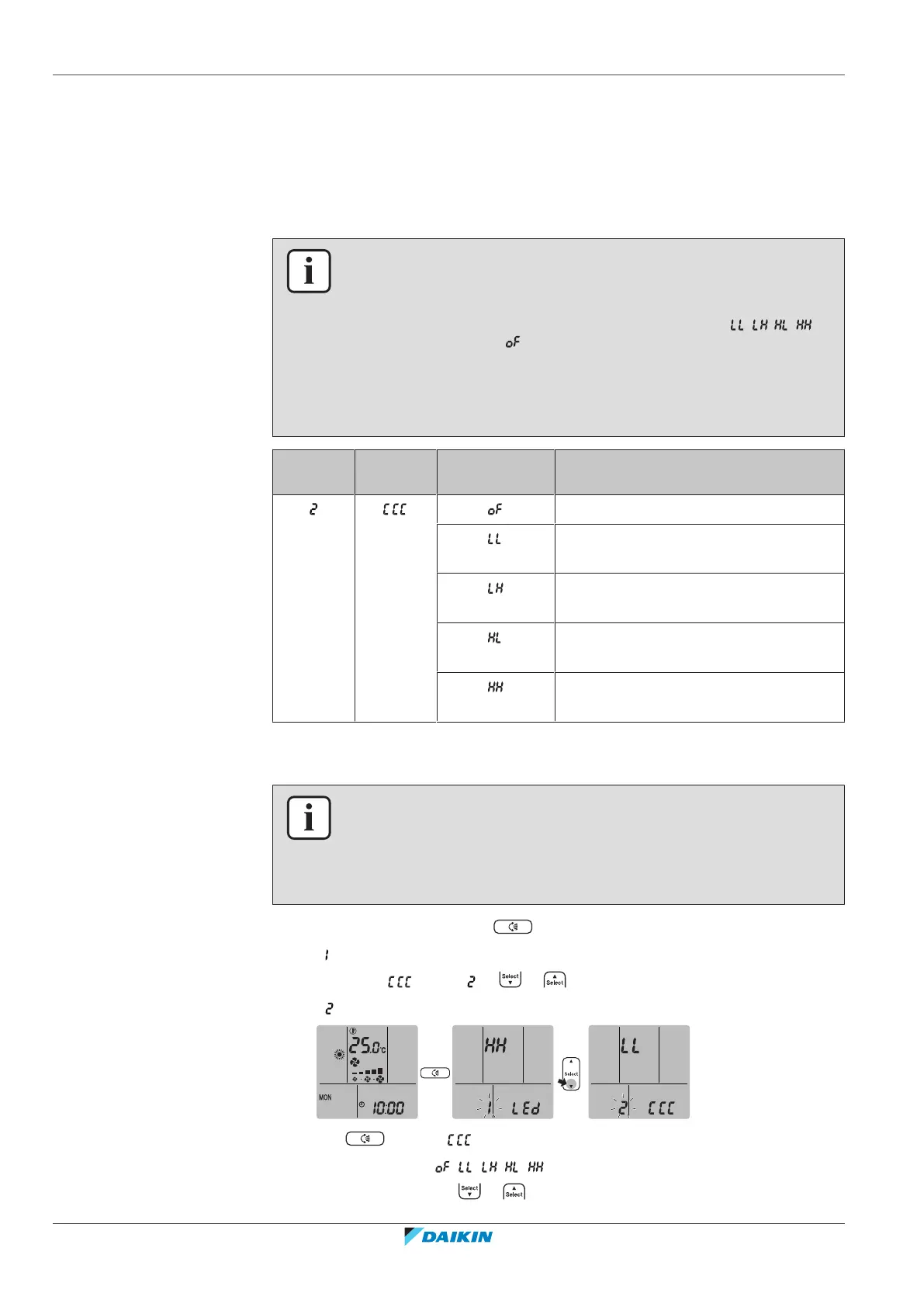
▪ It is possible to set 4 different levels of compensation intensity ( , , , ) or
switch the function off ( ).
▪ According to the selected intensity, the unit will compensate for the outdoor
ambient temperature drop by increasing the indoor target temperature setpoint
(lower outdoor ambient temperature = higher increase of target indoor
temperature setpoint).
Setting
mode
Symbol Setting Climate compensation control is…
…turned OFF, no compensation
..turned ON, low compensation, low
compensation at 0°C
…turned ON, low compensation, high
compensation at 0°C
…turned ON, high compensation, low
compensation at 0°C
…turned ON, high compensation, high
compensation at 0°C
5.4.1 To start/stop Climate compensation control (CCC)
INFORMATION
Climate compensation control can be activated on in heating operation mode
"5.3Operation mode and temperature setpoint"[420].
Climate compensation control can be set at any ambient condition, but it will take
effect only when outdoor temperature drops below +7°C.
1 On the home screen, press for at least 2seconds.
Result: is blinking.
2 Navigate to setting by or .
Result: is blinking.
3 Press to enter setting.
Result: Setting symbol ( , , , , ) is blinking.
4 Change the setting by or in following order.















 To Next Page