5 | Operation
User reference guide
23
FTXTM-R, FTXTM-S
Daikin room air conditioner
4P728152-2 – 2023.03
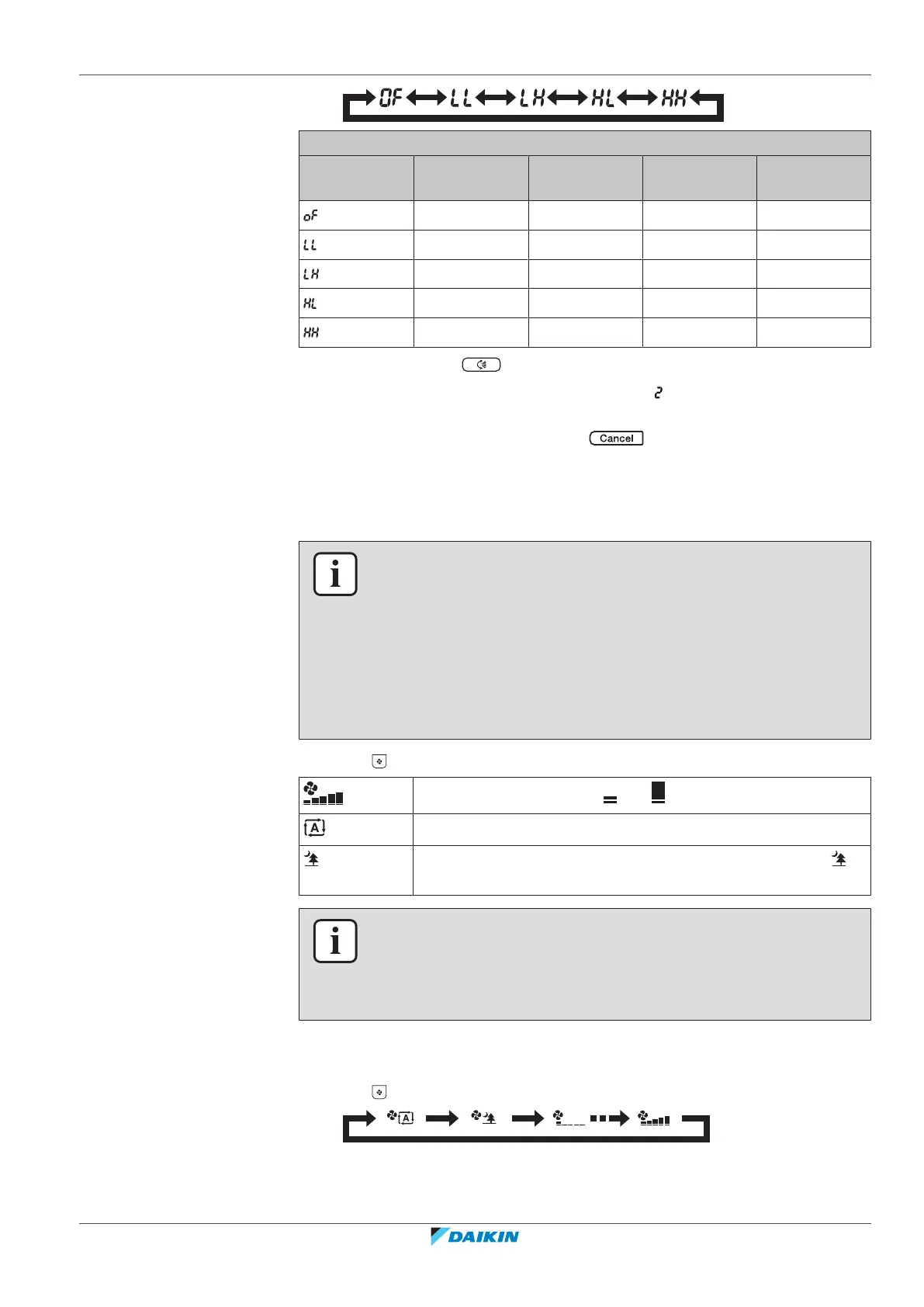
Increase of room set point value according to the outdoor unit temperature
Outdoor
ambient
+7°C 0°C -10°C -25°C
0°C 0°C 0°C 0°C
0°C +0.5°C +1°C +2°C
0°C +1°C +1.5°C +2°C
0°C +1.5°C +2°C +4°C
0°C +2°C +2°C +4°C
5 Confirm setting by .
Result: Setting is changed, you are in setting menu, is blinking.
Note: The display automatically returns to the home screen after 60seconds. To
return to the default screen sooner, press .
5.5 Airflow rate
INFORMATION
▪ When using drying operation mode, you CANNOT adjust the airflow rate setting.
▪ The airflow rate in heating mode will lower to avoid generating cold airflow.
When temperature of the airflow rise, operation will continue at the set airflow
rate.
▪ The airflow rate in heating mode will NOT be lowered in case of temperature
setpoint <18°C (cold airflow will NOT be prevented). This feature maintains the
room temperature above the freezing point in places such as distant areas,
summer houses, remote cabins, and garages.
1 Press to choose:
5 airflow rate levels, from " " to " "
Automatic airflow rate operation
Indoor unit quiet operation. When the airflow rate is set to " ",
the noise from the unit will be reduced.
INFORMATION
If the unit reaches the temperature setpoint:
▪ in cooling or automatic mode. Fan will stop operating.
▪ in heating mode. Fan will operate in low airflow rate.
5.5.1 To adjust the airflow rate
1 Press to change the airflow setting as follows:


 To Next Page