5 | Operation
User reference guide
35
FTXTM-R, FTXTM-S
Daikin room air conditioner
4P728152-2 – 2023.03
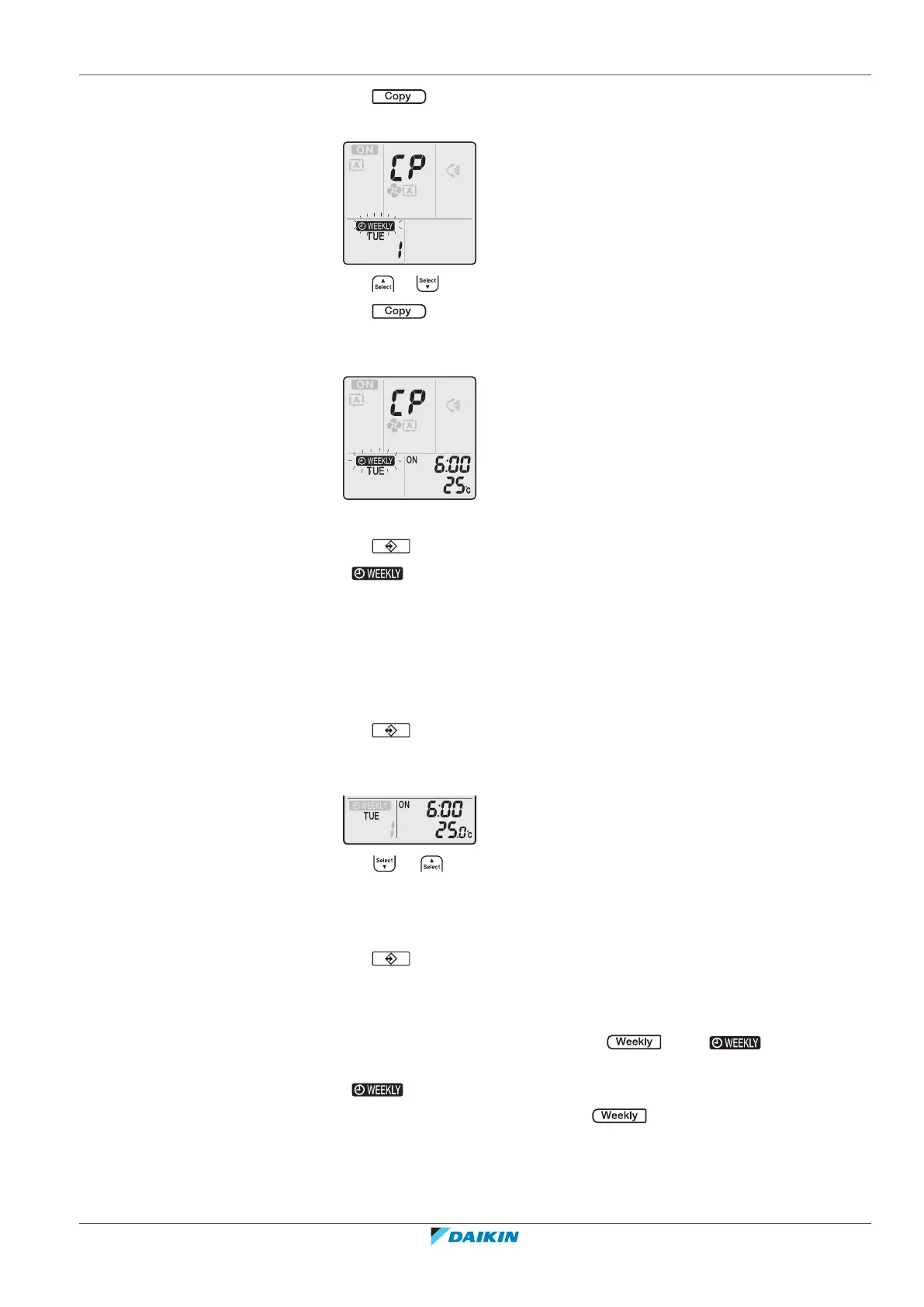
3 Press .
Result: The reservation of the selected day of the week will be copied.
4 Press or to select the destination day.
5 Press .
Result: The whole reservation is copied to the selected day and the timer lamp
lights orange.
Note: To copy to another day, repeat the procedure.
6 Press to complete the setting.
Result: is displayed on the LCD.
Note: To change the reservation setting after copying, refer to "5.12.1 To set
Weekly timer operation"[433].
5.12.3 To confirm reservations
You can confirm if all reservations are set to your needs.
1 Press .
Result: The day of the week and the reservation number of the current day
are displayed.
2 Press or to select the day of the week and reservation number to be
confirmed and check the reservation details.
Note: To change the reservation setting, refer to "5.12.1 To set Weekly timer
operation"[433].
3 Press to exit the confirmation mode.
5.12.4 To deactivate and reactivate Weekly timer operation
1 To deactivate the Weekly timer, press while is displayed on
the LCD.
Result: disappears from the LCD and the timer lamp goes off.
2 To reactivate the Weekly timer, press again.
Result: The last set reservation mode will be used.















 To Next Page