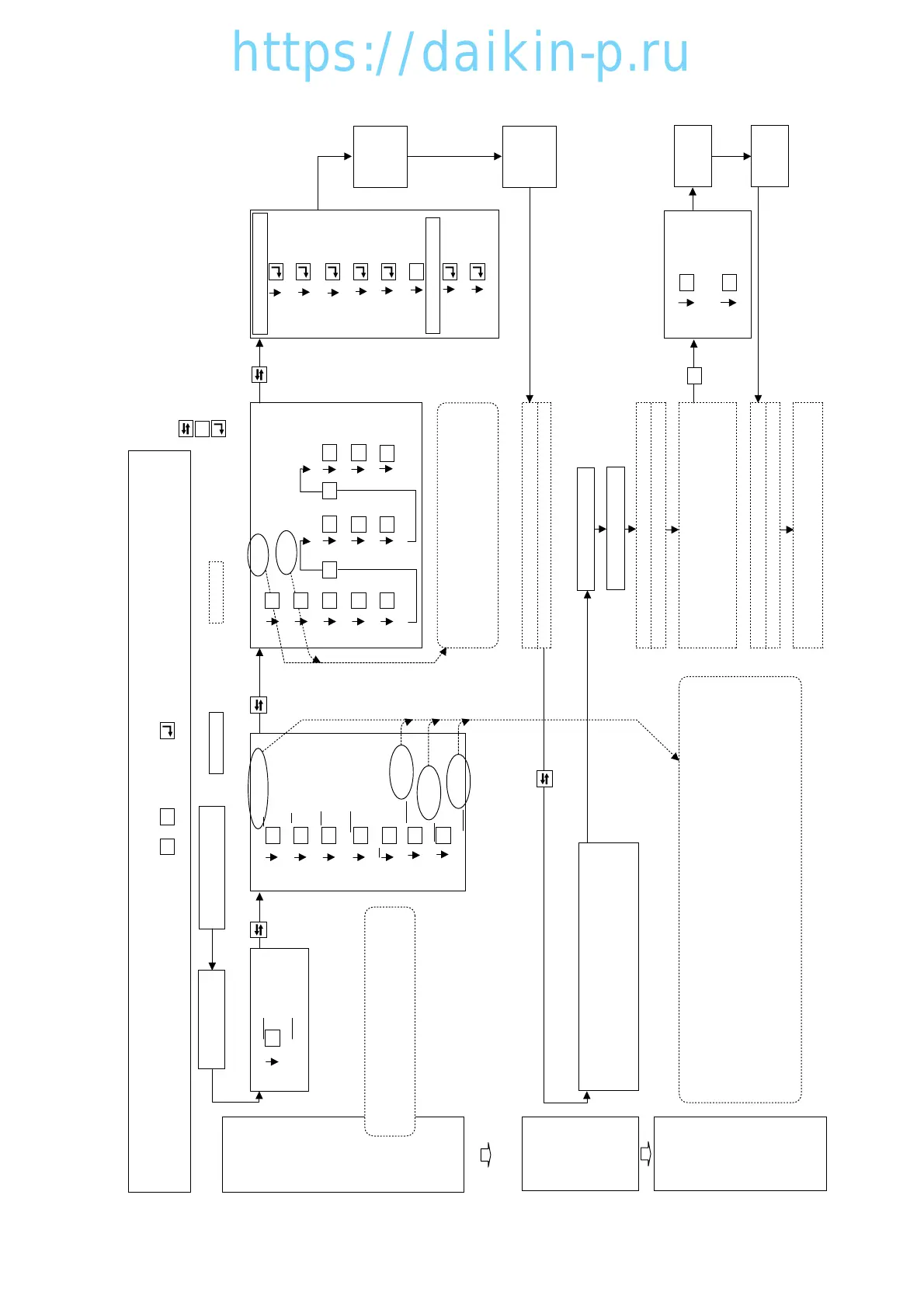
: Select key
: Manual action
: S key
: Enter key
: Controller operation
INITIAL
SETTING
for
4 MODES
※13. Optional Function Setting Mode
※14. Basic Function Setting Mode
※15. Optional Condition Setting Mode ※16. Input Data Mode
USDA : OFF (or 3 or 4) DECOS3 : C (or b or a *1)
CHARTLS : OFF (or ON *5)
SET I.d (Container I.D)
Press for
3 seconds
Circuit
Breaker
OFF
Circuit
Breaker
ON
Unit Switch
OFF
Unit Switch
ON
Press for
3 seconds
dHU : OFF (or ON)
USDA 1/2 : 1 (or 2 *6)
i.d.-C
REC SEN : ON (or OFF) H001 : 3 H005 : 3 d3 : 1
Set 4 alphabets
OC-SET : Sing (or dUAL)
H002 : 2 H006 : 1 d-1 : 1
i.d-n
'---Note 1---
HP : 10 (or 5)
H003 : 2 d : 1 d-2 : 1
After moving to setting item with S key,
select the initial setting value with △ or ▽
key and determine it with Enter key.
Key operation
1.Underlined figures show the value of the most usual setting case. Actually all the setting have been set following 3.8.3 INITIAL SETTING TABLE at factory.
2.When the setting change is required, select the desired setting using or key and press key to confirm, and then turn circuit breaker off.
3.When controller is replaced from the spare parts, confirm the model name first, and then set a items by following 3.8.3 INITIAL SETTING TABLE
DISP : OFF (or ON *2) H004 : 2 d2 : 1 C/F : C
SET I.d
COMP : 100 (or 33 *3)
SET TIME
REHEAT : OFF (or ON *4)
Set year, month & day
Set hour and minute
Press for 3 seconds All Indication light ON (for 3 seconds)
Starting preparation (for 18 seconds)
TRIP START
SETTING
in 18 seconds
※6. PTI selection mode (for Trip Start Setting)
1. Select 「Manual Check」 with △ or ▽ key and
determine it with Enter key.
2. Select Trip Start 「TS H」 with △ or ▽ key and
set it to "0" by pressing Enter key for 3 seconds.
All Indication light ON (for 3 seconds)
Starting preparation (for 18 seconds)
All Indication light ON (for 3 seconds)
Starting preparation (for 18 seconds)
※2. Operation setting mode
OPERATION
CONDITION
SETTING
Set Control Temperature
Alarm F301 : Non setting of [Control Temperature]
E303 : Non setting of [Control Humidity] Set Control Humidity
if dHU is set to ON if dHU is set to ON.
E305 : Non setting of [Defrost Interval]
Set Defrost Interval.
Operation
Circuit Breaker : ON
Unit Switch : ON
Unit Switch : OFF
Unit Switch : ON
Log. Interv : 30
(or 15, 60 or 120)
Press for
3 seconds
S
S
S
S
S
S
S
S
S S S S S
S
S S S
S S S
S
Notes
*5. Set ON for the unit not equiped recorder.
*6. Set 2 for Black receptacles of USDA sensors.
(Factory set 1 is for Gray receptacles.)
*1. The software of DECOS3c is intechageable to DECOS3b for LXE10D.
Therefore, make sure to recognize the controller type "C" or "b" at the initial setting.
i.e.: set to "C" for DECOS3c (LXE10E)
set to "b" for DECOS3b (LXE10D)
*2. Set ON for the unit requested "Panel LED Display Light OFF" function.
*3. Set 33 for the unit LXE10D-A10C~A10G installed reciprocating type compressor with
unloading valve.
*4. Set ON for the unit equiped REHEAT Coil for defumidification control (option).
S
S
S
S
S
△
▽




 To Next Page