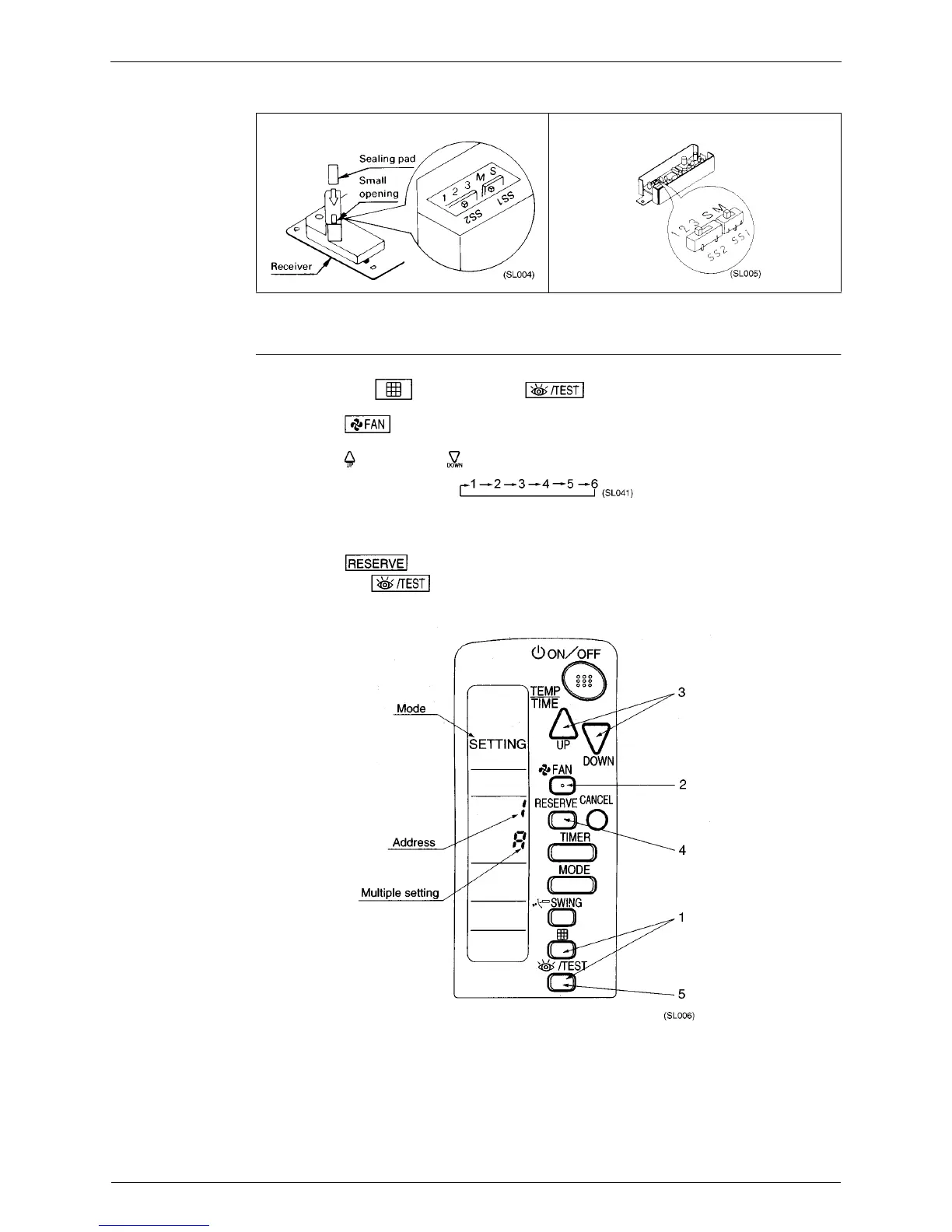
Method of Field Set (Reset after Maintenance Inspection/Repair) Si-71A
26 Explanation of Field Set
After completing setting, seal off the opening of the address switch and the MAIN/SUB switch with the
attached sealing pad.
Setting The
Address of
Wireless Remote
Controller
(It is Factory Set to
“1”)
<Setting from the remote controller>
1. Hold down the “ “ button and the “ “ button for at least 4 seconds, to get the
FIELD SET MODE. (Indicated in the display area in the figure at right).
2. Press the “ “ button and select a multiple setting (A/b). Each time the button is pressed the
display swicthes between “A” and “b”.
3. Press the “ “ button and “ “ button to set the address.
Address can be set from 1 to 6, but set it to 1 ~ 3 and to same address as the receiver. (The receiver
does not work with address 4 ~ 6.)
4. Press the “ “ button to enter the setting.
5. Hold down the “ “ button for at least 1 second to quit the FIELD SET MODE and return to
the normal display.
<In Case of FUY Model>



 To Next Page