Si-71A Method of Field Set (Reset after Maintenance Inspection/Repair)
Explanation of Field Set 29
1.6 Centralized Group No. Setting
„
If carrying out centralized control with a central remote controller and unified ON/OFF controller, you
have to set the group No. for each group by remote controller.
„
To set the group No., first turn on the power supply of the central remote controller, unified ON/OFF
controller and indoor unit.
Centralized Group
No. Setting by
Remote Controller.
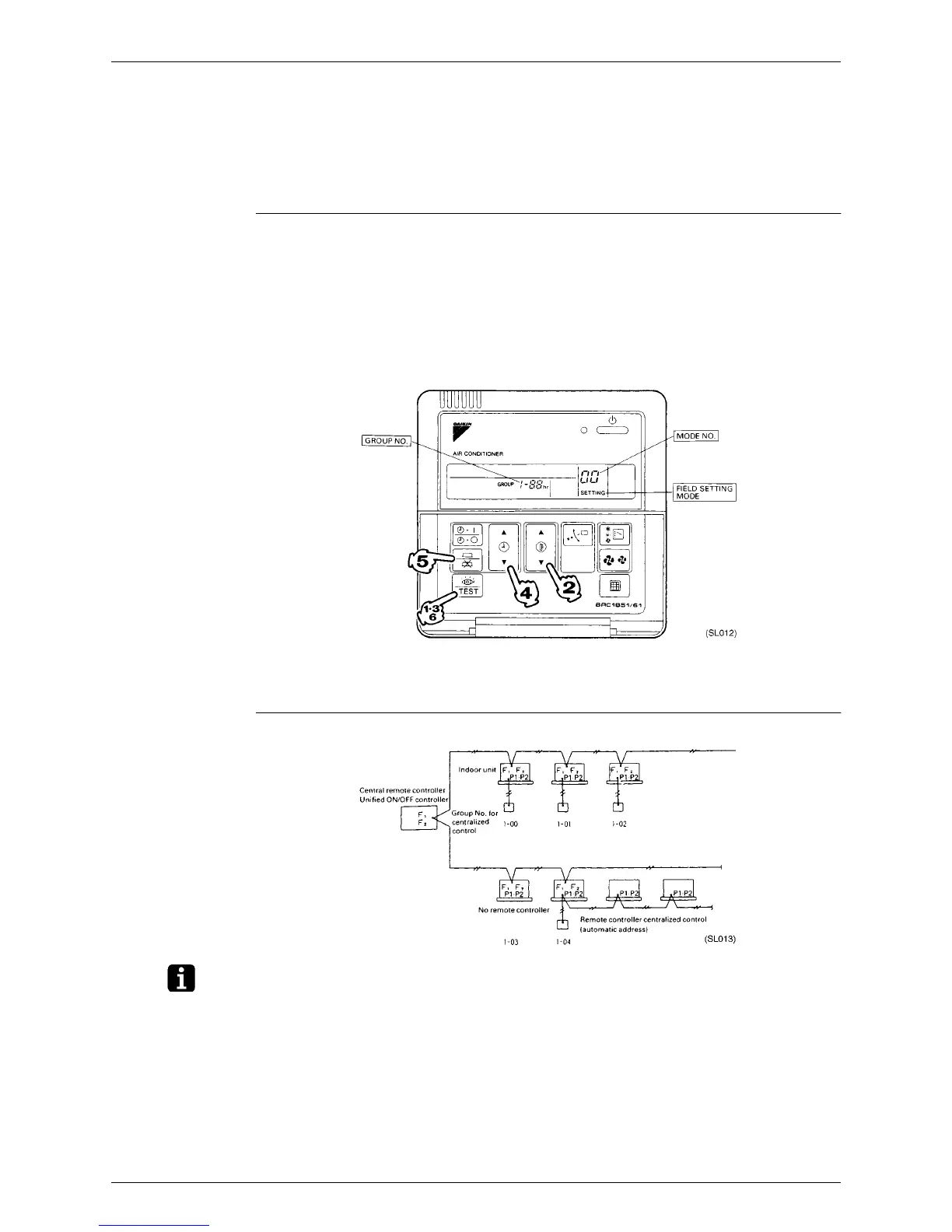
1. If the inspection/test button is pushed for 4 seconds or more when in the normal mode, operation enters
the “field set mode.”
2. Using the temperature control buttons, set the mode No. to “00.”
3. Push the inspection/test button to inspect the group No. display.
4. Using the programming time button, set the group No. for each group. (Group No. rises in the order of
1-00, 1-01, ...1-15, 2-00 ...4-15, etc. The unified ON/OFF controller however displays only the range of
group numbers selected by the switch for setting each address.)
5. Push the timer ON/OFF button and enter the selected group No.
6. Push the inspection/test button and return to the normal mode.
∗
If the address has to be set individually for each unit for power consumption counting, etc., set the mode
No. to “30.”
Group No. Setting
Example
Note:
1. “F1,F2”indicates interface adaptor for SKY AIR series.
2. If not using remote controllers, temporarily connect a remote controller to set the group No., set the
group No. for centralized control, and then disconnect the controller.



 To Next Page