6
The handset rings (1) (unless it is in silent
mode) and the backlighting flashes.
(1) If nobody answers, the handset rings for 20 secs (factory setting) and then stops. The duration of ringing can be
adjusted (see Programming handset operating options). If the handset is on its base, the handset rings at the
programmed volume (see Modifying handset operating options). If the handset is off its base, the ringing volume
becomes progressively louder (from level 1 to the programmed level).
(2) The names of access points can be customised (see Modifying doorphone operating options).
The name of the access
point calling (2) is displayed.
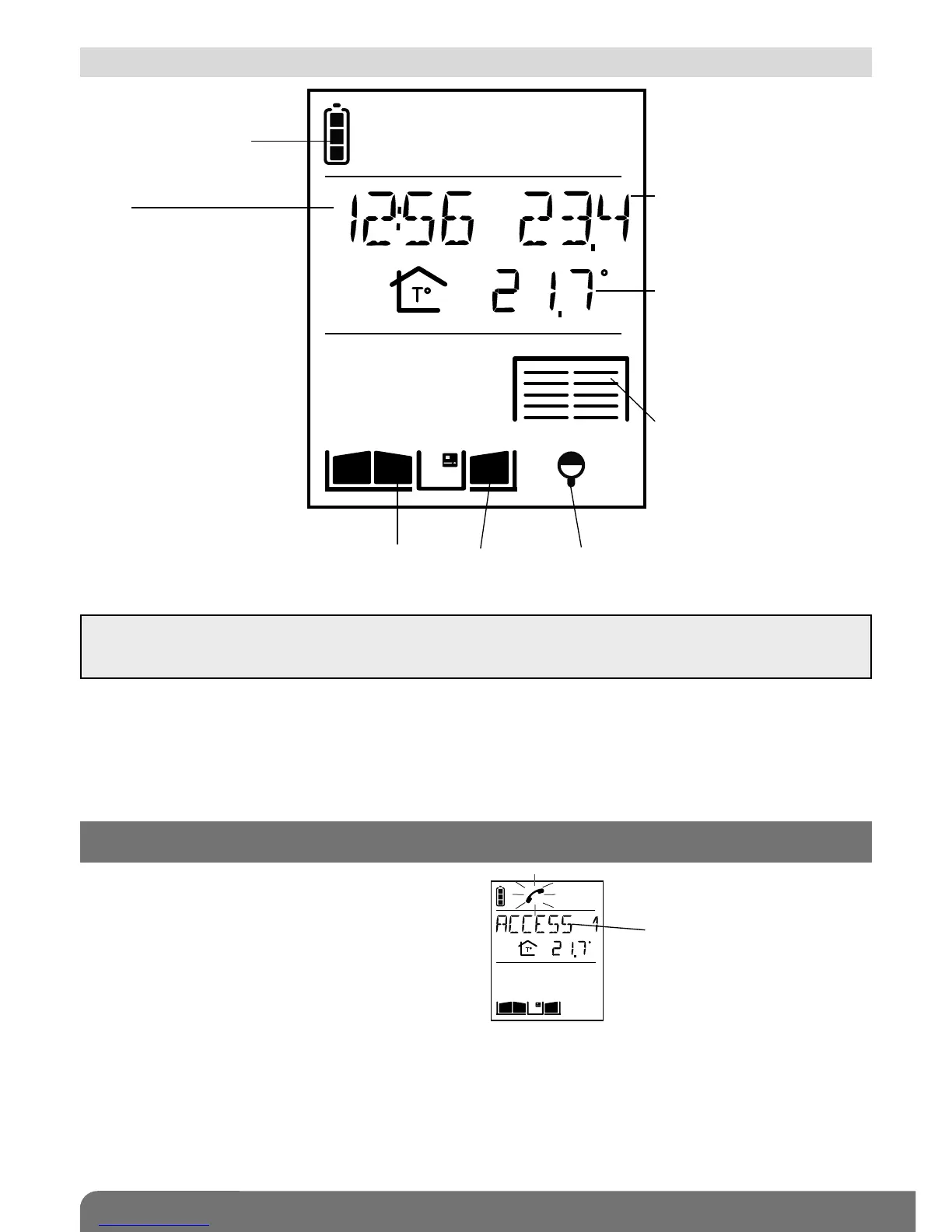
Handset battery status
Time
Gate, side gate and latch status Lighting status
Garage status
1.3 Handset display in standby mode (general information screen)
2. Answering a visitor’s call
IMPORTANT: if the handsets or controllers are too close to each other when you perform different tests, this
may cause disturbance (Larsen effects, crackling, etc.). Move the various devices over 3 metres away from
each other.
Indication of the indoor
temperature
The temperature displayed is
the temperature measured on
the handset and is updated
every 10 minutes
Indication of the outdoor
temperature
The temperature displayed is
the temperature measured at
the first access point
programmed and is updated
every 10 minutes



 To Next Page