13
4
INFORMATION ON USE AND OPERATION
A) Main switch: this is used to power on the machine.
B) Knob: this is used to start and adjust the steam from
the wand (B1).
C) Grouphead control panel (1).
D) Control terminal: used to regulate the operation of the
machine and to display the main operating parameters.
E) Grouphead control panel (2).
F) Grouphead control panel (3).
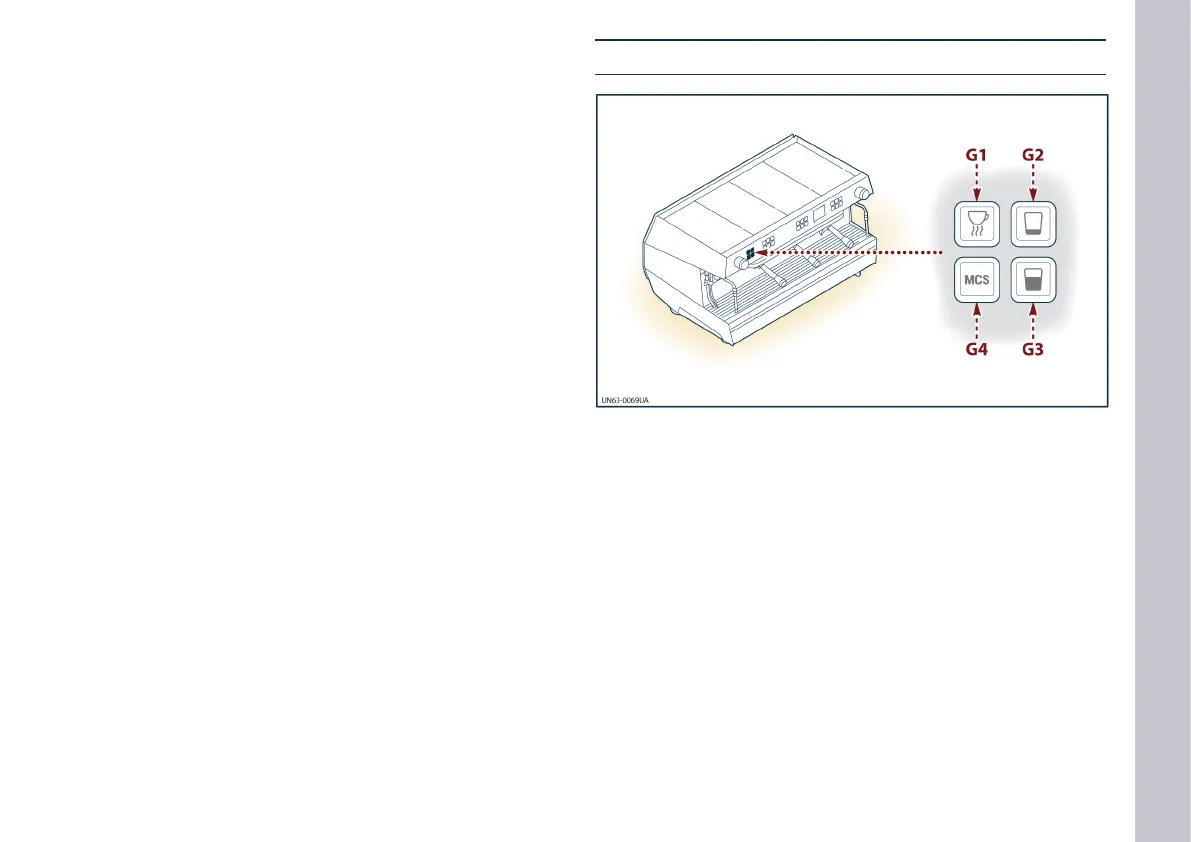
G) Control panel for additional features: this is used to
turn on the hot water supply and the cappuccino wand
(see “Description of control panel for additional features”).
H) Knob: this is used to start and adjust the steam from
the wand (H1).
The keys denoting the activated grouphead ash until
the set operating temperatures are reached.
L) Pressure gauge: this shows the steam pressure in the
boiler.
M) Pressure gauge: this shows the pressure in the water
circuit.
P) Backlit key: this is used to start and stop the boiler.
Q) Backlit key: this is used to change the cup warming
surface temperature (see “Activation of the cup warm-
ing surface”).
This key is enabled with the (G1) button (see “Descrip-
tion of control panel for additional features”).
Description of control panel for additional features
G1) Button: this is used to start and enable the tempera-
ture adjustment for the cup warming surface.
G2) Button: this is used to dispense a measure of hot wa-
ter.
G3) Button: this is used to dispense two measures of hot
water.
G4) Button: this is used to start the MCS automatic cap-
puccino wand.
Key to gure and description of controls














 To Next Page