21
4
INFORMATION ON USE AND OPERATION
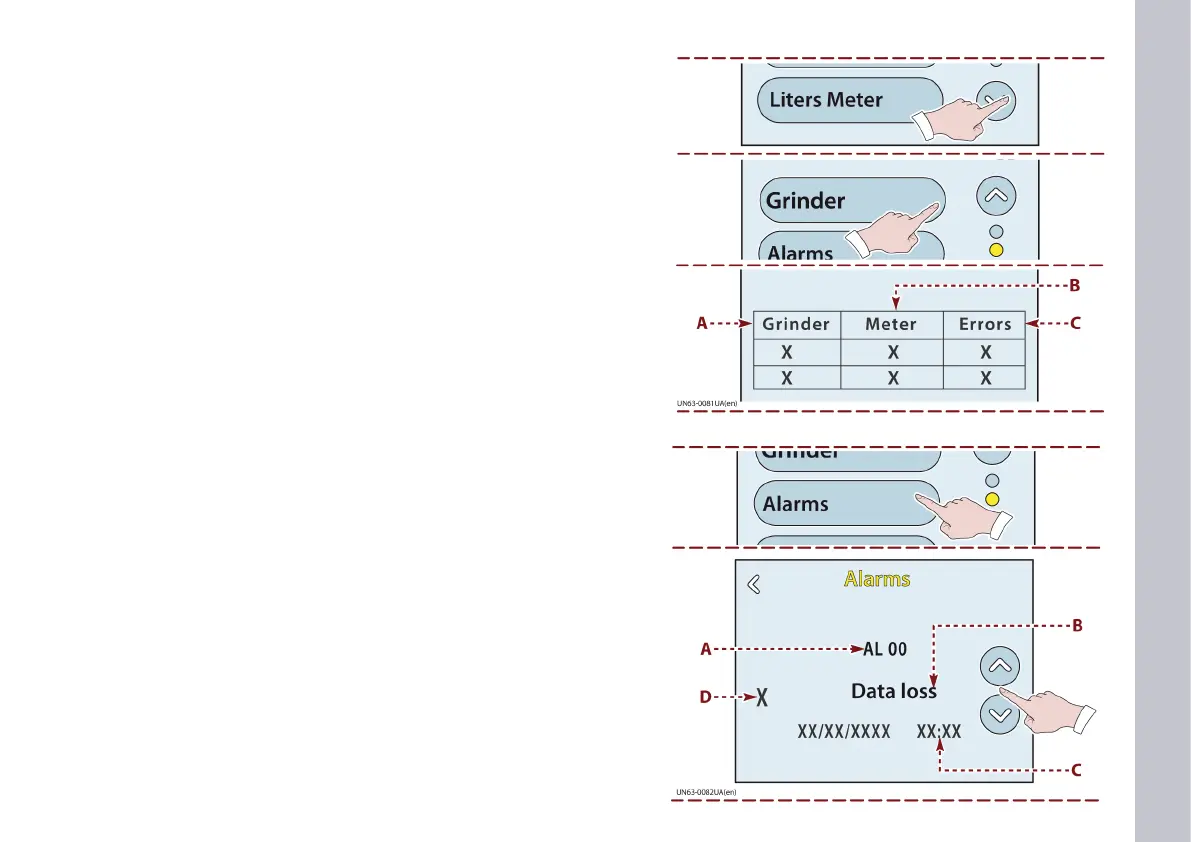
1) Touch this key to display the GRINDER feature.
Touch this key to display the GRINDER page.
If the coee grinder is not connected to the machine, the follow-
ing message appears: not tted.
A) This is the reference number for the coee grinder that is con-
nected.
Up to three individual coee grinders or one double coee grind-
er can be connected to the machine.
B) This shows the number of coees extracted, which is used as a
sample for correcting the coee bean grinding level.
The number of coees used for the sample is set by the manu-
facturer.
C) This is the dierence between the actual extraction time and the
set extraction time.
The coee grinder uses this reading as a basis for altering the
coee bean grinding level.
GRINDER page
Touch this key to display the ALARMS page.
A) This is the alarm code.
B) This is the description of the alarm.
C) This is the alarm date and time.
D) This is the alarm number.
- Touch the keys to view the alarms.
ALARMS page














 To Next Page