Troubleshooting Danaher Motion Kollmorgen Speciality Electronics
24 SERVOSTAR CD-LITE User Manual
Firmware Upgrades
From time to time, Danaher Motion adds features to its products that expand their overall capabilities.
Features added to the SERVOSTAR CD-Lite can be easily implemented at the customer’s site. This is
accomplished by downloading new firmware via the drive’s serial port directly from a host computer.
When ordering a firmware upgrade, you receive the following files:
Lccd_xxx.emb - firmware code (xxx describe the firm ware version).
Ember.txt - firmware upgrade utility
Cdlignit.exe - windows application to download the firmware code
Ig.bat – for user how want to ember in DOS Mode
Ignite.exe - for user how want to ember in DOS Mode
Upgrade Procedure
(in windows operation system)
1. Turn off the CD-LITE.
2. Change the DIP switches 8 and 10 to 1 (you can find them on top of the CD-LITE).
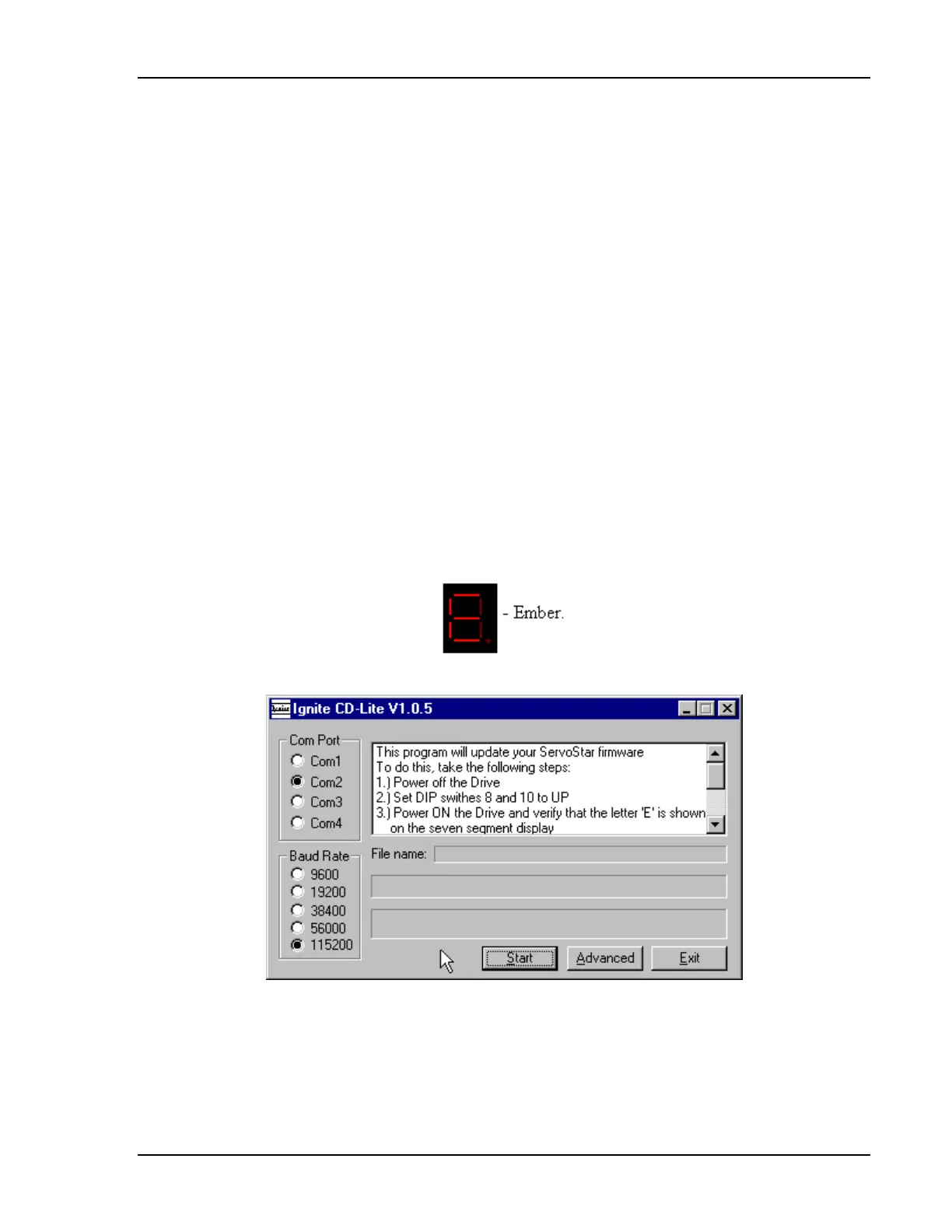
3. Turn ON the CD-LITE, Make sure that the seven segment Led on the CD-LITE changes to E.
4. With explorer activate Cdlignit.exe the following dialog box appears:
5. Select the Com Port.
6. Select Baud Rate (default 115200).
7. Select Advanced the dialog box “Advanced options” appears.
Artisan Technology Group - Quality Instrumentation ... Guaranteed | (888) 88-SOURCE | www.artisantg.com



 To Next Page