Installation Guide CF-MC Master Controller
8
02/2013 VIUHK8C1 Danfoss Heating Solutions
Changing default display temperature:
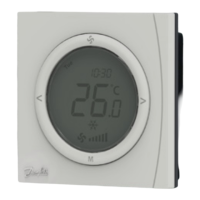
•The actual room temperature is shown in the display as default.
•To change default display from actual room temperature to actual oor surface temperature,
press and hold the push button until SET MAX is shown in the display.
•Press the button
shortly and repeatedly until or is ashing in the display.
•Press the up/down selector to select the new default display temperature:
Room temperature Floor surface temperature.
Setting of room temperature:
•Make sure actual room temperature is shown in the display.
•Press the up/down selector to set the desired room temperature value. SET is shown in the
display.
•When releasing the up/down selector the display returns to actual temperature.
Note! The thermostat regulates the oor heating system according to room temperature set point, within
the maximum and minimum limitations dened for the oor surface temperature.
Room temperature limitation:
•Make sure actual room temperature is shown in the display.
•Press the push button until SET MAX is shown in the display.
•Press the up/down selector to set the maximum room temperature limitation.
•Press the push button shortly, SET MIN is shown in the display.
•Press the up/down selector to set the minimum room temperature limitation.
•Press the push button shortly and the actual oor surface temperature is shown in the
display.
Floor surface temperature limitation (only valid for CF-RF):
•Ensure actual oor surface temperature is shown in the display illustrated by
.
•Press and hold the push button until SET MAX is also shown in the display.
•Press the up/down selector to set the maximum oor surface temperature limitation.
•Press the push button shortly, SET MIN is also shown in the display.
•Press the up/down selector to set the minimum oor surface temperature limitation.
IMPORTANT!
As heat emission from the oor may vary slightly depending on oor covering - and thereby cause inaccu-
rate temperature measurement - it may be necessary to adjust the setting of max. and min. oor surface
temperatures accordingly. It is important always to follow recommendations from the oor manufacturer
regarding max. oor surface temperature. It is recommended to include mixing shunt for oor heating
circuits in order to ensure optimal ow temperature. - In addition to minimised energy consumption, cor-
rect setting of the ow temperature will eliminate the risk of excessive heat transfer to the oor.
6. Conguration
6.1 Actuator Outputs
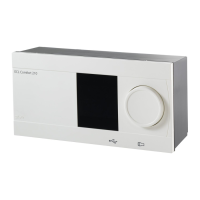
Activate Output mode on CF-MC Master Controller (g. 20/22):
•Use the menu selection button
to select the Output mode. Output LED ashes.
•Activate Output mode by pressing OK . Output LED goes ON.
Select the output conguration:
•Press the output selection button and toggle between the possible output congurations
- the output LEDs will be ON – indicated below:
•1 LED: The outputs are congured to NC actuators with ON/OFF regulation.
•2 LEDs: The outputs are congured to NO actuators with ON/OFF regulation.
•3 LEDs: The outputs are congured to NC actuators with Pulse Width Modulation (PWM)
regulation for oor heating (default).
•4 LEDs: The outputs are congured to NO actuators with Pulse Width Modulation (PWM)
regulation for oor heating.
•5 LEDs: A Remote Controller is installed, and it is not possible to change settings from the
CF-MC Master Controller.
•Activate selected output conguration by pressing OK .
Note! During periods with no output activations the CF-MC Master Controller will run a valve motion
program every 2 weeks and it will last for up to 12 minutes. Individual output conguration is possible with
the CF-RC Remote Controller, see separate instruction.


 To Next Page
 Loading...