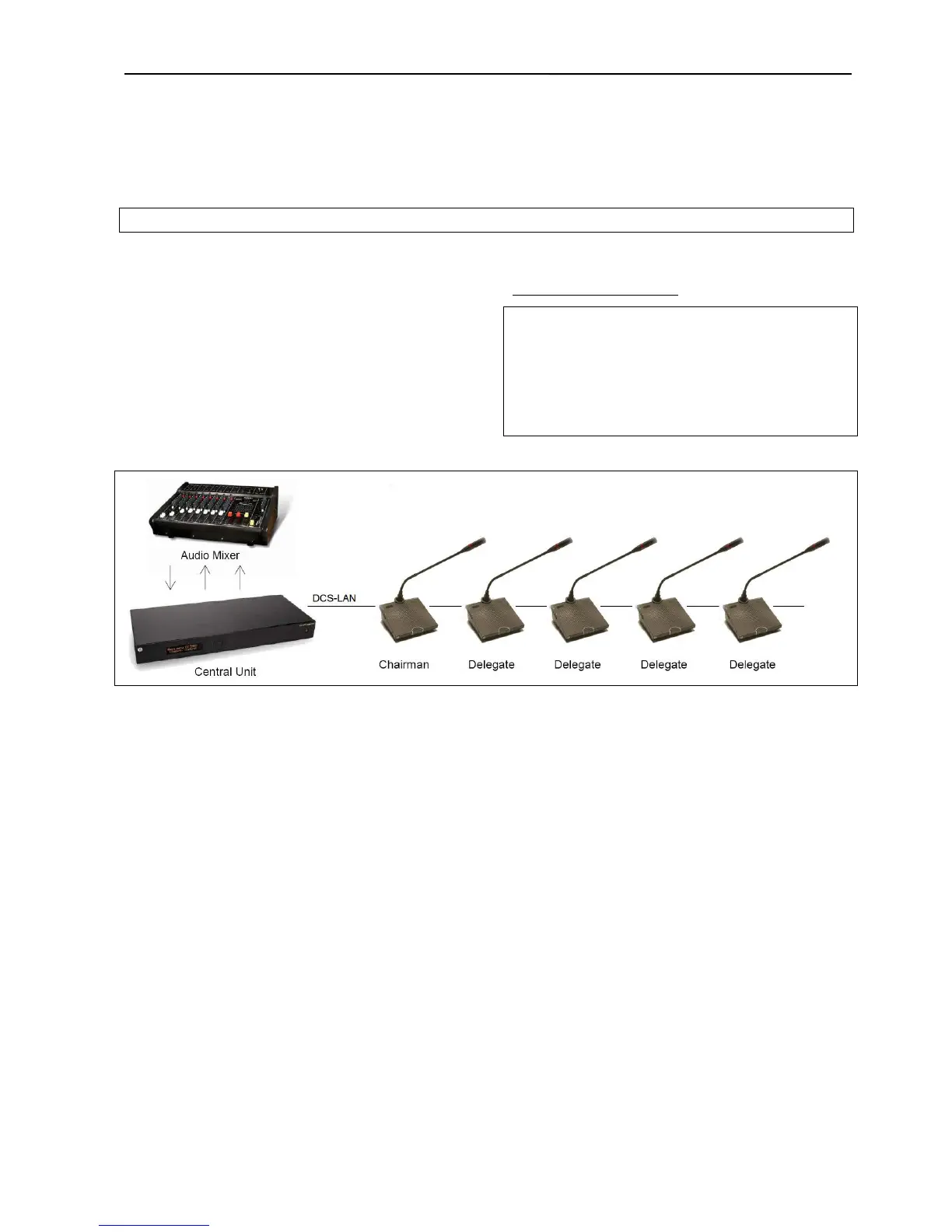
6.3.5 Connecting an audio mixer
The CU 6105 is connected to the Conference Units
using EC 6001-xx Cat5e cables.
This configuration is used when the volume from one
or more microphones is required to be controlled
separately or equalization is needed. One or more
Outputs are connected to the external mixer, where
the control or equalization is done.
The audio from the audio mixer is then send back to
the CU using the ‘Audio In 1 or 2’ input.
Use the ‘Group’ selection for the four outputs and
make seat selection for each group. Refer to section
‘6.5 Web Browser
’ item #8.
Important: If ‘Out A’ is also send to the mixer the following
settings must to be done:
‘CU 6105 Setup * Audio * Loudspeaker Control *
Microphone -> Loudspeaker’ shall be set to ‘Off’.
‘In 1 or 2 -> Out. A’ shall be un-selected in the selection ‘CU
6105 Setup * Audio * Input/Output Control * Audio In 1 or
2’.
Figure 6.3-F Connecting the DCS 6000 Digital Conference System to an audio mixer.



 To Next Page