DIS User Manual
User Manual CU 6105.docx
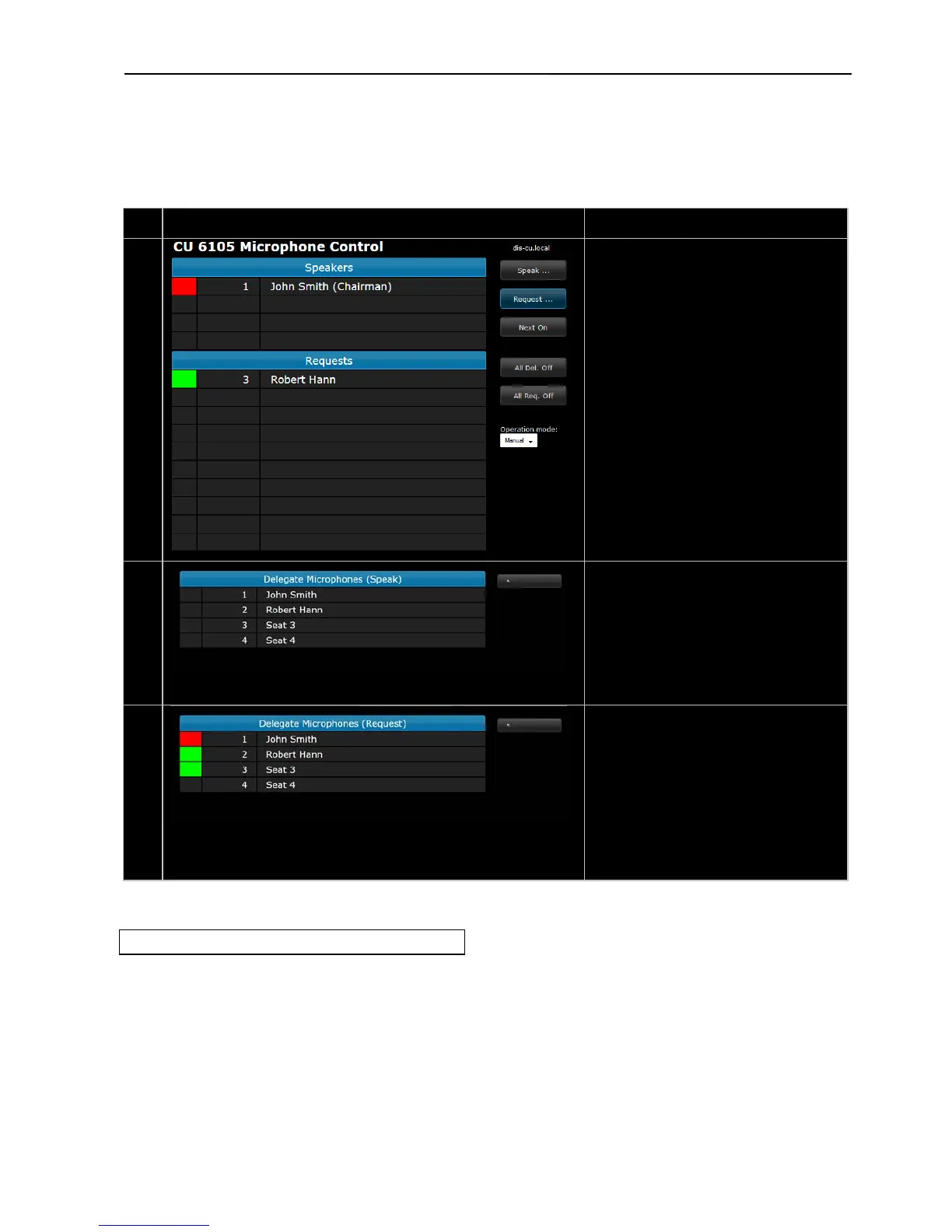
Speakers –
Shows the list of active speakers. The
number of list lines are defined by the
setting in ‘Max. Total Speakers’.
An speakers is turned off by clicking the
Shows the list of delegates requesting to
speak. The number of list lines are defined
by the setting in ‘Maximum Requests’.
An delegate is turned on by clicking the
Delegate Microphones (Speak) –
Shows the list of seats with delegates and
chairmen. Clicking a name will turn on the
microphone.
If a unit is disconnected the seat will be
greyed out and cannot be activated.
Delegate Microphones (Requests) –
Shows the list of seats with delegates and
chairmen. Clicking a delegate name will
place the delegate in the request queue. A
Chairman will not be placed in the request
queue.
If a unit is disconnected the seat will be
greyed out and cannot be activated.
Figure 6.5-D CU 6105 Microphone Control
6.5.3 Using Web browser in PC
Opening the ‘CU 6105 Setup’ in one window and the
‘CU 6105 Microphone Control’ in another window or
tab makes it easy to switch between the two screens.
To get Full Screen mode press F11.



 To Next Page