72
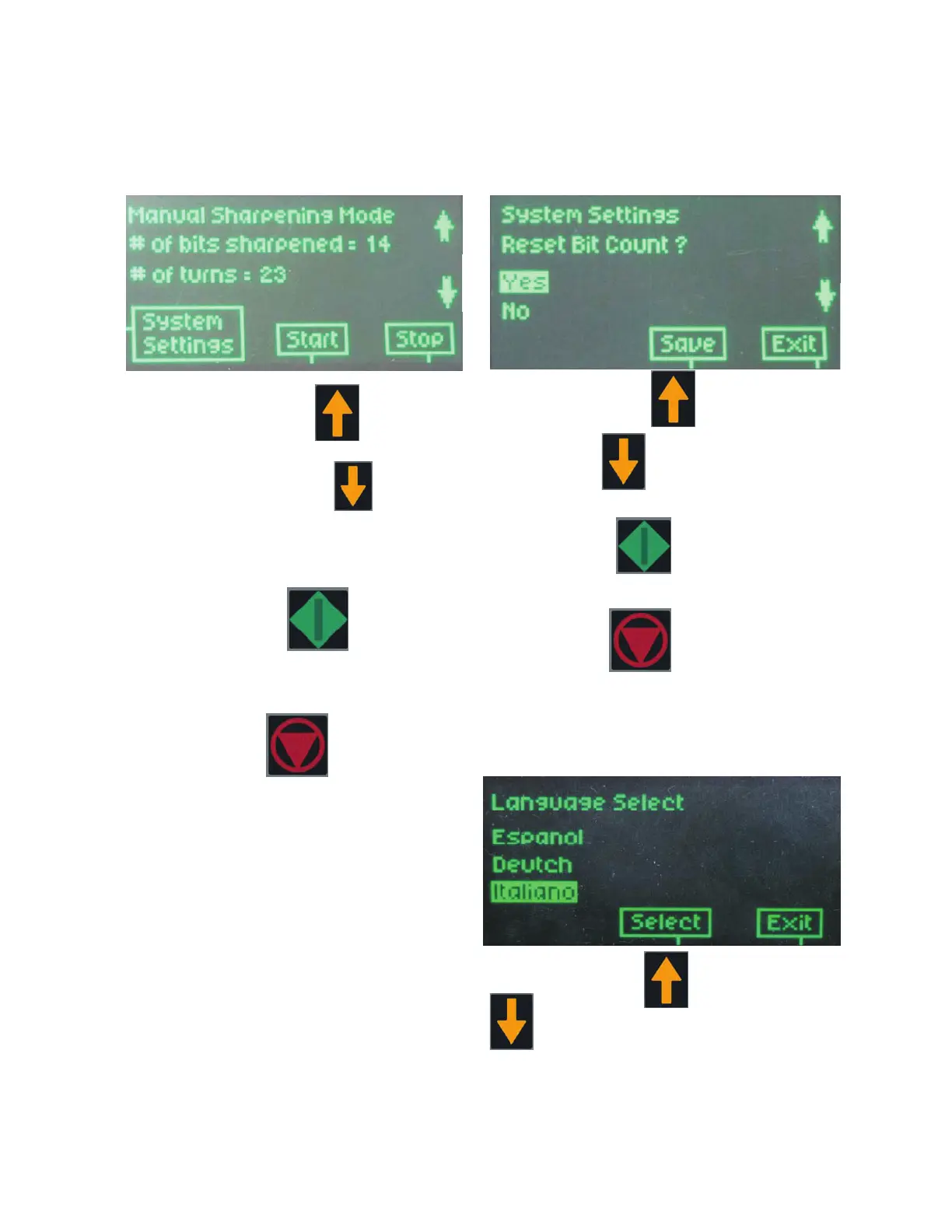
RESET BIT COUNT:
By selecting “Reset Bit Count”,
The display shows:
Pressing “Arrow up”, or
“Arrow down”, will highlight each menu
option.
Pressing “Save”, resets the bit count,
only, if the “yes” is highlighted.
Pressing “Exit”, exits without saving.
LANUGUAGE SELECTION:
By selecting “Language Option”,
The display shows:
Pressing “Arrow up” or “ Arrow down”
will highlight each language option.
Display Details
MANUAL:
By selecting “Manual”,
The display shows:
By pressing “Arrow up”, the number of
Manual turns increases.
By pressing “Arrow Down”, the number
of Manual turns is decreased.
This automatically saves the new setting.
After pressing “Start”, the manual
sharpening begins.
The display starts counting down the number
of turns. At the end of sharpening, the Bit
Count increases.
By pressing “Stop”, the manual sharp-
ening ends.


 To Next Page