73
Pressing “Select”, displays language se-
lection and exits.
Pressing “Exit”, exits without saving.
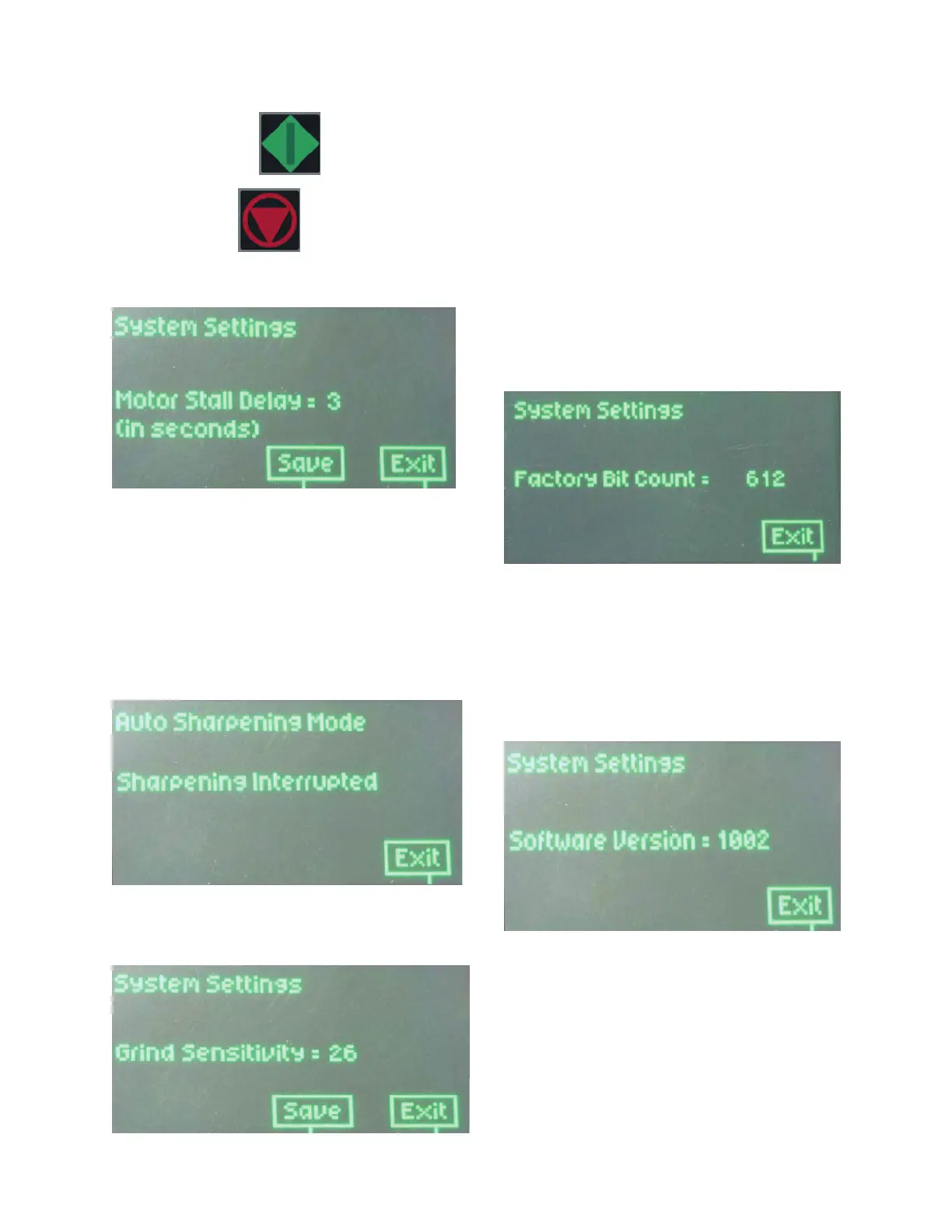
MOTOR STALL DELAY:
This screen will appear on the display:
“Motor Stall Delay is used to detect a prolonged
period of the Gear Motor not turning, sensing a
blocked or jammed condition. The available set-
tings are 2, 3 or 4 seconds; the factory default
is 3 seconds.
If the unit detects a 3 seconds lapse and the
chuck has not rotated at least a half turn, the
unit will shut itself off and “Sharpening Inter-
rupted” will appear.
The system will reset itself.
.GRIND SENSITIVITY:
The Grind Sensitivity is a measure of how
quickly the controller responds to the ma-
terial take off during AUTO grinding. A
lower number generally creates more
turns, a higher number means
fewer turns before the controller decides it
has reached the proper material removal.
This variable is set at a factory default of
25. When Darex CBN and Diamond wheels
are used, the setting of 25 is appropriate
and will not need to be changed.
FACTORY BIT COUNT:
This screen displays the accumulative
number of times the cycle start button has
been pressed. This number cannot be re-
set and will be used for warranty evalua-
tions.
SOFTWARE VERSION:
This screen displays the current version of
software. You will need to know the soft-
ware version for upgrade status and
troubleshooting.
Display Details


 To Next Page