12
5. IR Remote Control
5.1 Remote Control Functions
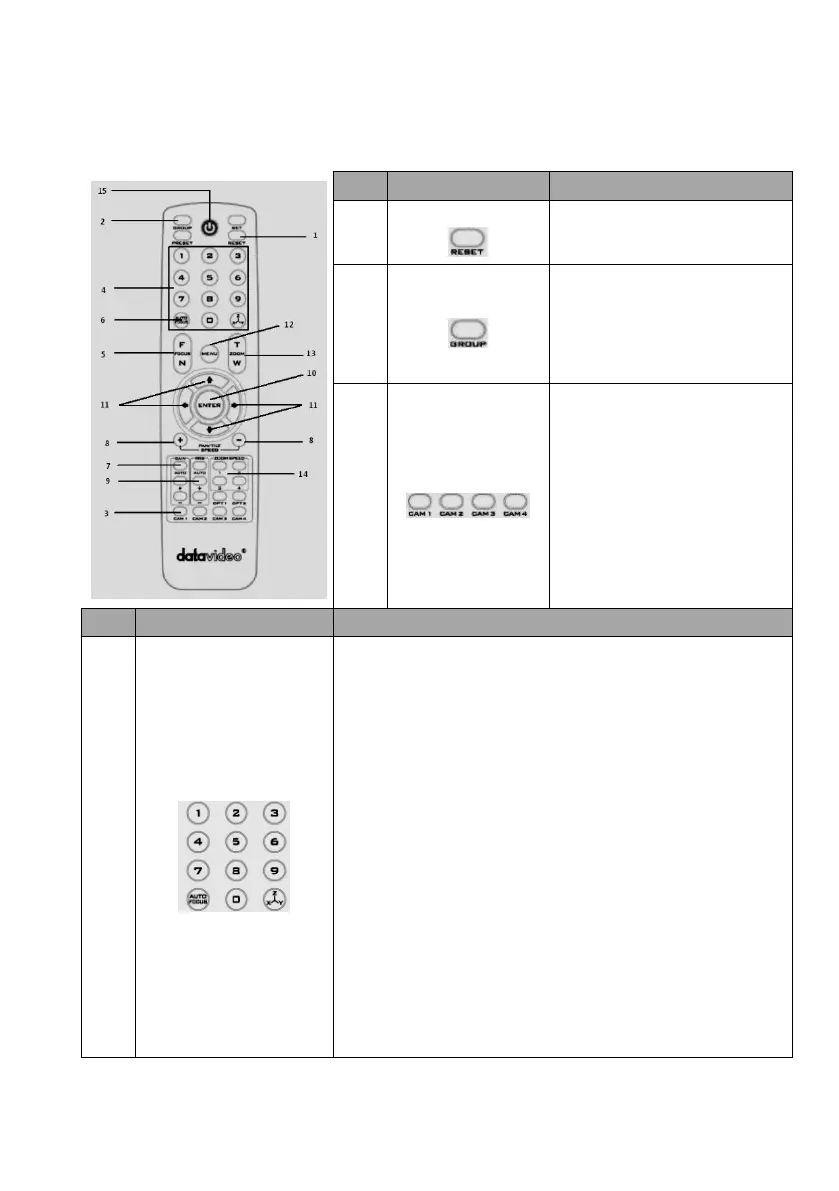
Press RESET button to return the
camera lens to the front.
Use the No. button & the group
button to select the group scan.
Press any of the No. buttons 1~8
and then press GROUP button.
Select CAM1-CAM4 in a multi-
camera environment
Assign an ID number to the
camera intended for operation by
adjusting the IRID (SW2) switch
located at the camera rear.
Press CAMERA SELECT (CAM 1~
CAM4) buttons set previously to
navigate between four cameras.
Various combinations of settings (position, zoom, focus, gain
control and iris control) can be saved to presets.
Adjust Preset Point
Adjust position, zoom, focus, gain control and iris of the camera.
Set up Preset Point
Press any of the POSITION buttons 1~50 and then press SET
button.
Recall saved settings
Press any of the POSITION buttons 1~50 and then press PRESET
button.
Set up Group Scan mode
Press any of the POSITION buttons 1~8 and then press GROUP
button.
Return Camera Lens back to Front
Press number 0 and then press PRESET button.








 To Next Page