EasyManua.ls Logo

Datavideo PTC-200W - On-Screen Menu

Datavideo PTC-200W
38 pages
Print Icon
To Next Page IconTo Next Page
To Previous Page IconTo Previous Page
Loading...
15
5.2 On-Screen Menu
On-Screen Menu allows the user to change various camera settings such as
shooting conditions and the system setup. Press [Menu] on the remote
control to enter the on-screen menu as shown below.
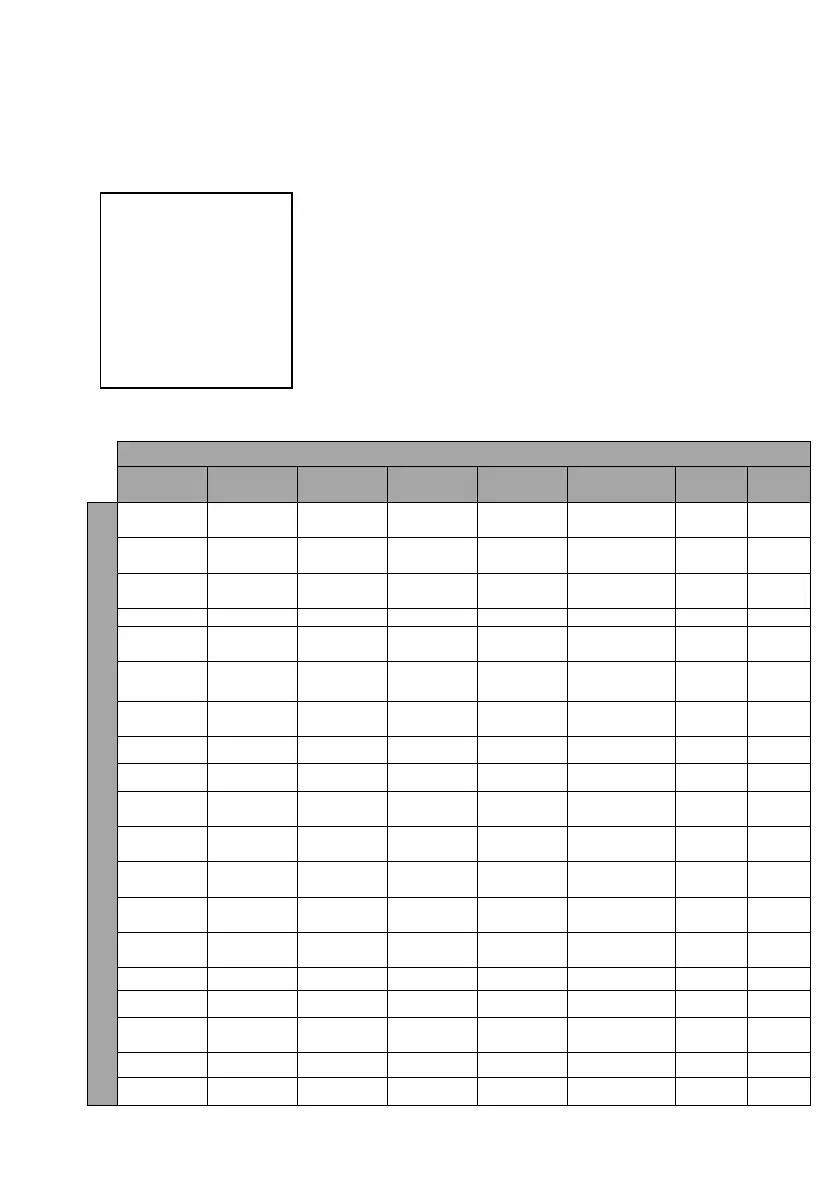
The following table lists all the options and the respective sub-options.
Main Options
Camera Set
(Normal)
Memory
Video
Output
Remote
Control
System
Camera Set
(Advance)
Reset
P/T/Z
Escape
Sub-Options
1. Camera
Name
1. Preset
Position
1. Selection
Way
1. PAN/TILT
Reverse
1. Display
1. Camera
Name
7. Reset
P/T/Z
2. Mirror
2.Group-1
2. Video
Mode
2. Remote
Source
2. Set
Motor
2. Mirror
3. White
Balance
3. Group-2
3. Pattern
3. Set RS-
422
3. Tally
Light
3. White
Balance
4. Focus
4. Group-3
4. Escape
4. Set DVIP
4. Reset All
4. Focus
5. Iris
5. Group-4
5. Set IR
5. Update
Software
5. Iris
6. AGC
6. Group-5
6. PTZ Info.
Output
6. Escape
6. AGC
7. Escape
7. Group-6
7. Escape
7. Fog
Correction
8. Group-7
8. Aperture
9. Group-8
9. Color Gain
10. Escape
10. Exposure
Comp.
11. Backlight
Correction
12. Day/Night
Mode
13. Shutter
Speed
14. Gamma
Mode
15. HR Mode
16. WD Mode
17. Digital
Zoom
18. Low Delay
19. Escape
On-Screen MENU
1: Camera Set (Normal)
2: Memory
3: Video Output
4: Remote Control
5: System
6: Camera Set (Advance)
7: Reset P/T/Z
8: Escape

Related product manuals