28
ExchangingtheDashboard/ReplacingtheBattery
Requiredtools: Phillipsscrewdriver/Blade1x70mm
Unplugthepowercord!
(Foryourpersonalsafetyandtoprotectthesensitiveelectronicpartsinsidethedashboard)
1.
2.
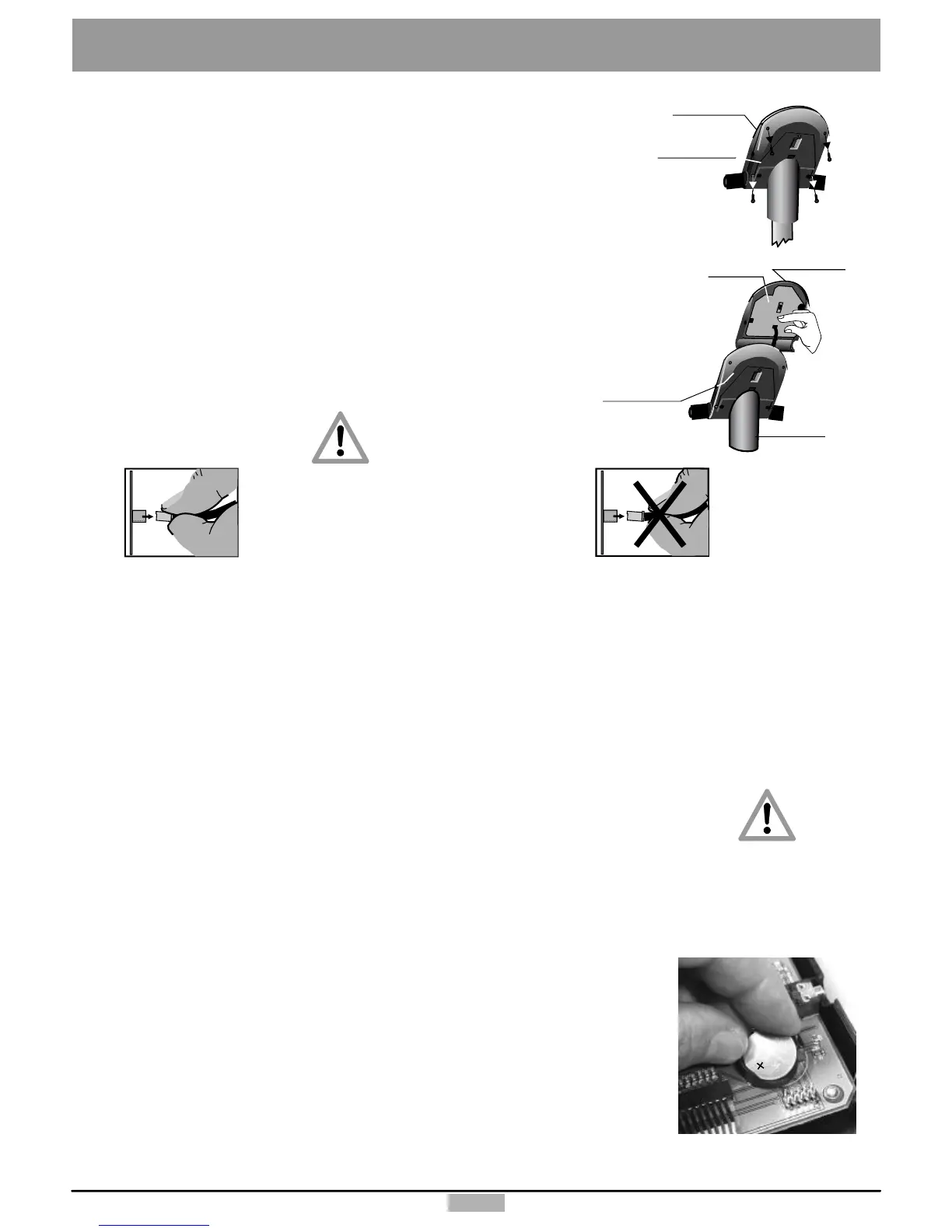
Thetoppartofthedashboardissecuredtothebottompartbymeanof4Phillipsscrews
(A,B,C,D).Useanappropriatescrewdrivertounscrewthesescrewsfromunderneath
thedashboard.(Seethefiguretotheright)PleasenotethatthescrewsC&Darelocated
towardtheoutwardborderandaredeeplyrecessedinthedashboardbottompart.Donot
unscrewthenearbylocatedscrews(X)!
3.
Thenyoucanremovethetoppartofthedashboardverycarefully.Firstopenthedashboardhousing
byraisingitfromthehighersideslightlyandgrasp(hold)withbothhandsunderneaththetopshellof
thedashboard.Raisethehigherpartofthedashboardtopshellfurtheruntilthelowersideseparates
fromthedashboardsupport.Becarefultoraisethetopshellofthedashboardhousingonlyuntilyou
feelaslightresistancefromthecablesthatareconnectedfromunderneath,anduntilyoucanreach
theconnectorsonthecircuitboardwithyourthumbandindexfinger.
4.
Youmustunplugbothconnectors.
Neverpullonthecablestounplugthem!!Thiswouldtearthemoff!
Neverpullthecable!
Itcouldtearoff!
CAUTION!
Failuretocorrectly
replacethebattery
maycreatean
explosionrisk.
2.
3.
A
B
C
D
X
X
Dashboard
bottompart
Dashboard
support
Circuit
board
Dashboard
toppart
Dashboard
toppart
Dashboard
bottompart
4.
Becarefulwhenpullingtheconnectorinorder
toavoiddamagingthecircuitboardand
theelectronicparts!
5.
Plugthedashboardconnectorandthehandpulseconnectortothefemaleconnectorofthecorrespondingcolouruntilthey
lockinposition.Thenpullcarefullythetwocablesthroughtheopeningofthebottompartofthedashboardandthedashboard
supportandtakecarenottojamthecableswhenyoureinstallthetoppartofthedashboardonthebottompart.
6.
Screwtheremovedhousingscrews(A,B,C,D)fromunderneaththedashboardandtightenthem.
7. Youcanknowplugthepowercord,turnonthedeviceandtestitsoperation.
Replacingthedashboardbattery
Abuttoncellbattery(CR2032)islocatedontheundersideofthedashboardcircuitboard.
Thisbatterymustbereplacedwhenthetimeanddatekeepingfunctionfails.Problemswhen
turningonthemachineanddisplayfailuresarealsosignsofanemptybattery.
Warning:ThedevicemustbeswitchedOFFwhenreplacingthebattery.Afterwardyoumust
setthedateandtime.
Unscrewandremovethe4screwsonthelowerpartofthedashboard.Thentilttheupperpart
ofthedashboardupcarefully.
Takecarenottoseparateanycableconnection.
Nevertouchtheelectronicpartsofthedashboardwithyourfingers!Chargesofstaticelectricity
candestroythesensitiveparts.
Presstheclipholderoutwardwithapintoreplacethebattery,removethebatteryandinsert
anewonewiththeplussymbolup.
Reassembletheupperpartofthedashboardcarefully.
Caution!Donotpinchanycable!
Notesaboutusedbuttoncellbatteries
-Keepbatteriesawayfromchildren,anddonotswallowthem!
-Donotrechargeemptybatteriesanddonotthrowtheminfire.
Pleaserecycleusedbatteriesbybringingthemtotheappropriatecollectpoint,orreturnthemtoyourdealer.



 To Next Page