UsingtheMenuandLanguageSelection
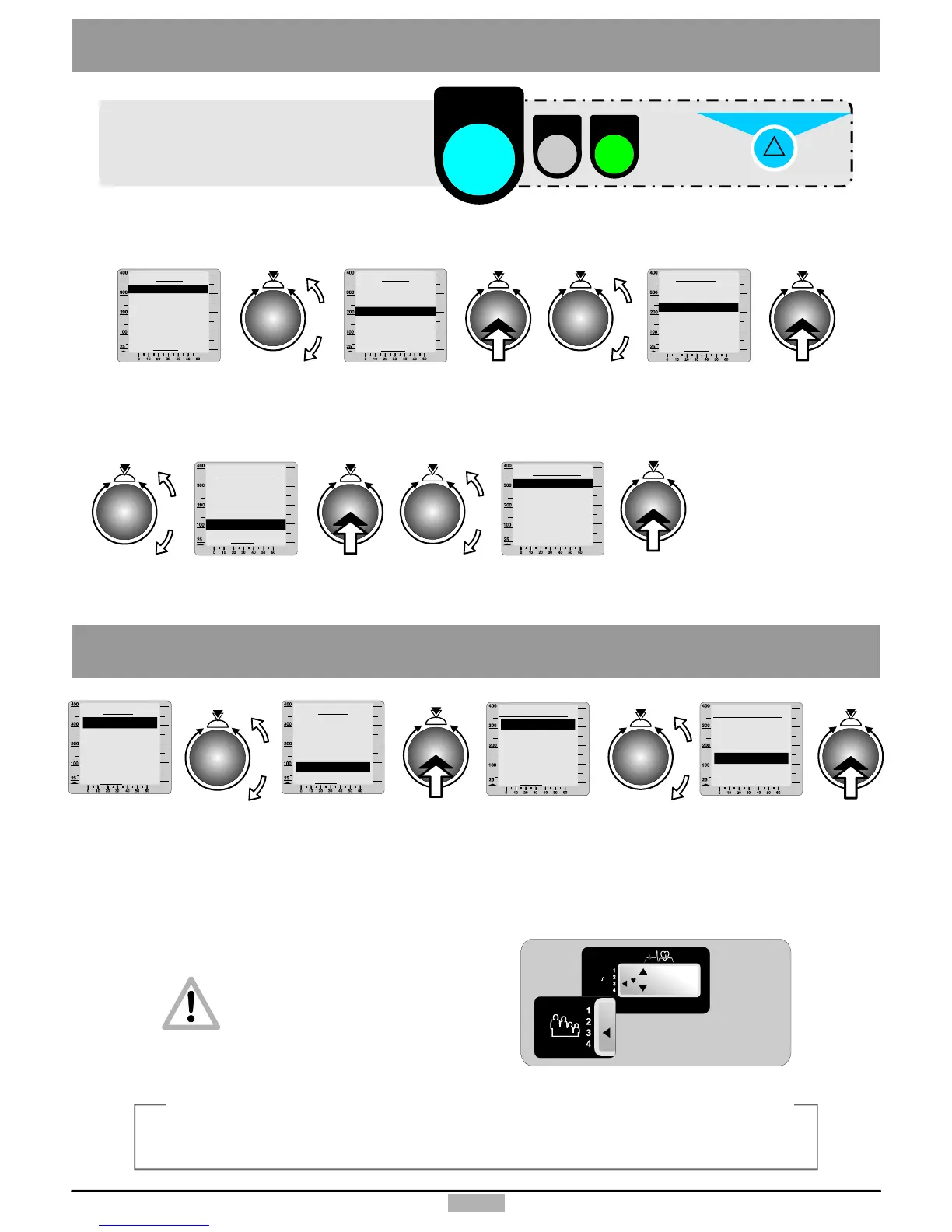
Turnthecontrolbuttontomoveupordowninthemenu.Pressthecontrolbuttontoopentheselected
option,e.g.languageselection.
UsetheMenukeytocallandleavethe
menu.Usethefunctionkeytomoveback
onestepinthemenu.
menu
fitness
info
4
1. Pressthemenukey
2. Turnthecontrolbuttontoselect“User”
3. Pressthecontrolbutton
4. Turnandpressthecontrolbuttontoselectauser
from1to4orGuest
5. Theselecteduseristhenindicatedontheleftside
oftheheartratewindow
ChoosingtheUser
Pulsedisplay
188
OK
Thedevicewillstorethetrainingdata
offourusers.Itisthereforeimportant
thateachuserselectshisown“number”
whentraining.Guestdataarenot stored.
1.Pressthekeymenu
2.Turnthecontrolbuttontoselect“Setting”
3.Pressthecontrolbutton
4.Turnandpressthecontrolbuttontoselect“DeviceData”
5. Turnandpressthecontrolbutton
toselect“Language”
6. Turnandpressthecontrolbutton
toselectrequiredlanguage
7. PresstheMenukeytoreturn
toyourtrainingprogram,
Pressthefunctionkeyto
returnto“DeviceData”
6..Pressthemenukeytoreturntothestart
Mother Father Daughter
Son
User1
User2
User3 User4
Thefollowingisanexampleofapossiblenumberattributionschemeinafamily:
watt
Menu
Back
Training
Trainingdata
Settings
Informations
Personselect.
watt
Settings
Personaldata
Devicedata
Back
watt
Language
Deutsch
English
Francais
Italiano
Portuguese
Back
watt
Devicedata
Date
Time
Contrast
Language
Back
watt
Personselec.
Guest
User1
2
3
4
User
User
User
Back
watt
Personselec.
Guest
User1
User2
User4
User3
Back
watt
Menu
Back
Training
Trainingdata
Settings
Informations
t.Personselec
watt
Menu
Back
Training
Trainingdata
Settings
Informations
Personselect.
watt
Menu
Back
Training
Trainingdata
Informations
Personselect.
Settings



 To Next Page