8
Optional:
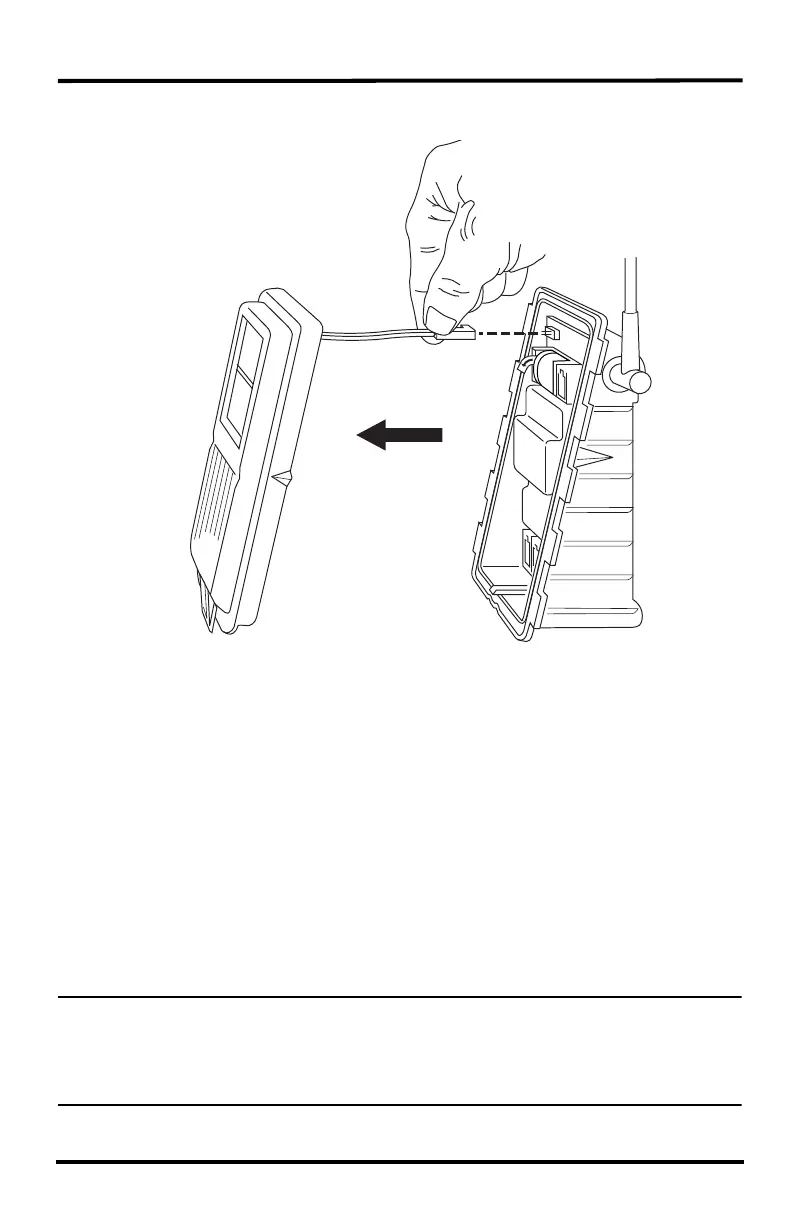
Disconnect the solar panel connection wire and the fan cable (fan versions).
The solar panel on the box cover is connected to the sensor interface by a wire. If
your sensor suite has a fan, the fan cable will also connect the cover to the sensor
interface. If the cover cannot be set aside while still connected to the sensor interface
safely, those cables can be disconnected.
Check the Factory-Installed Sensor Connections
1. Verify that the rain collector and temperature/humidity sensor cables are plugged
into the receptacles labeled RAIN and TEMP/HUM on the sensor interface.
2. If your sensor suite includes UV and/or solar radiation sensors, verify that the
sensor cables are plugged into the receptacles labeled UV and SUN on the sensor
interface.
Connect the Anemometer Cable to the Sensor Interface
Note: The anemometer comes with 40 feet (12 meters) of cable to allow for mounting the
anemometer separately from the rain collector and other sensors. The cable is coiled
and secured at the factory with enough cable unwound from the coil to allow you to
work with it and to allow the anemometer to be mounted on the same pole as the rain
collector.












 To Next Page