14
Wireless Sensor Suite Assembly
Tip: When powering up to check transmission before installation, be careful to avoid recording erroneous
data. Assembling the sensor suite outside will help to avoid permanently recording erroneous
temperature and humidity (inside) data. Be careful not to tip the rain spoons or spin the wind cups or
vane.
Apply Power to the Sensor Suite
Energy from the solar panel is stored for power at night. A factory-installed lithium
battery is an alternative power source the sensor interface uses when it is depleted. In
the sensor transmitter, remove the battery pull tab. Make sure the battery is firmly
seated. Once powered, the sensor suite immediately begins transmitting data.
Check Transmitter ID
A WeatherLink Console can receive data from
up to 8 different wireless transmitters. The
default Transmitter ID for the sensor suite and
console is 1.
In most cases it will not be necessary to
change the Transmitter ID. The console and sensor suite should begin
communicating automatically when power is applied.
Note: If another Davis weather station is within range of your console or other Davis receiver,
you should change the Transmitter ID. Remember to use the same ID on the sensor
suite and on the Console.
Optional: Changing the Sensor Suite Transmitter ID
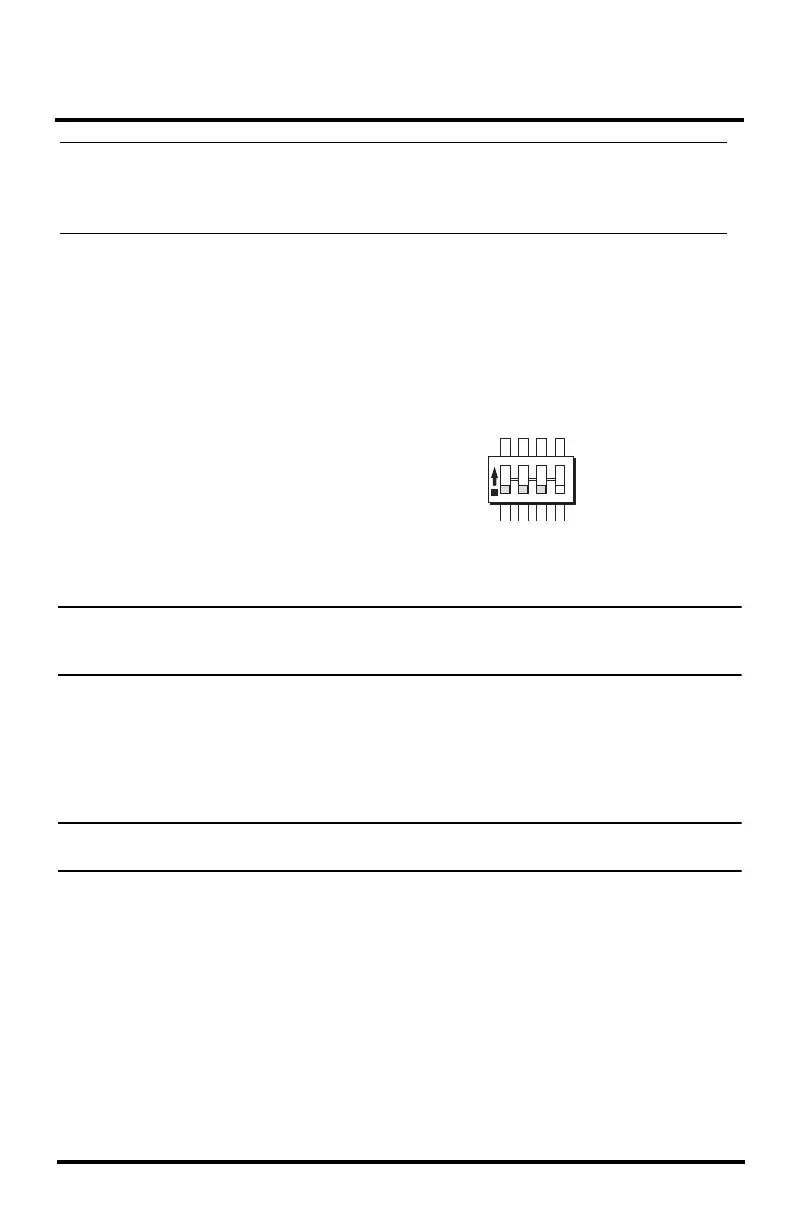
Each wireless transmitting station, including the sensor suite, uses one of eight
selectable Transmitter IDs. DIP switches #1, 2 and 3 on the transmitter control the
ID — or channel — the station transmits on. DIP switch #4 is used for transmission
testing, not for the Transmitter ID.
Note: You must configure the receiver (WeatherLink Console, WeatherLink Live or other
receiver) to “listen” to the Sensor Suite by its transmitter ID.
The default Transmitter ID is 1 for both the sensor suite and the WeatherLink
Console, and should work fine for most situations. Change the Transmitter ID if any
of the following issues are true:
• Another Davis Instruments wireless weather station operating nearby already
uses Transmitter ID 1.
• You have purchased additional Vantage Pro2 or Vantage Vue wireless
transmitting stations and one of the stations has already been designated as
Station No. 1.
1234
ON
Settings for Transmitter ID 1:
DIP Switch 1 = OFF
DIP Switch 2 = OFF
DIP Switch 3 = OFF












 To Next Page