15
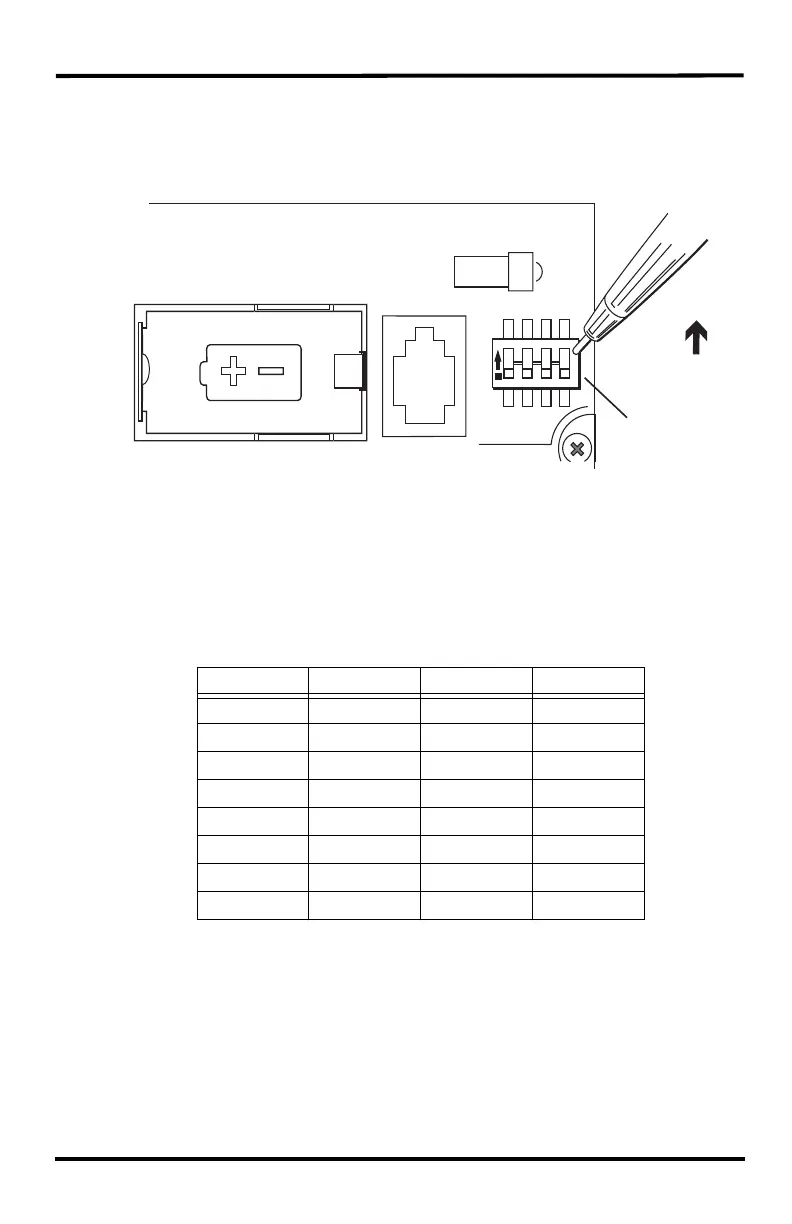
On the sensor suite, the Transmitter ID is set using the DIP switches located on
the sensor interface. To access the sensor interface, open the transmitter shelter
cover. (See page 7.)
Transmitter ID DIP switches in top-right corner of sensor interface
To change to another ID, use a ballpoint pen or paper clip to toggle DIP switches
#1, 2, and 3. The settings for Transmitter IDs 1 - 8 are shown in the table below.
Configure the WeatherLink Console or WeatherLink Live to “listen” to any
transmitter IDs in your system, as described in the WeatherLink Console User
Guide or WeatherLink Live User Guide.
Using Multiple Transmitting Stations
A single WeatherLink Console or WeatherLink Live can receive signals from a
total of up to eight transmitters, in any combination, including eight sensor suites.
Each transmitter must be set to a different transmitter ID.
ID CODE SWITCH 1SWITCH 2SWITCH 3
#1 (default) off off off
#2 off off ON
#3 off ON off
#4 off ON ON
#5 ON off off
#6 ON off ON
#7 ON ON off
#8 ON ON ON
1234
ON
DIP Switches
ON












 To Next Page