16
Setup the WeatherLink Console
Note: If you are using a WeatherLink Live or other Davis receiver, please refer to your
receiver manual to set it up.
1. Power the console if it does not already have power.
2. Follow the prompts on the WeatherLink Console to configure it to “listen” to your
sensor suite.
Tip: Tip: The WeatherLink User Guide can be found on our in the support
section of our website at https://support.davisinstruments.com or by
scanning this code:
Verify Data from Sensor Suite Sensors
1. Create your WeatherLink account and download the WeatherLink Live app.
If you are using a WeatherLink Console, a WeatherLink.com account is not
required but it will enhance your weather experience and allow you to upload,
share and store you data on the WeatherLink Cloud. A WeatherLink.com account
is required for use with a WeatherLink Live. If you have not already done so,
create your WeatherLink account and download the WeatherLink mobile app.
2. Watch for incoming current data from outdoor sensors, such as outside
temperature, to appear on your Console or WeatherLink app. This may take up to
10 minutes. This indicates that your device has begun to record permanent data.
3. If there is a communication problem between the sensor suite and the Weather-
Link Console or WeatherLink Live, refer to the manual or call tech support.
4. After verification of incoming
data, you can power down the
Weather Link Live or Weather-
Link Console so that no errone-
ous data, such as rain from
accidental tips of the rain spoon,
is recorded during sensor suite
installation.
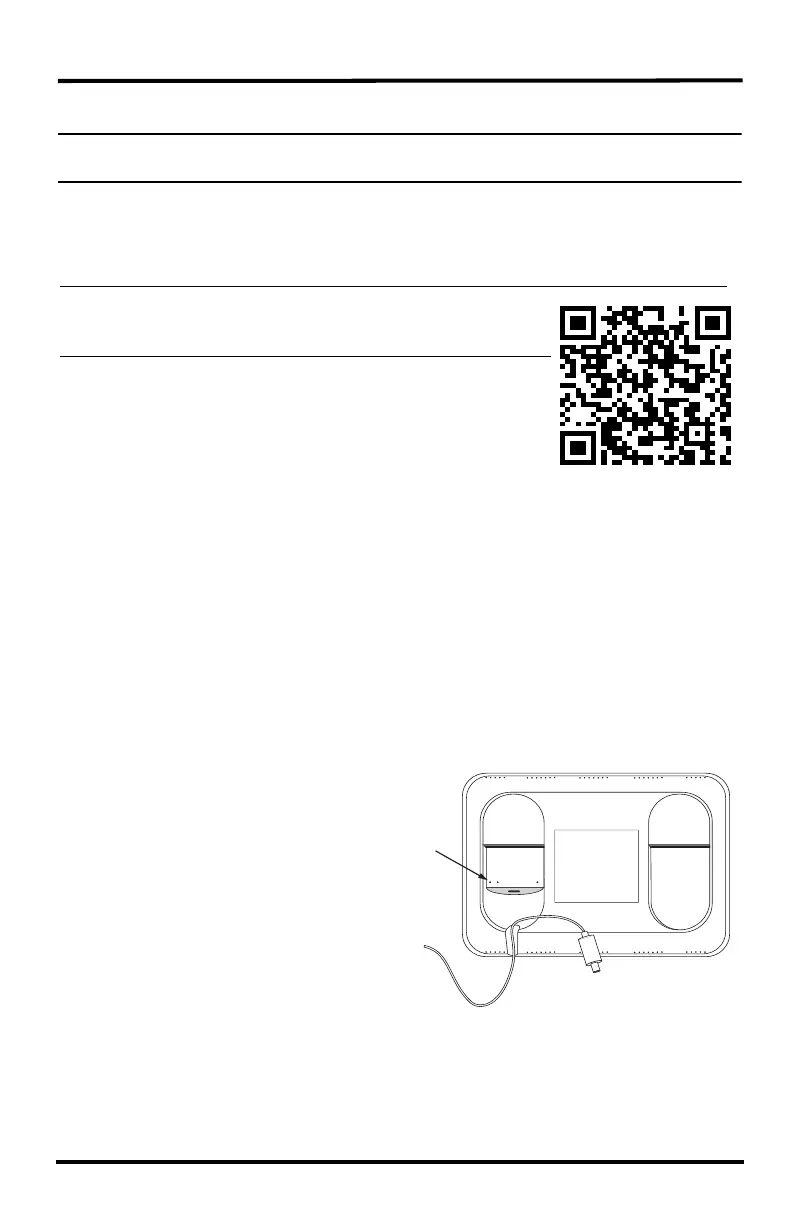
To power down the Console,
unplug the AC power. Insert a
paper clip into the Power Off
access hole on the back of the Console. (It is the left-most hole.) Hold until the
Power Off menu appears on the screen. Tap Power Off.
After the Sensor Suite is installed in its final location, repower the Console by
plugging the AC cable back in. The Console will automatically restart.
Power O
Access
WEATHERLINK CONSOLE BACK












 To Next Page