6
220i
DriveRack
®
User Manual
Section 1
1.1 - Rear Panel
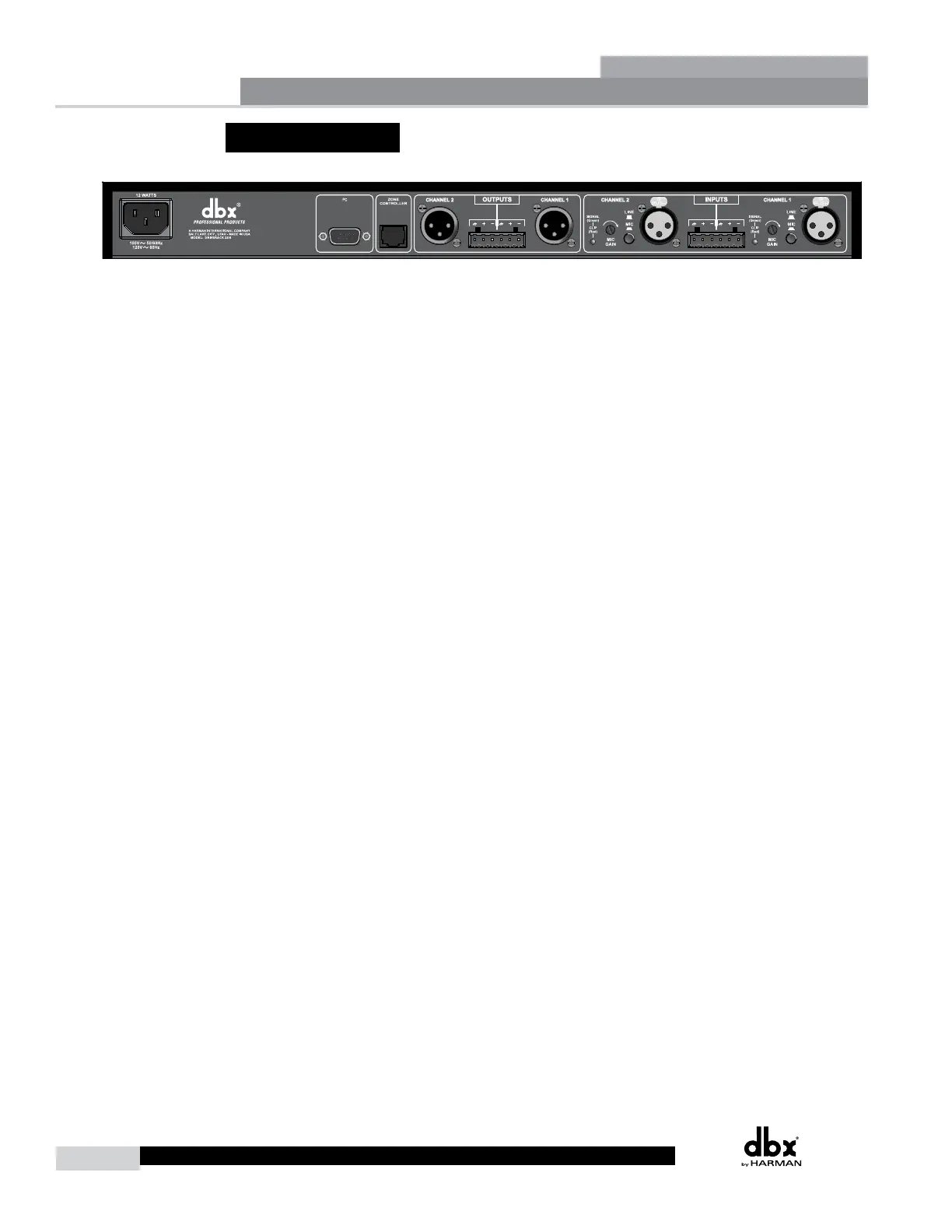
IEC Power Cord Receptacle
The DriveRack 220i comes with a power supply that will accept voltages ranging from 100V-120V at
frequencies from 50Hz-60Hz. An IEC cord is included. EU version accepts 220V-240V at frequencies
from 50Hz-60Hz.
PC Connection
This DB-9 type null modem connection is used to send and receive information to and from the GUI
interface.
NOTE: Front and rear PC connections should not be used at the same time as these connections are
wired in parallel.
Zone Control Input (RJ-45 connector type)
This input connection is used to send information and power to the ZC wall controllers.
Inputs 1-2
The input section of the DriveRack 220i offers two electronically balanced XLR connectors mic/line
inputs with Phantom Power.
Outputs 1-2
The output section of the DriveRack 220i offers two electronically balanced XLR connectors. In
addition, the 220i offers Euroblock input connector options.
Signal/Clip LED
This LED is used to indicate microphone signal input or clip.
Mic Gain Control
This knob is used to set the input gain for the microphone input.
Line/Mic Selector
This switch is used to select either a line or microphone input.
Getting Started



 To Next Page