5
4. Installing
The N3 Pro Dash Cam is Only suitable for motor vehicles.
The N3 Pro Dash Cam is factory configured and ready for use after installation.
4.1 Installing Procedure
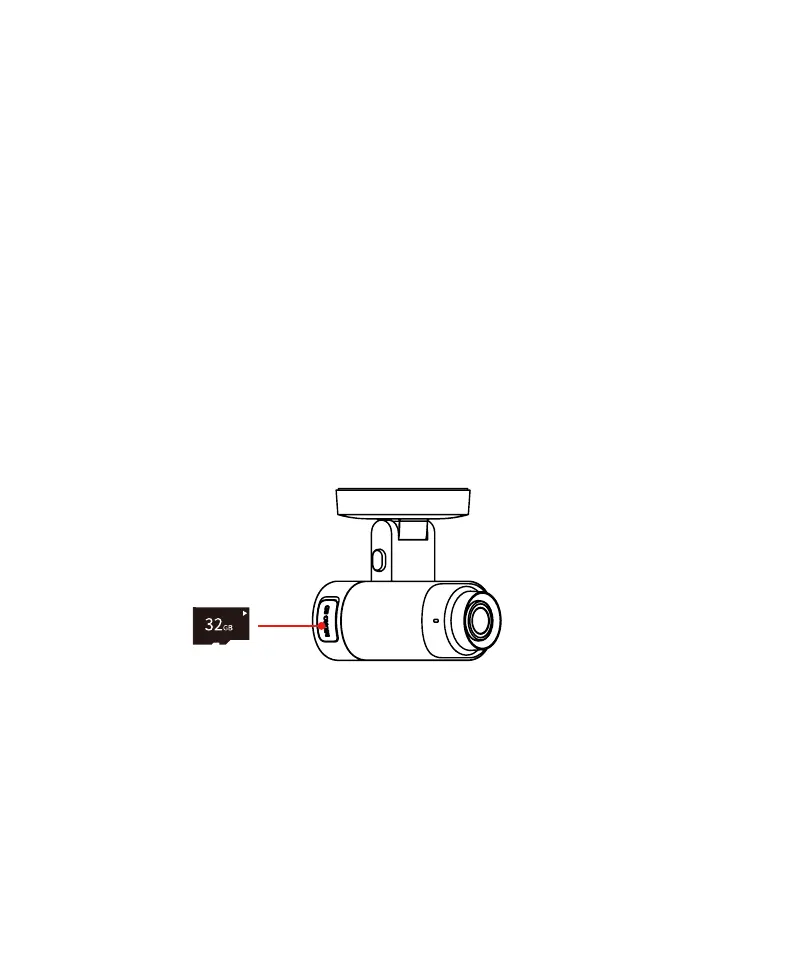
4.1.1 Installing the TF Memory Card
● The N3 Pro supports a maximum of 512GB TF memory card and requires a Class 10 high-speed card. Different
brands of TF memory cards may affect the storage of performance, some TF memory cards have the risk of missing
records. It is recommended to use the following brands of TF memory cards: DDPAI, Kingston, Samsung, Toshiba,
and Lexar.
● Insert or remove the TF card Only when the Dash Cam is not connected to the power supply. Inserting or
removing the TF card when the Dash Cam is running may damage the files within.
● Please confirm the orientation of the TF card before installation, if the memory card is forcibly inserted in the
wrong direction, the memory card, card slot or the card data may be damaged.
1. Open the TF card slot cover on the left side of N3 Pro.
2. Insert the TF card into the N3 Pro slot (with the text side facing upwards and the connecting finger side
facing downwards), and then push the card into the slot.
3. Close the card slot cover.
4.1.2 Power-On Checking
● Do not perform any operation to set up this product while driving.
● Downloading the app will incur your mobile data usage, if you don’t wish so, connect your smartphone to the
Internet.
Before installing the N3 Pro Dash Cam, perform power-on check to confirm the N3 Pro Dash Cam is connected to
the DDPAI App normally.
Please note that the Dash Cam will automatically format the
TF card at the first time using the TF memory card.



 To Next Page