10
7. Setting Up the N3 Pro on DDPAI App
The Dash Cam can be connected to the DDPAI App on smartphone via its built-in Wi-Fi without incurring user's
data usage, forming a small Dash Cam-smartphone WLAN. Through this Wi-Fi network, you can preview, playback,
download and share driving recordings and photos in real time on the DDPAI App on smartphone.
7.1 DDPAI App Downloading and installing the DDPAI App
7.1.1 Download methods:
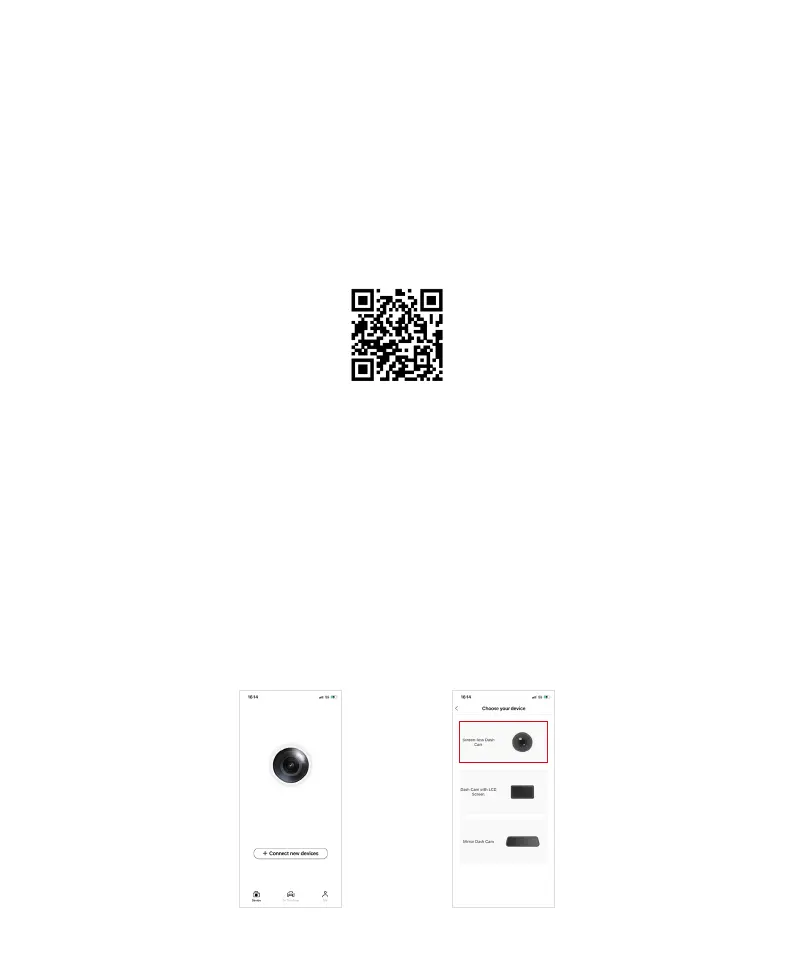
1. Scan the following QR code on the smartphone.
2. Download the DDPAI App from Google Play or App Store.
7.1.2 When the download is complete, click on the App to install.
Note: If the authorizations prompt during installation, please grant full permissions, otherwise it may affect the
connection between DDPAI App with the N3 Pro.
7.2 Connecting N3 Pro to the DDPAI App
7.2.1 Guide to adding connecting N3 Pro:
a. On the Device main page of the DDPAI App, + Connect new devices and enter the selection page. Then click on
"Screen-less Dash Cam".



 To Next Page