16
12. FAQ
Q1: TF Card error?
1. The TF card has not been formatted before use. Please format it referring to Formating TF Card.
2. The Dash Cam supports up to 512GB, and it is recommended to use a high-speed Class 10 card from brands such
as DDPAI, Kingston, Samsung, Toshiba, or Lexar.
Q2: Rear camera abnormal, unable to switch?
Check if the rear camera indicator light is on (green light on constantly). If not, please check the following:
1. Ensure there is no gap between the bracket and the Dash Cam.
2. Check if the rear camera connection cable is fully inserted into the headphone jack on the bracket.
3. If it still cannot be connected, please contact us at feedback@DDPAI.com.
Q3: Forgot the Dash Cam's Wi-Fi password?
Press and hold the reset key with a pin for 6s to 8s to restore the factory settings. The initial default Wi-Fi password
is "1234567890".
Q4: Unable to connect to Wi-Fi?
1. Turn off VPN and other security software when connecting.
2. When installing the App, grant all the requested application permissions.
3. Reset the device and reinstall the DDPAI App.
4. If still unable to connect, please contact us at feedback@DDPAI.com
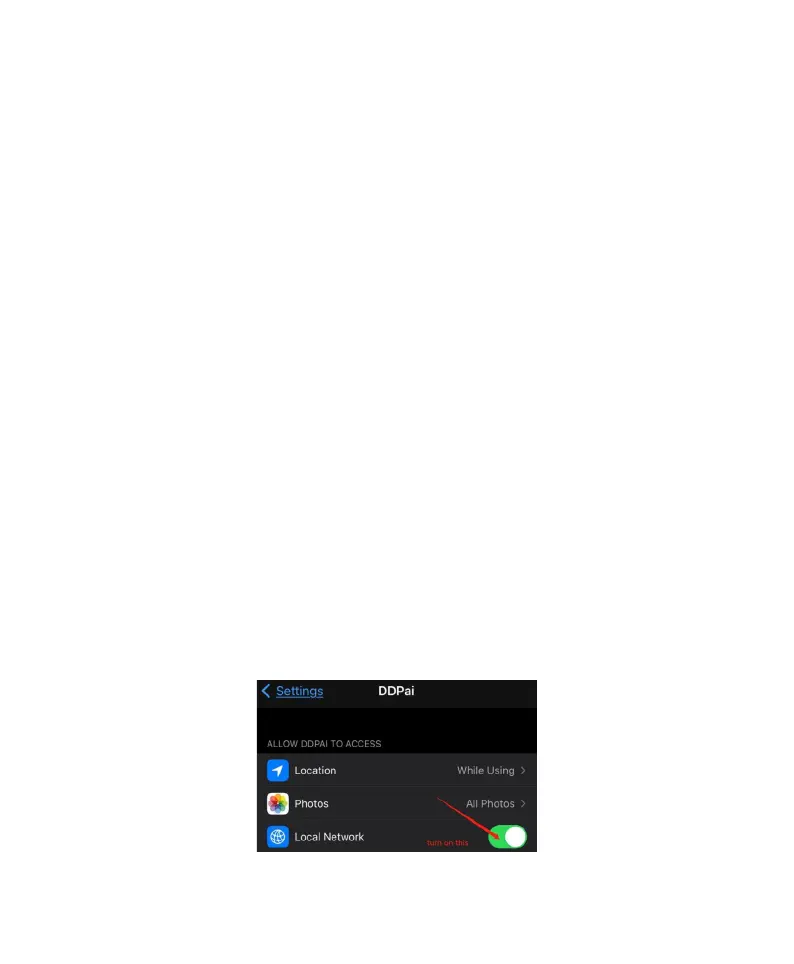
Q5: Real-time preview on iPhone is black screen?
Turn on Local Network?
Find DDPAI App in the settings on iPhone, and make the following settings:Turn on Local Network.



 To Next Page