14
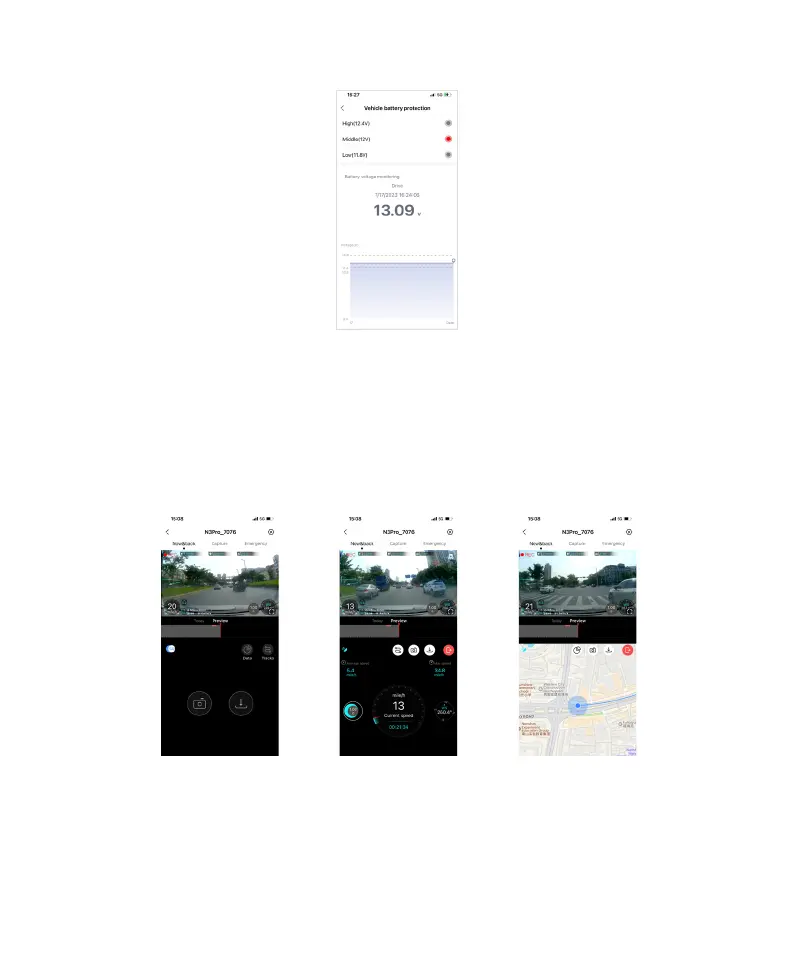
You can also view the real-time battery voltage detection on this page.
9. GPS Function
The N3 Pro Dash Cam supports GPS function, and it is turned on by default.
When the N3 Pro Dash Cam is in an open outdoor area, it can receive GPS signals. After the GPS signal is
successfully located, the GPS information will be recorded in your recorded video. You can view various information
such as time, speed, altitude, direction, and driving track in the DDPAI App.
Note: GPS signal reception is affected in densely populated residential areas, underground parking lots, tunnels,
and cloudy weather and etc.
The Dash Cam's GPS function is turned on by default, and you can also manually turn it on:
1. On the main page, click on the SR Switch to turn on the GPS function. Once turned on, various driving
information will be displayed on the monitoring screen in the App, including date, driving track, speed, altitude,
lane information, direction, front vehicle speed, and distance to the vehicle ahead.



 To Next Page