GHD
™
& Scout
™
User’s Manual
GHD
™
& Scout
™
User’s Manual
20
25/Aug/2010
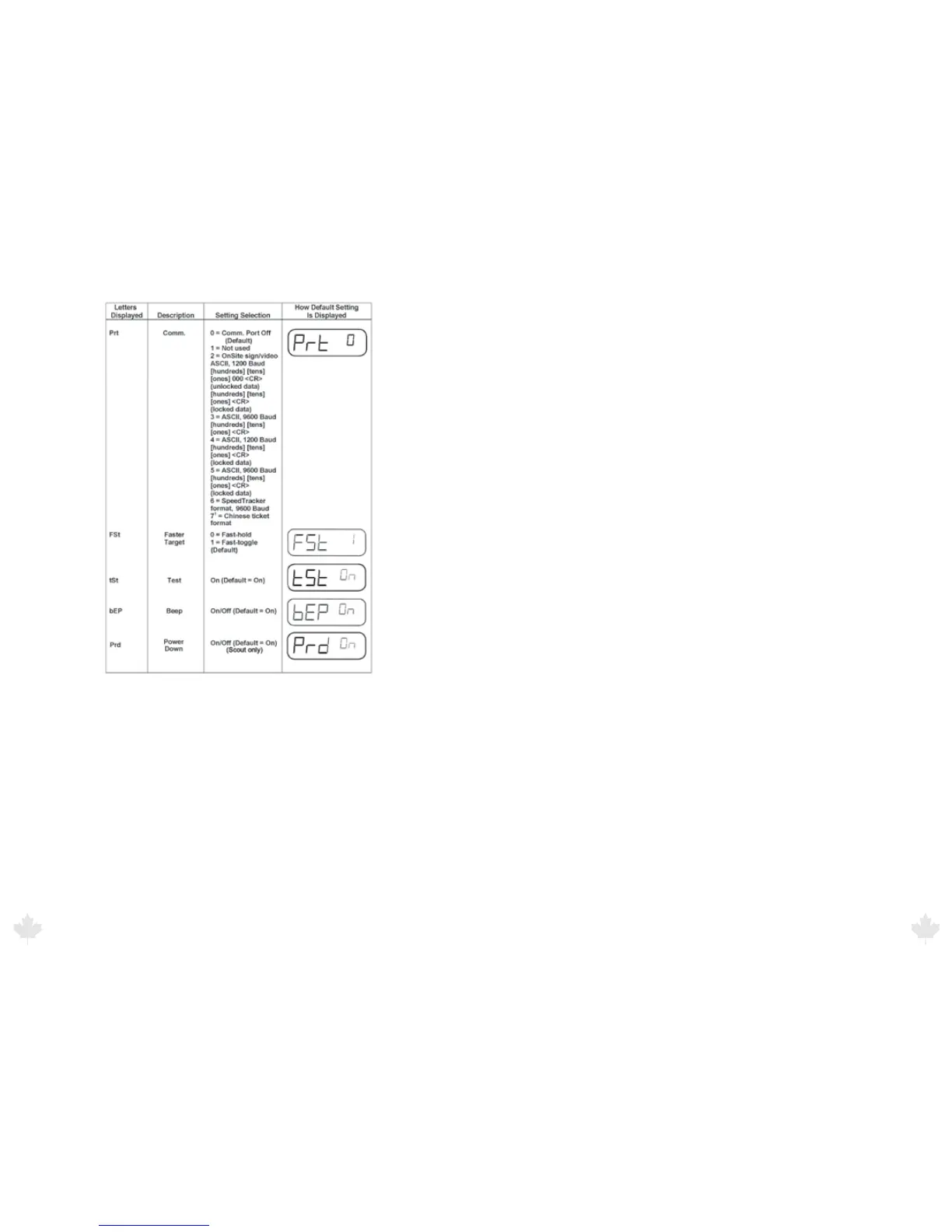
Figure 5.1b
Menu Settings (
1
International Version Only)
DIRECTION (dir): Direction lets you select the direction of the
vehicle you want to display. The dir default value t A indicates that
you are monitoring vehicles moving both toward and away from the
radar gun.
BACKLIGHT (bL): This turns on and o the LCD backlight. bL ON is
the default setting.
AUDIO (Aud): The Audio setting controls the volume level of the
Doppler tone. The volume level settings are from 4 to 8 (4 is lowest,
and 8 is the highest volume level.)
SENSITIVITY LEVEL (SEn): The SEn option lets you control the
maximum target-acquisition range. SEn levels range from 1 through
6 (1 is the minimum range, and 6 is the maximum range.)
SQUELCH (SLh): The squelch determines the type of Doppler audio
you want the radar gun to send out. When squelch is on, the sound
is only the Doppler tone for the displayed target. When squelch is o,
you will hear all Doppler tones, including other vehicles, interference
and any noise the antenna receives.
COMMUNICATIONS PORT (Prt): The Prt setting indicates which
communication port conguration you want the system to use. Zero
means no serial communication, and 1 through 6 (and 7 if you have
the international version) are various setting options (see the menu
settings.)
FASTER VEHICLE (FSt): The FSt setting programs the FAST button
for either Faster-Hold or Faster-Toggle mode. The default, 1, is Faster-
Toggle, and 0 is Faster-Hold.
MINITEST (tSt): The tSt requires the system to automatically
perform a “mini” self test every 10 minutes.
BEEP (bEP): The bEP option sets the system to give an audible “beep”
to verify every time a key is pressed. bEP ON is the default setting.
POWER DOWN (Prd): The Prd option (Scout only) and is designed
to maximize the amount of time the radar can operate before the
batteries need to be recharged. With the feature set to ON the radar
will automatically power o if there has not been any trigger or key
presses for 15 minutes in order to conserve battery power. Prd ON is
the default setting.
25/Aug/2010
21



 To Next Page