SI-3
™
User’s Manual
10
2. The SI-3™ is designed to be connected to the computer's serial
port. However if you do not have a serial port and are using a
USB to Serial adapter make sure the adapter has been installed
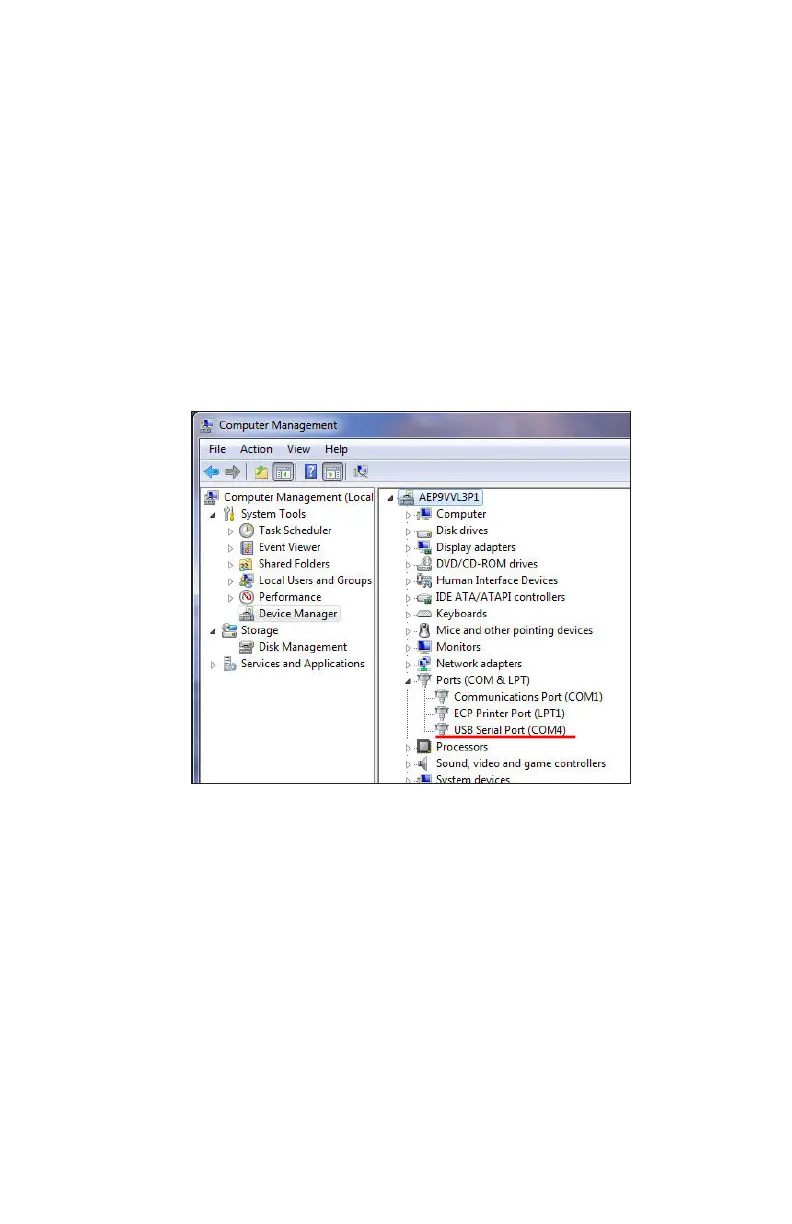
per the instructions that came with it. Next, connect the SI-3™
to the computer through the adapter and check the Device
Manager, Ports. The port assignment will appear as "USB Serial
Port". Note the port assignment. The example in Figure 4.2b
shows that Port 4 has been assigned. Your port assignment may
be dierent and the port assignment can change the next time
the USB to Serial adapter is plugged in.
Figure 4.2b
Device Manager screen
2. From the Conguration Program screen select the COM port
that your PC has assigned. If you are connecting through the
computer's serial port, it will normally be "Com 1" or "Com 2". If
you are using the USB to Serial adapter, use the port shown in
Device Manager/Ports.
3. Change the baud rate if necessary – the SI-3™ default baud
rate is 9600. Press the "Connect" button near the top of the
window. SI-3™ Cong will query the RS232 line to see if an SI-3™
is connected to the computer. If it responds with the “Unable to



 To Next Page