25
Data Settings (for 4G/5G Router Mode)
Data Settings is used to monitor the data usage of your Deco in real-time. You can limit your data usage according to your monthly allowance or total
allowance and you will receive a warning if your data usage reaches the specified level.
Note: It is not available to modify the data settings when remotely managing the network from Deco app.
When Deco works in Wireless Router mode, you need to go to MORE > Advanced > Operation Mode > 4G/5G Backup and enable 4G/5G Backup to configure the data settings.
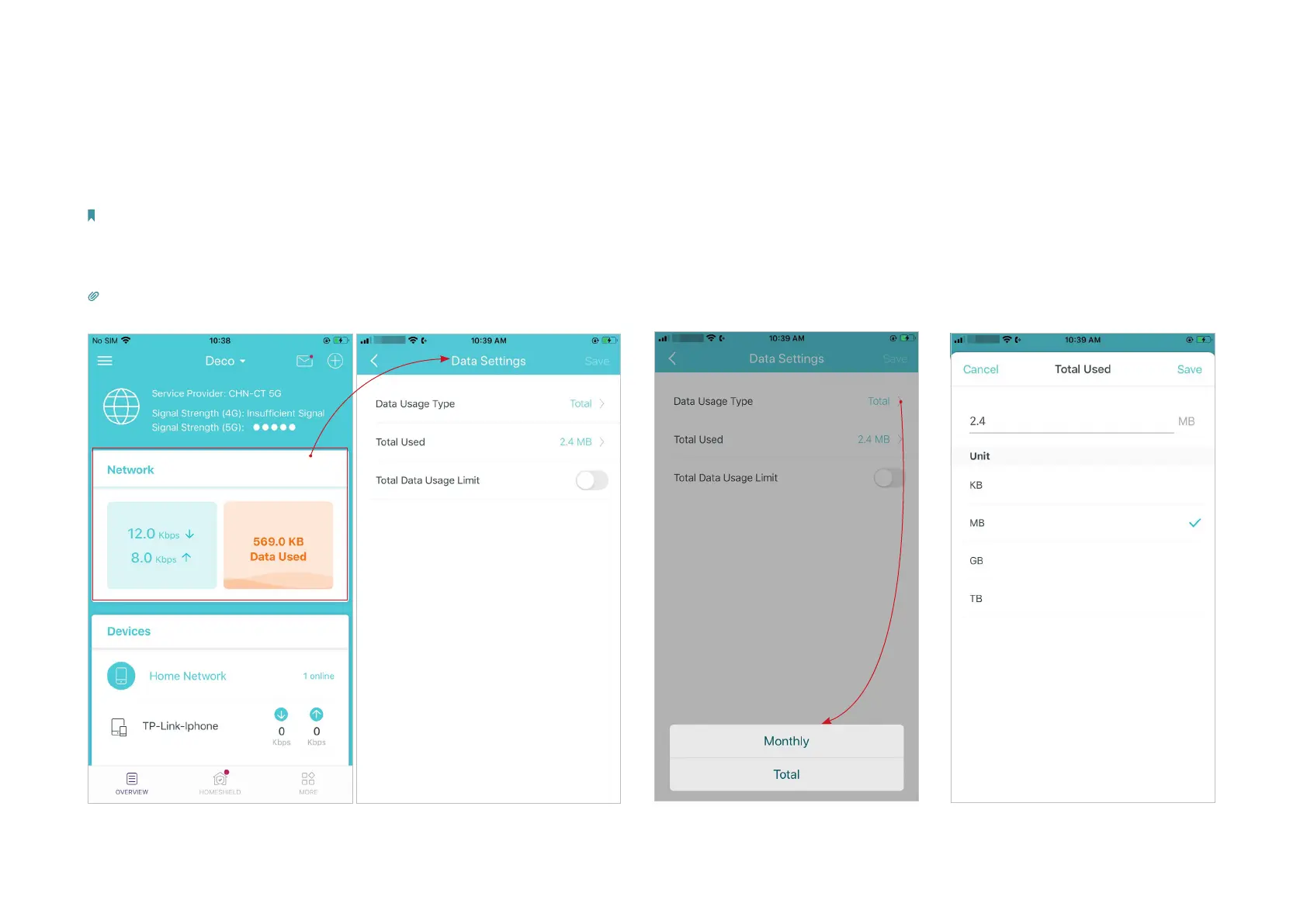
1. In Overview, tap the Network card to enter the Data Settings page.
Tip: You can also go to MORE > Advanced > Data Settings to enter the Data Settings page.
*The app screen depicted is for 4G/5G Router mode only and may dier when Deco works in dierent modes.
2. Set the data usage type as
Monthly or Total.
3. Correct the total/monthly used data
manually if the data is inaccurate.


 To Next Page