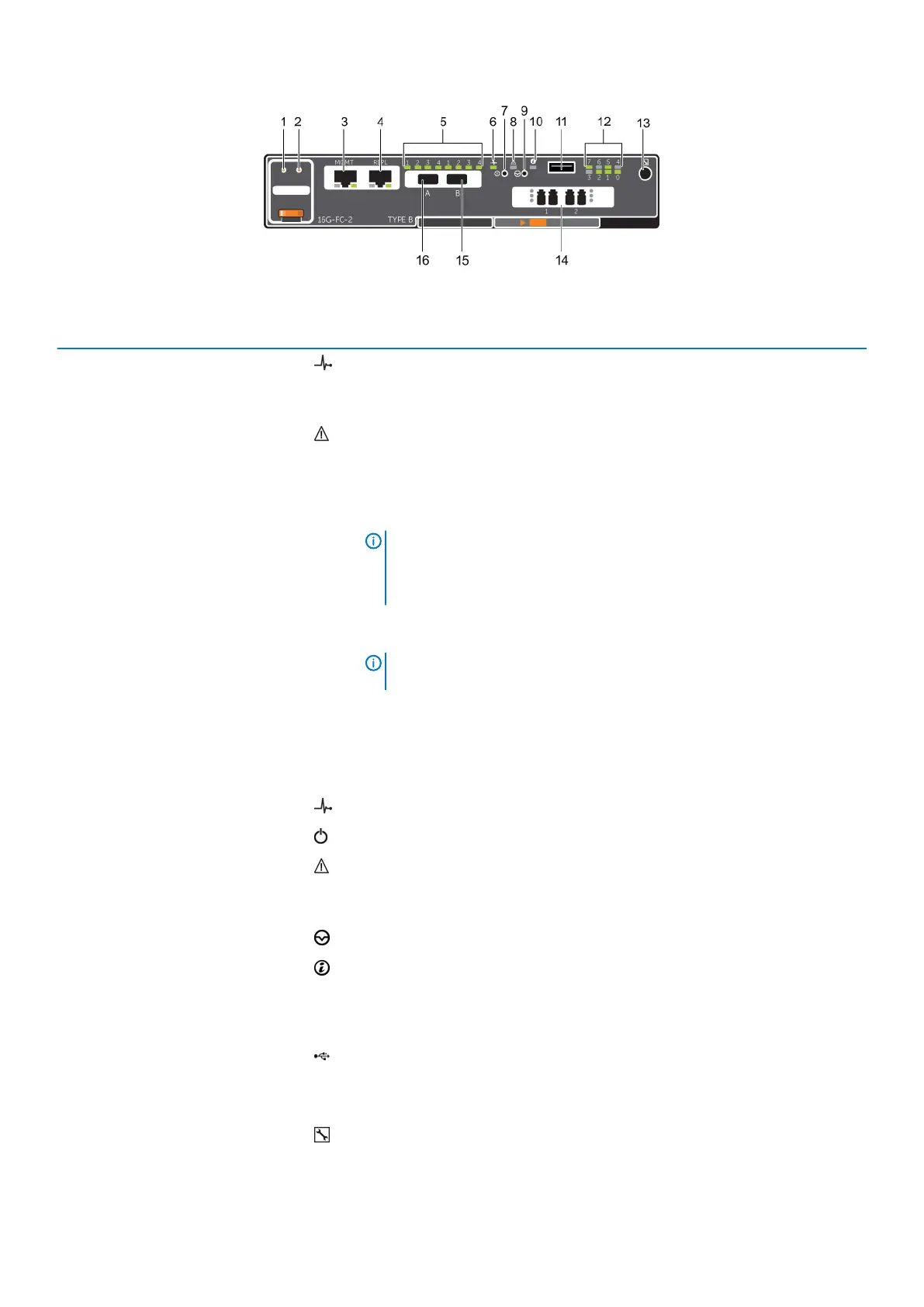
Figure 4. SCv2000/SCv2020 Storage System Storage Controller with Two 16 Gb Fibre Channel Front-End Ports
Item Control/Feature Icon Description
1 Battery status indicator
• Blinking green (on 0.5 sec. / off 1.5 sec.) – Battery heartbeat
• Fast blinking green (on 0.5 sec. / off 0.5 sec.) – Battery is charging
• Steady green – Battery is ready
2 Battery fault indicator
• Off – No faults
• Blinking amber – Correctable fault detected
• Steady amber – Uncorrectable fault detected; replace battery
3 MGMT port (Slot 3/Port 1) — Ethernet/iSCSI port that is typically used for storage system management and
access to the BMC
NOTE: To use the MGMT port as an iSCSI port for replication to another
Storage Center, a Flex Port license and replication license are required.
To use the MGMT port as a front-end connection to host servers, a Flex
Port license is required.
4 REPL port (Slot 3/Port 2) — Ethernet/iSCSI port that is typically used for replication to another Storage Center
(requires a replication license)
NOTE: To use the RELP port as a front-end connection to host servers,
a Flex Port license is required.
5 SAS activity indicators — There are four SAS PHYs per SAS port.
• Off – SAS PHY is not connected
• Steady green – SAS PHY is connected, but not active
• Blinking green – SAS PHY is not connected nor active
6 Storage controller status On – Storage controller completed a power-on self-test (POST)
7 Recessed power off button Not currently used
8 Storage controller fault
• Off – No faults
• Steady amber – Firmware has detected an error
• Blinking amber – Storage controller is performing a POST
9 Recessed reset button Not currently used
10 Identification LED
• Off – Identification disabled
• Blinking blue (for 15 sec.) – Identification is enabled
• Blinking blue (continuously) – Storage controller shut down to the Advanced
Configuration and Power Interface (ACPI) S5 state
11 USB port One USB 3.0 connector
12 Diagnostic LEDs (8) —
• Green LEDs 0–3 – Low byte hex POST code
• Green LEDs 4–7 – High byte hex POST code
13 Serial port (3.5 mm mini jack) Not for customer use
14 Two options: — LEDs for the four 8 Gb Fibre Channel ports:
10 About the SCv2000/SCv2020 Storage System





 To Next Page