Item Control/Feature Icon Description
• Four Fibre Channel ports
(Slot 1/Port 1, Slot 1/Port 2,
Slot 1/Port 3, and Slot 1/
Port 4) with three LEDs per
port
• Two Fibre Channel ports
(Slot 1/Port 1 and Slot 1/
Port 2) with three LEDs per
port
• All off – No power
• All on – Booting up
• Blinking amber – 2 Gbps activity
• Blinking green – 4 Gbps activity
• Blinking yellow – 8 Gbps activity
• Blinking amber and yellow – Beacon
• All blinking (simultaneous) – Firmware initialized
• All blinking (alternating) – Firmware fault
LEDs for the two 16 Gb Fibre Channel ports:
• All off – No power
• All on – Booting up
• Blinking amber – 4 Gbps activity
• Blinking green – 8 Gbps activity
• Blinking yellow – 16 Gbps activity
• Blinking amber and yellow – Beacon
• All blinking (simultaneous) – Firmware initialized
• All blinking (alternating) – Firmware fault
15 Mini-SAS port B (Slot 2/Port 2) Back-end expansion port B
16 Mini-SAS port A (Slot 2/Port 1) Back-end expansion port A
SCv2000/SCv2020 Storage System Storage Controller with iSCSI
Front-End Ports
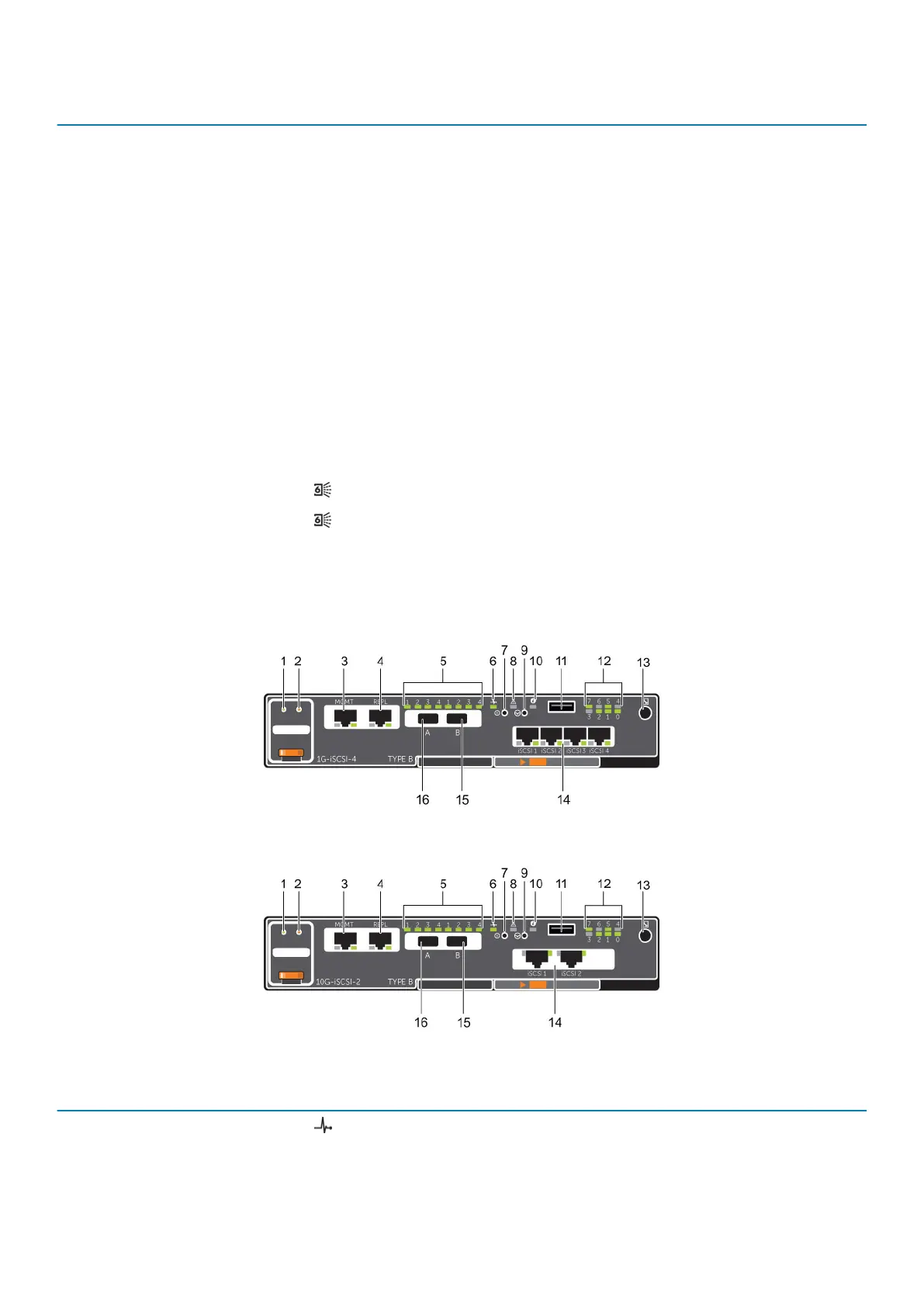
The following figures show the features and indicators on a storage controller with iSCSI front-end ports.
Figure 5. SCv2000/SCv2020 Storage System Storage Controller with Four 1 GbE iSCSI Front-End Ports
Figure 6. SCv2000/SCv2020 Storage System Storage Controller with Two 10 GbE iSCSI Front-End Ports
Item
Control/Feature Icon Description
1 Battery status indicator
• Blinking green (on 0.5 sec. / off 1.5 sec.) – Battery heartbeat
• Fast blinking green (on 0.5 sec. / off 0.5 sec.) – Battery is charging
• Steady green – Battery is ready
About the SCv2000/SCv2020 Storage System 11





 To Next Page