Understanding the Operator Panel
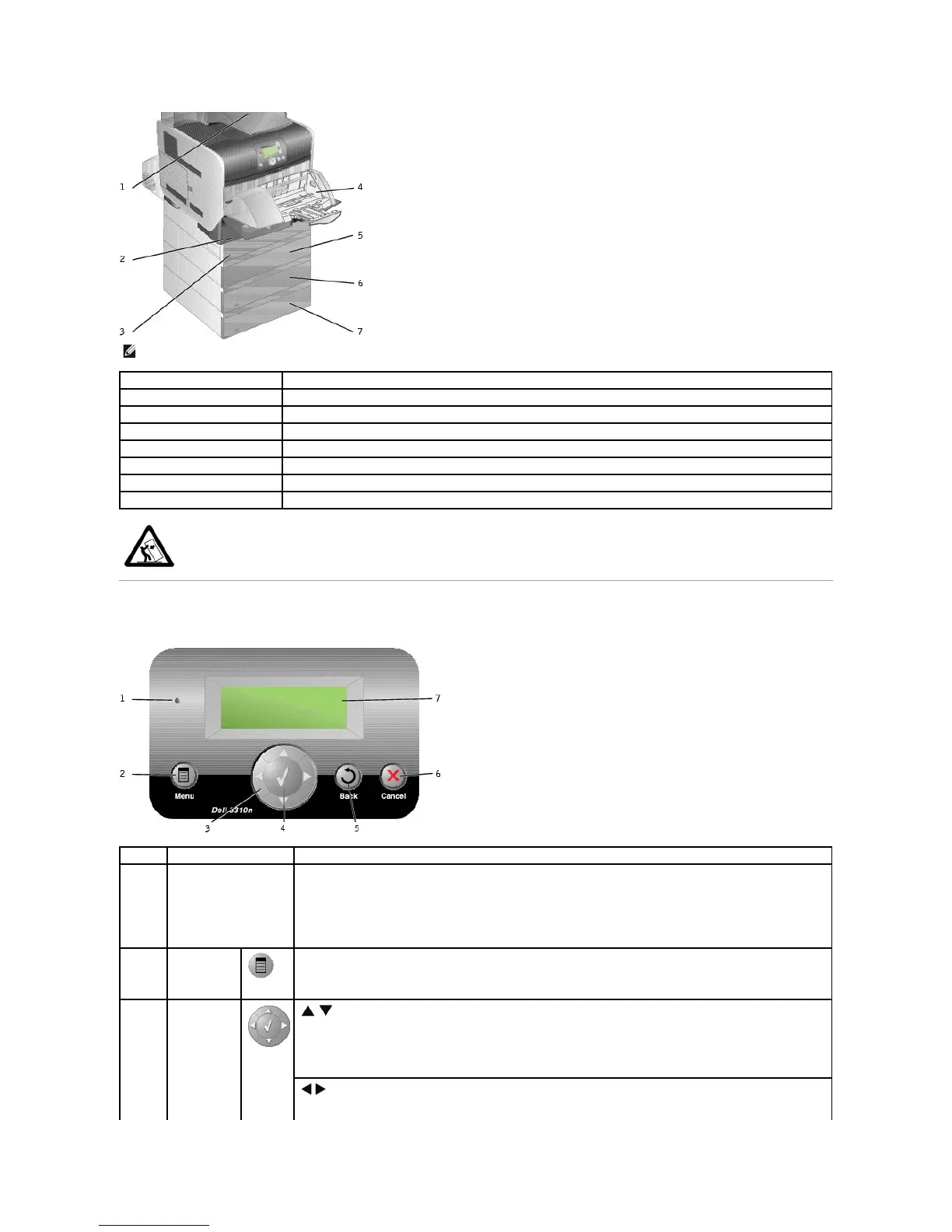
NOTE: You can install up to four optional paper trays, or three trays and a duplex unit.
Output expander (650 sheets)
Tray 1/Standard tray (500 sheets)
Envelope feeder (85 envelopes)
Tray 2 (250 or 500 sheets)
Tray 3 (250 or 500 sheets)
Tray 4 (250 or 500 sheets)
CAUTION: Floor-mounted configurations require additional furniture for stability. You must use either a printer stand or printer base if
you are using more than one input option or a duplex unit and an input option.
Determine whether the printer is on, busy, idle, processing a job, or requires operator intervention.
l Off Power is off.
l Solid green Printer is on, but idle.
l Blinking green Printer is warming up, processing data, or printing a job.
l Solid amber Operator intervention is required.
Open the menu index.
NOTE: The printer must be in the Ready state to access the menu index. A message indicating the menus are
unavailable will appear if the printer is not ready.
Move up and down lists.
When navigating through a list using the Up or Down arrow button, the cursor moves one line at a time. Pressing the
Down arrow button at the bottom of the screen changes the screen to the next whole page.
Move within a screen such as moving from one menu index item to another. The Left or Right arrow button is also















 To Next Page