how the printing on the back of the sheet (even-
numbered pages) is oriented in relation to the printing
on the front (odd-numbered pages).
NOTE: You must have an optional duplex unit installed.
orientation and top edge for landscape orientation).
Assumes binding along the short edge of the page (top edge for portrait
orientation and left edge for landscape orientation).
Sets the number of copies you want for the printer
default value.
NOTE: Set the number of copies required for a specific
job from the printer driver.
Values selected from the printer driver always override values selected
from the operator panel.
Specifies whether to include application-generated blank
pages as part of your printed output.
Does not print application-generated blank pages as part of your job.
Prints application-generated blank pages as part of your job.
Keeps the pages of a print job stacked in sequence
when printing multiple copies of the job.
Prints each page of a job the number of times specified by the Copies
menu item. For example, if you set Copies to 2, and send three pages
to print, the printer prints page 1, page 1, page 2, page 2, page 3, page
3.
Prints entire job the number of times specified by the Copies menu item.
For example, if you set Copies to 2, and send three pages to print, the
printer prints page 1, page 2, page 3, page 1, page 2, page 3.
Inserts blank separator sheets between jobs, between
multiple copies of a job, or between each page of a job.
Does not insert separator sheets.
Inserts a blank sheet between each copy of a job. If Collation is Off, a
blank page is inserted between each set of printed pages (all page 1's,
all page 2's, and so on). If Collation is On, a blank page is inserted
between each collated copy of the job.
Inserts a blank sheet between jobs.
Inserts a blank sheet between each page of a job. This is useful if you
are printing transparencies or want to insert blank pages in a document
for notes.
Specifies the paper source that holds separator sheets.
Selects separator sheets from the specified tray.
Selects separator sheets from the multipurpose feeder.
NOTE: You must also set Configure MP to Cassette.
Selects separator sheets from the envelope feeder.
NOTE: Only displayed when the envelope feeder is installed.
Prints multiple-page images on one side of a sheet of
paper. Also called n-up or Paper Saver.
Prints 1 page image per side.
Prints 2 page images per side.
Prints 3 page images per side.
Prints 4 page images per side.
Prints 6 page images per side.
Prints 9 page images per side.
Prints 12 page images per side.
Prints 16 page images per side.
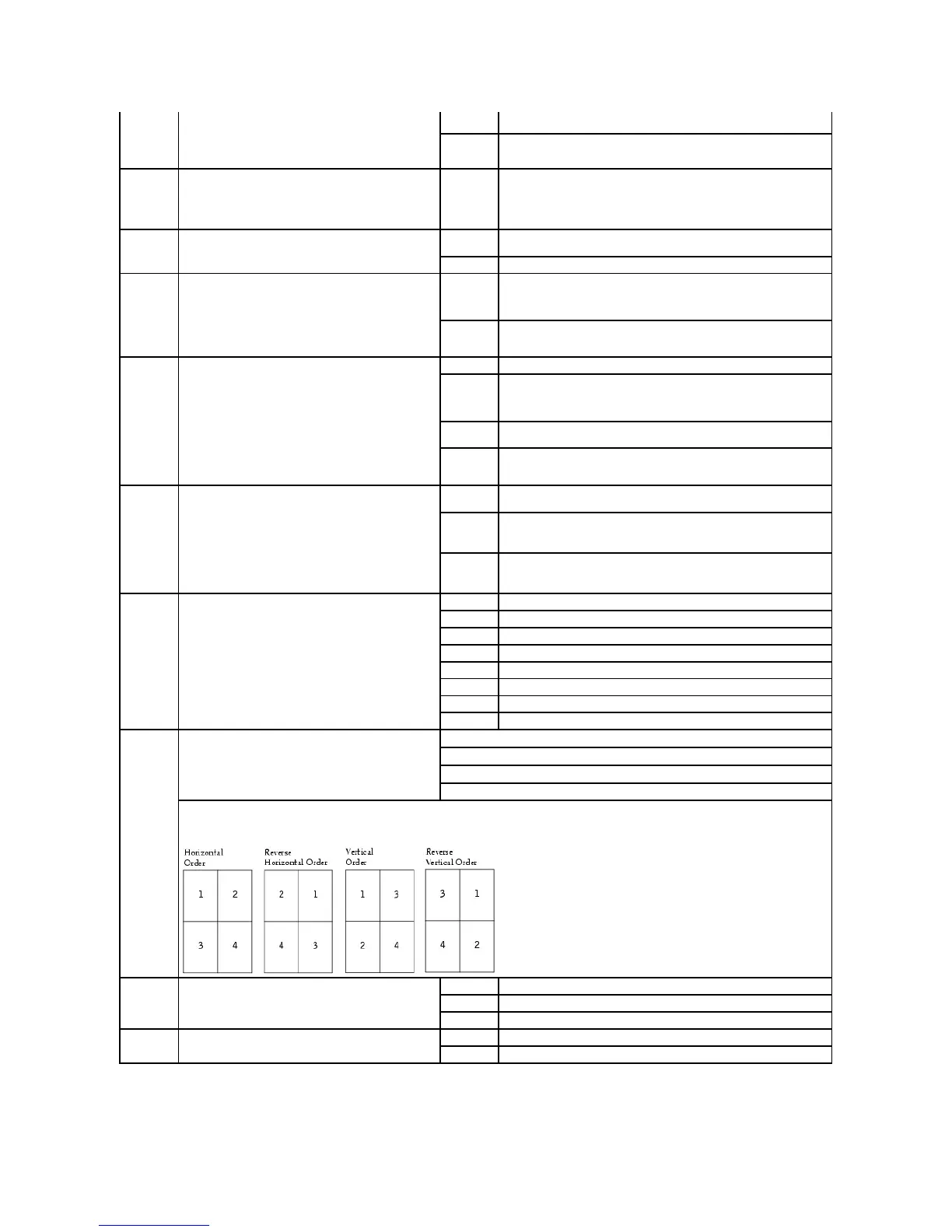
Determines the positioning of multiple page images
when using Multipage Print.
The positioning depends on the number of images and
whether the images are portrait or landscape in
orientation.
For example, if you select 4-Up multipage printing and portrait orientation, the results differ depending on the Multipage Order value you
select:
Determines the orientation of a multiple-page sheet.
Lets the printer choose between portrait and landscape orientation.
Sets the long edge of the paper as the top of the page (landscape).
Sets the short edge of the paper as the top of the page (portrait).
Prints a border around each page image when using
Multipage Print.
Does not print a border around each page image.
Prints a solid line border around each page image.




 To Next Page