NetWare
Use this menu selection to view or change the printer NetWare settings.
AppleTalk
Use this menu selection to view or change the printer AppleTalk settings.
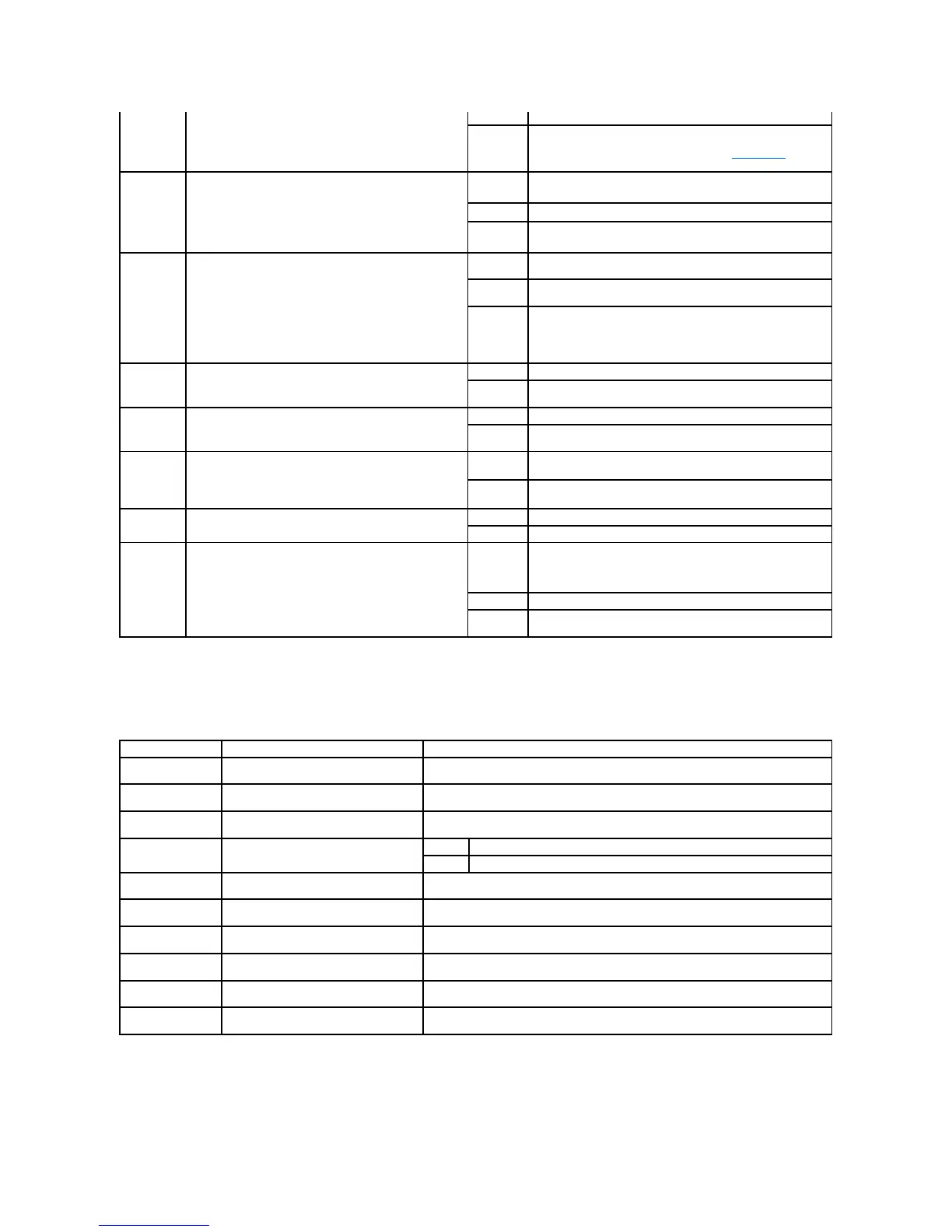
parallel port requires it, regardless of the default printer
language.
Printer does not examine the incoming data. The printer uses PCL
emulation to process the job if PCL SmartSwitch is On, or uses
the default printer language specified in the Setup Menu if PCL
SmartSwitch is Off.
Specifies whether the printer performs the special processing
required for bidirectional communication, following the
conventions defined in the Network Printing Alliance (NPA)
Protocol.
NOTE: Changing this menu item automatically resets the
printer.
Printer performs NPA processing. If data is not in NPA format, it is
rejected as bad data.
Printer does not perform NPA processing.
Printer examines data, determines the format, and then
processes it appropriately.
Configures the size of the parallel input buffer.
NOTE: Changing this menu item automatically resets the
printer.
Disables job buffering. Any jobs already buffered on the disk are
printed before normal processing of incoming jobs resumes.
Printer automatically calculates the Parallel Buffer size
(recommended setting).
3K to
maximum
size
allowed
User specifies the Parallel Buffer size. The maximum size
depends on the amount of memory in the printer, the size of the
other link buffers, and whether Resource Save is set to On or
Off. To maximize the range for the Parallel Buffer size, disable or
reduce the size of the serial and USB buffers.
Enables bidirectional communication through the parallel
port.
Disables parallel port negotiation.
Enables bidirectional communication through the parallel
interface.
Specifies the parallel interface protocol.
May resolve some parallel interface problems.
Provides compatibility with most existing parallel interface
implementations (recommended setting).
Determines whether the printer honors hardware
initialization requests from the computer. The computer
requests initialization by activating the INIT signal on the
parallel interface. Many personal computers activate the INIT
signal each time the computer is turned on and off.
Printer does not honor hardware initialization requests from the
computer.
Printer honors hardware initialization requests from the
computer.
Determines whether the parallel port data is sampled on the
leading or trailing edge of strobe.
Samples parallel port data on the leading edge of strobe.
Samples parallel port data on the trailing edge of strobe.
Configures the printer to process Macintosh binary PostScript
print jobs.
Printer processes raw binary PostScript print jobs from computers
using the Macintosh operating system.
NOTE: This setting often causes Windows print jobs to fail.
Printer filters PostScript print jobs using standard protocol.
Printer processes print jobs from computers using either Windows
or Macintosh operating systems.
Displays the assigned NetWare login
name.
Selecting View Login Name displays the NetWare name on the operator panel.
Displays the assigned NetWare print
mode.
Selecting View Print Mode displays the NetWare print mode on the operator panel.
Displays the assigned NetWare number.
Selecting View Network Number displays the NetWare network number on the operator
panel.
Activates or deactivates the NetWare
feature.
Activates the NetWare feature.
Deactivates the NetWare feature.
Sets the Ethernet 802.2 value On or Off.
Sets the Ethernet 802.3 value On or Off.
Sets the Ethernet Type II value On or Off.
Sets the Ethernet SNAP value On or Off.
Sets the Packet Burst value On or Off.
Sets the NSQ/GSQ Mode value On or Off.




 To Next Page