32 │ Operating the Monitor
Operating the Monitor
Power On the Monitor
Press the button to turn on the monitor.
Using the Front-Panel Controls
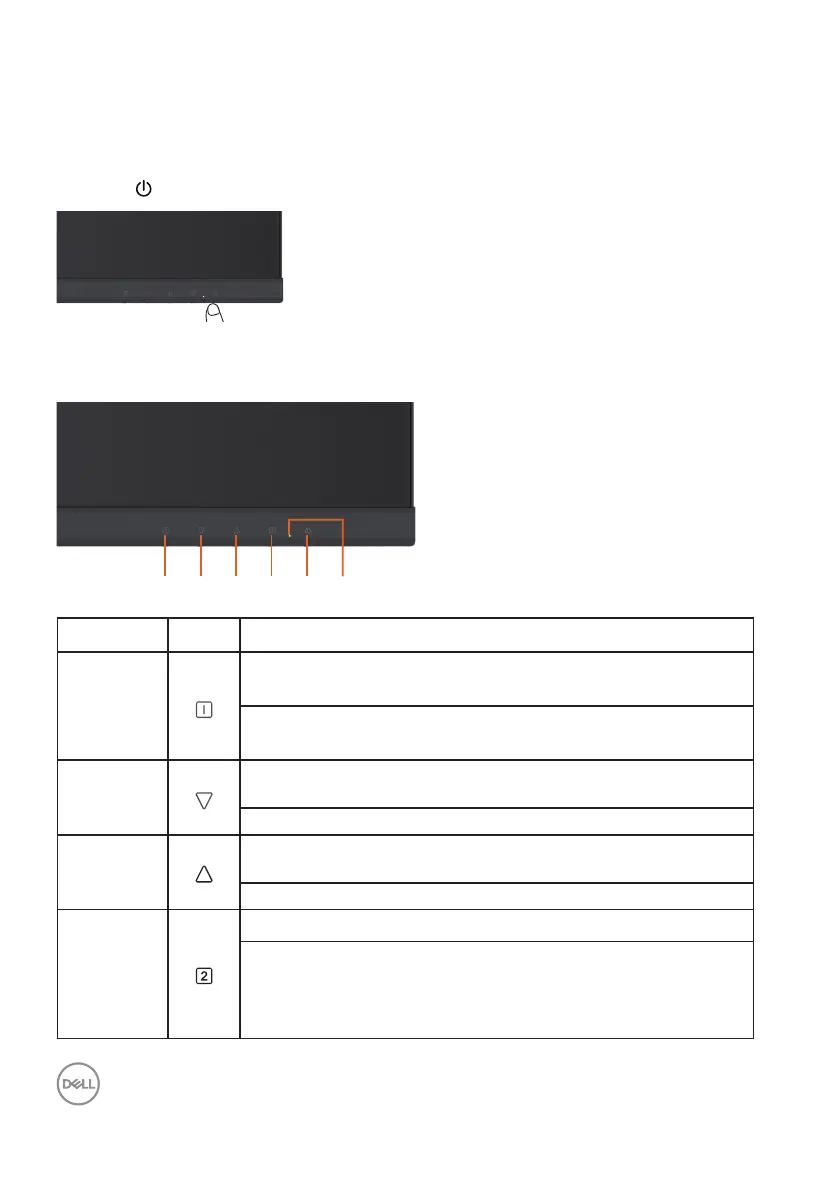
Use the keys on the front of the monitor to adjust the settings.
123456
Front-Panel Button Description
1
Use this button to launch the on-screen display (OSD).
See Accessing the Menu System.
Use this button to go back to the main menu or exit the
OSD main menu.
2
Use this button to select the next item down the list or
decrease the setting value.
When not in OSD menu, directly enters Contrast/Brightness.
3
Use this button to select the next item up the list or increase
the setting value.
When not in OSD menu, directly enters Color Vision Mode.
4
Use this button to select the OSD menu.
When not in OSD menu, directly enters Input Source from a list
of VGA, HDMI, Auto (D2421H/D2721H).
When not in OSD menu, directly enters Input Source from a list
of HDMI1, HDMI2, HDMI3, DP, Auto (D2421DS).












 To Next Page