About Your Monitor │ 7
Identifying Parts and Controls
NOTE: The graphics are used for the purpose of illustration only. Appearance on
the computer may vary.
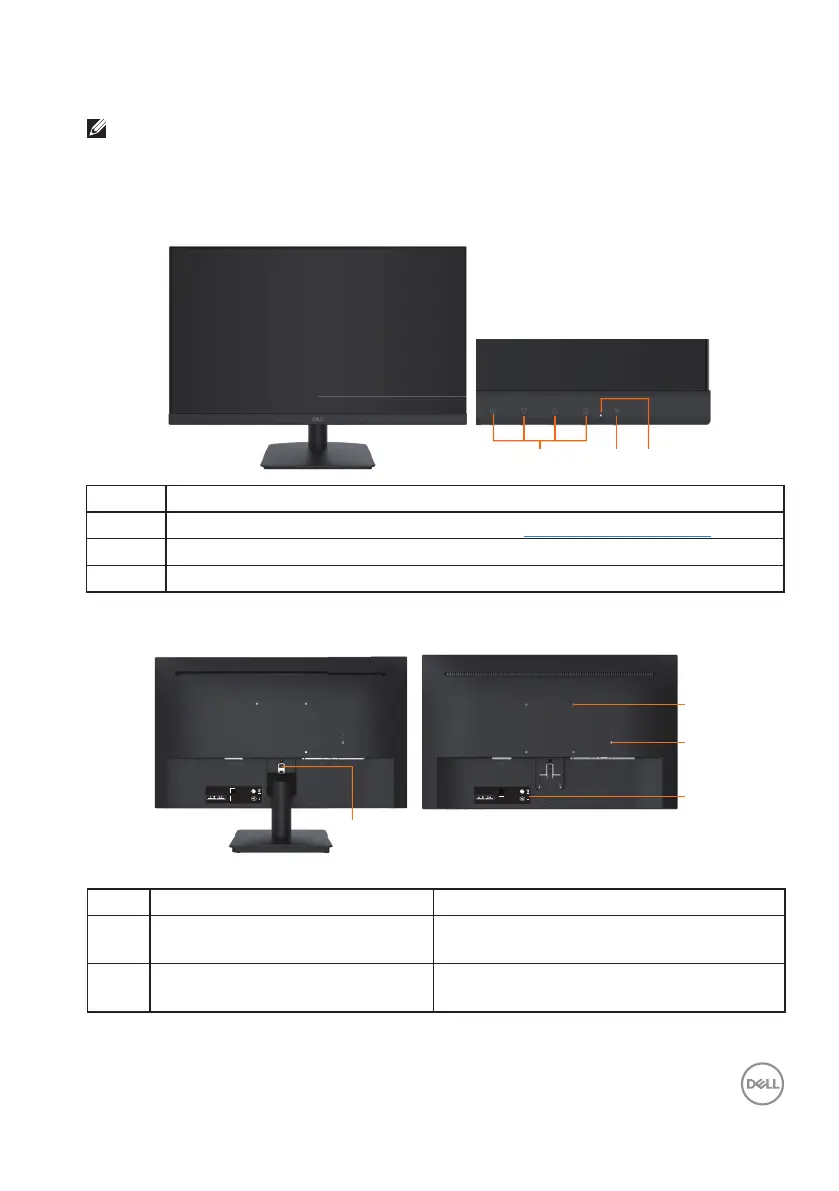
D2421H
Front view
123
Label Description
1
Function buttons (For more information, see Operating the Monitor)
2 Power On/Off button
3 LED indicator
Back view
⏨Წᱴ⽰ಞ/Flat Panel Monitor
ශModel No.: D2421H
䗉ޛ⭫Ⓠ/ Rating:
100-240V~ 50/60Hz 0.8A
䙖൦ѣള Made in China
䙖ᰛᵕ Manufactured date:
DELL D2421H
April 2020
⏨Წᱴ⽰ಞ/Flat Panel Monitor
ශModel No.: D2421H
䗉ޛ⭫Ⓠ/ Rating:
100-240V~ 50/60Hz 0.8A
䙖൦ѣള Made in China
䙖ᰛᵕ Manufactured date:
DELLD2421H
April 2020
1
4
2
3
Back View with Monitor Stand
Label Description Use
1 VESA mounting holes (100 mm) Supports optional mounting of the monitor
using a VESA mount or arm.
2 Security lock slot Secures monitor with security lock
(security lock not included).












 To Next Page