About Your Monitor │ 9
2 Power On/Off button
3 LED indicator
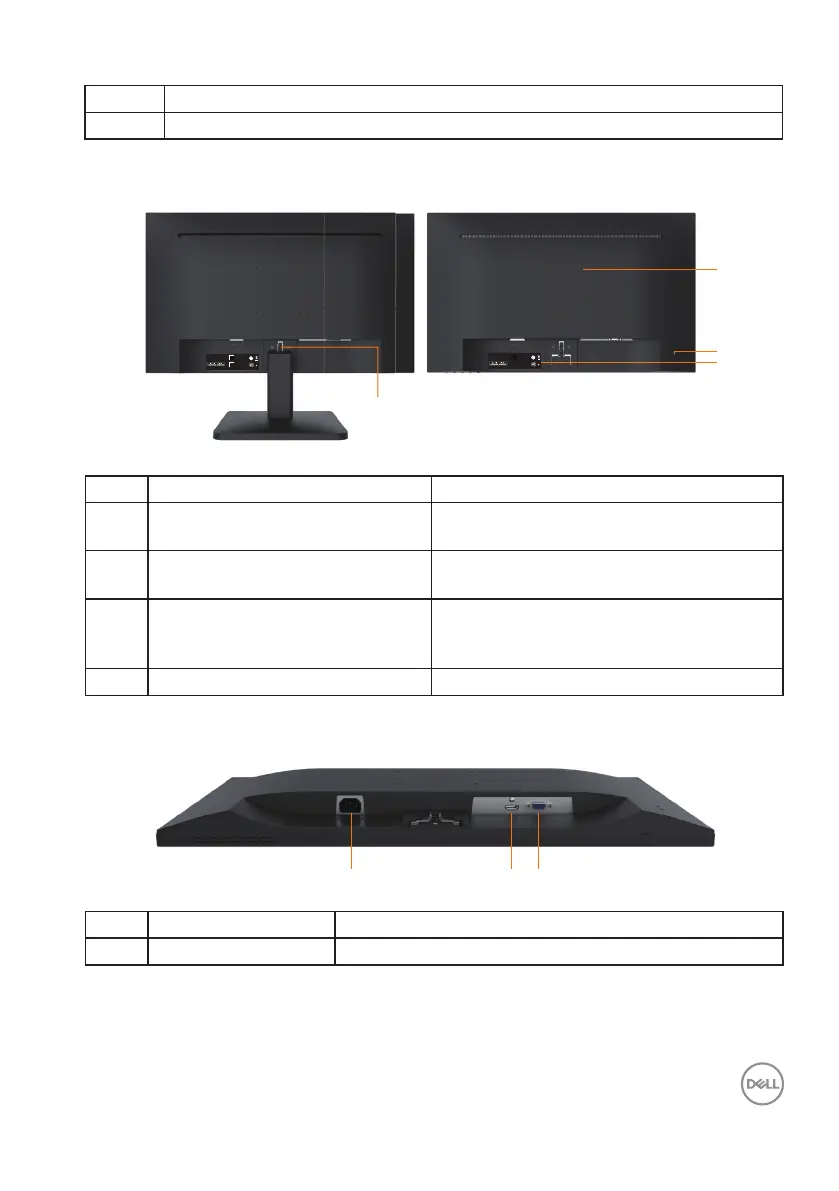
Back view
1
2
3
4
⏨Წᱴ⽰ಞ/Flat Panel Monitor
ශModel No.: D2721H
䗉ޛ⭫Ⓠ/ Rating:
100-240V~ 50/60Hz 1.0A
䙖൦ѣള Made in China
䙖ᰛᵕ Manufactured date:
DELL D2721H
April 2020
⏨Წᱴ⽰ಞ/Flat Panel Monitor
ශModel No.: D2721H
䗉ޛ⭫Ⓠ/ Rating:
100-240V~ 50/60Hz 1.0A
䙖൦ѣള Made in China
䙖ᰛᵕ Manufactured date:
DELL D2721H
April 2020
Back View with Monitor Stand
Label Description Use
1 VESA mounting holes (100 mm) Supports optional mounting of the monitor
using a VESA mount or arm.
2 Security lock slot Secures monitor with security lock
(security lock not included).
3 Regulatory rating label with
Barcode serial number
Lists the regulatory approvals. Refer to
this label if you need to contact Dell for
technical support.
4 Stand release button Release stand from monitor.
Bottom View
123
Label Description Use
1 AC power connector To connect the monitor power cable.












 To Next Page