Removing a memory module
Prerequisites
1. Follow the safety guidelines listed in the Safety instructions.
2. Follow the procedure listed in the Before working inside your system.
3. Remove the air shroud or remove the GPU air shroud.
WARNING: The memory modules are hot to touch for some time after the system has been powered off. Allow
the memory modules to cool before handling them.
Steps
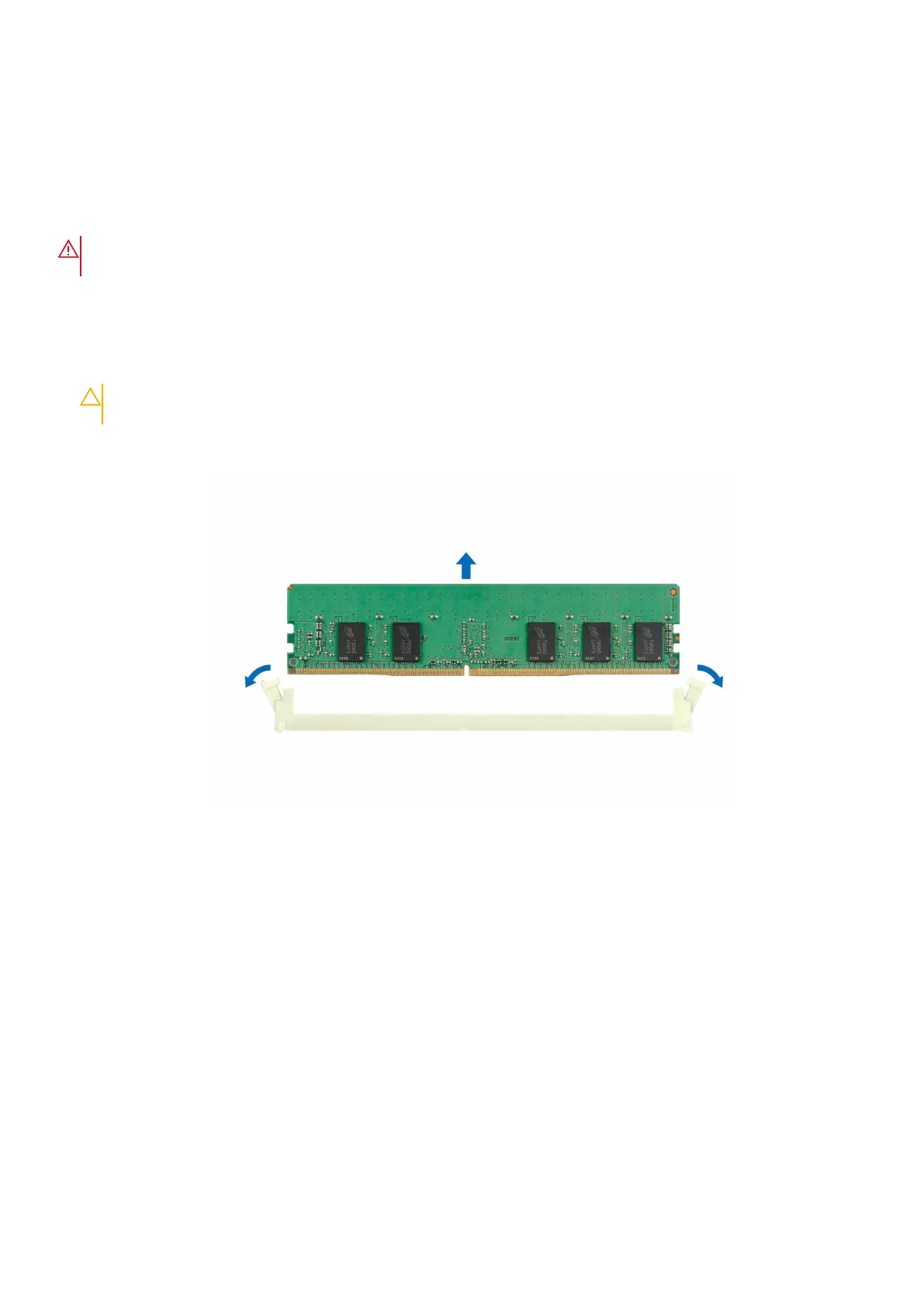
1. Locate the appropriate memory module socket.
2. To release the memory module from the socket, simultaneously press the ejectors on both ends of the memory module
socket to fully open.
CAUTION: Handle each memory module only by the card edges, ensuring not to touch the middle of the
memory module or metallic contacts.
3. Lift the memory module away from the system.
Figure 97. Removing a memory module
Next steps
Replace the memory module.
Installing a memory module
Prerequisites
1. Follow the safety guidelines listed in the Safety instructions.
2. Follow the procedure listed in the Before working inside your system.
3. Remove the air shroud or remove the GPU air shroud.
Steps
1. Locate the appropriate memory module socket.
100
Installing and removing system components



 To Next Page