+12-26V DC power connector
Bottom view
Features
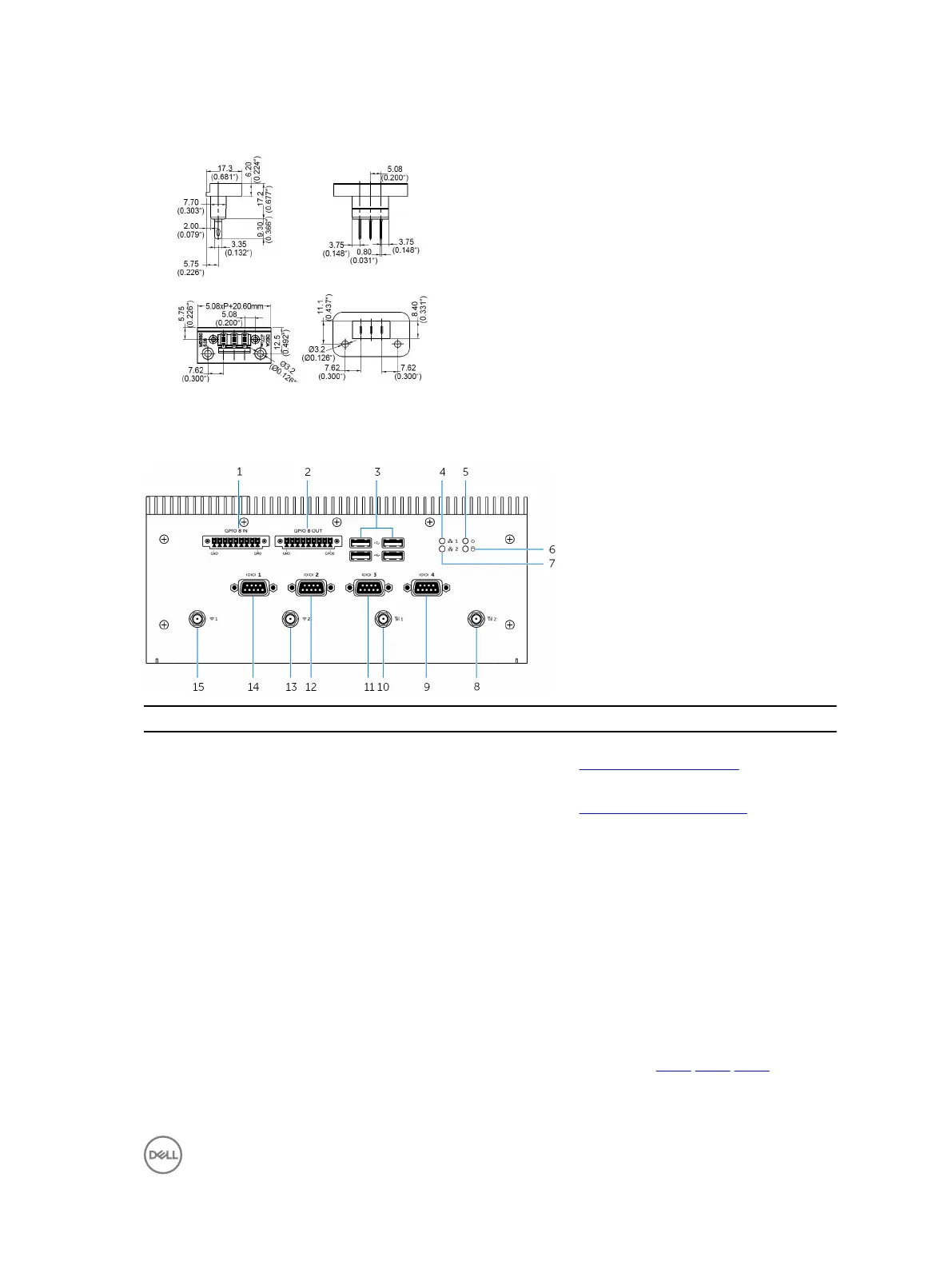
1 GPIO-in 8-pin port
1, 2, 4
Connect to a GPIO-out enabled device or dongle. For more
information, see GPIO-in connector mapping.
2 GPIO-out 8-pin port
2, 3, 4
Connect to a GPIO-in enabled device or dongle. For more
information, see GPIO-out connector mapping.
3 USB 2.0 ports (4) Connect USB enabled devices. Provides data transfer
speeds up to 480 Mbps.
4 Network status light one Indicates the network activity of network port one.
5 Power status light Indicates the power‑state of the Embedded Box PC.
6 Hard-drive activity light Turns on when the Embedded Box PC reads from or writes
to the internal storage device.
7 Network status light two Indicates the network activity of the network port two.
8 Mobile broadband antenna port two Connect a mobile broadband antenna to increase the range
and strength of the mobile broadband signals.
9 RS232/RS422/RS485 port four (configurable in
the BIOS)
Connect an RS232/RS422/RS485 cable to the Embedded Box
PC. For more information, see RS232/RS422/RS485
connector mapping.
9


 To Next Page